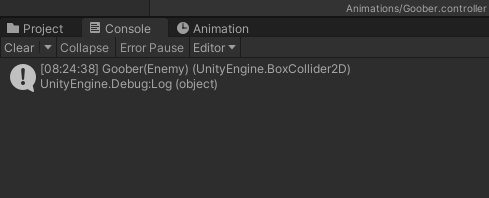
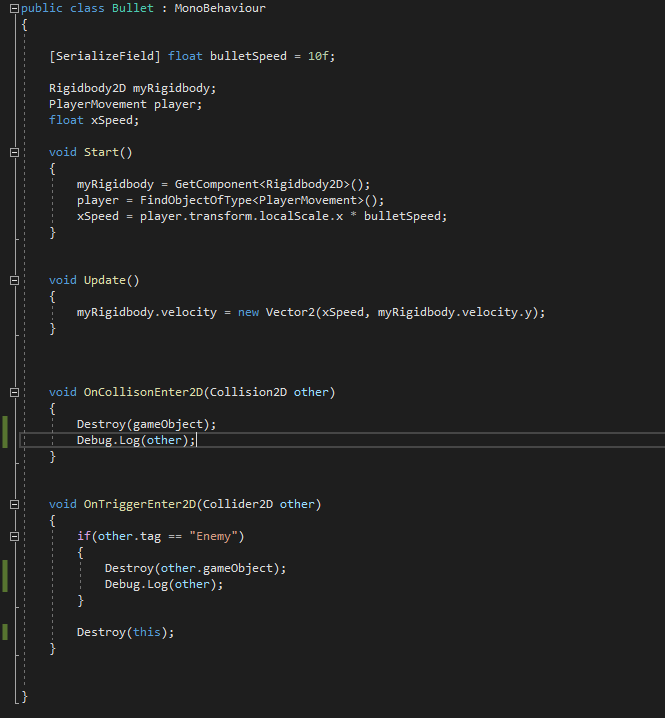
I have been trying to get the bullets disappear when they hit the walls. Enemy and bullet both are destroyed when it is a Trigger, but the bullet does not disappear when it is a collision. Look at the following image, c# script and advice.
@bixarrio , you are right. Looking at the Unity documentation they say the following:
    void DestroyGameObject()
    {
        Destroy(gameObject);
    }

    void DestroyScriptInstance()
    {
        // Removes this script instance from the game object
        Destroy(this);
    }
In any case, I saw a looked at the wrong function as well. The poster mentioned the OnCollision and I commented on the OnTrigger which is my mistake, so please ignore my feeble attempt
ok, I can see it logging something, but I don’t know what. I don’t see any enemies on the screen, so I can only assume that it is from OnTriggerEnter2D and not from OnCollisionEnter2D. So, nothing is hitting OnCollisionEnter2D. You want to know if something is hitting the methods. Putting debug logs in all the methods and having them all print the same thing doesn’t help much.
OnTriggerEnter2D works, so remove the debug logs from there. You don’t need it. Can you do that and run it again? Then, also show the inspector for Bullet. I would like to see the colliders on the bullet object
As you suggested, I have removed Debug.Log from OnTriggerEnter2D and found out my OnCollisionEnter2D method is not working. Do you suggested changing the physical size of capsule colliders 2D on both bullet and enemies ?
You could make the colliders of the bullets and enemies significantly larger. If they are very small, they could be missed by fast moving objects. Or they could miss other colliders if they are small. For reasons of performance, Unity does not check everything each frame. And game objects do not move but teleport each frame. The smooth movement is an optical illusion.
By the way, could there be a typo in the OncollisionEnter2D method? I think there is an “i” missing.