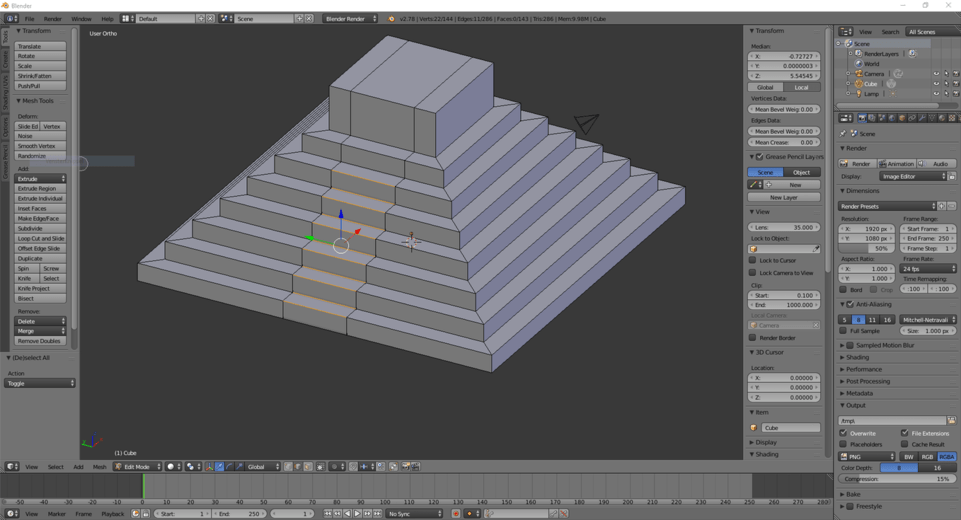
I have selected the right edges to delete with the circle select tool like so:
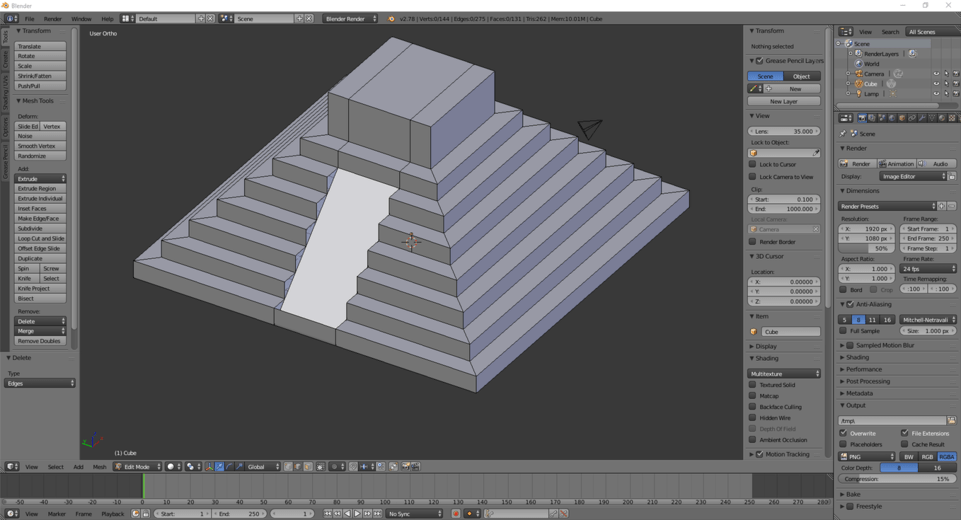
However, when I press X and confirm, the bottom edge didn’t delete and there is still a face that shouldn’t be there:
If I then only selected that edge that failed to delete, press X and confirm, it is gone. But I don’t undertstand why it wouldn’t delete in the first place?
Hey Siebe,
I really can’t be 100% sure why it did not delete as intended. The only thought I have is that there may be an extra edge/face that was hidden under the one that wasn’t deleted.
The circle select tool is one of my favorite tools, but to state clearly, it will only select what is the top most visible thing unless you turn on wireframe mode or something.
If you still have the model at the point in question, you could grab that single edge with wireframe mode enabled and move it. That might show if you had extra geometry there or not.
Let me know if it works or not with wireframe mode.
Hope that helps~
1 Like
Hey James,
Unfortunately, I don’t have the model at the point where I had this happen. I deleted the edge by itself and when on with the lectures.
But I think that I get what you’re explaining. That there was an edge at the exact same place as the edge that had to be deleted. That would make total sense why this happened.
Thanks for your explanation, with your help I know what to look for next time this happens.