Hello.
For an unknow reason, my character doesn’t attack enemies.
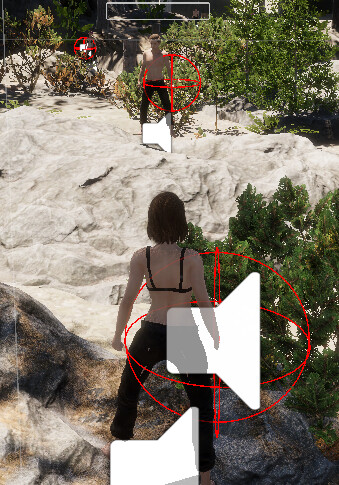
I can target them, , the weapon point looks spawning has it should be in the weapon GameObject :
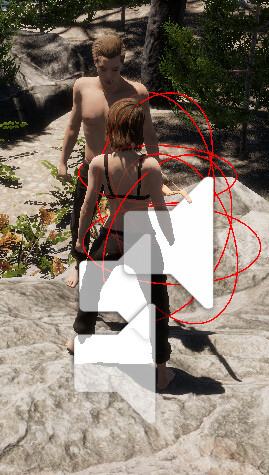
If I put my bow in the inventory, the red gizmo switch on the right hand as it should be according unarmed fight.
But the left mouse clic doesn’t do anything.
My cursor change when the mouse is on an enemy.
But nothing happens even if i’m very near of the target:
In my animator, all my unarmed atttacks have Attack Tag and the animation name match with the motion name.
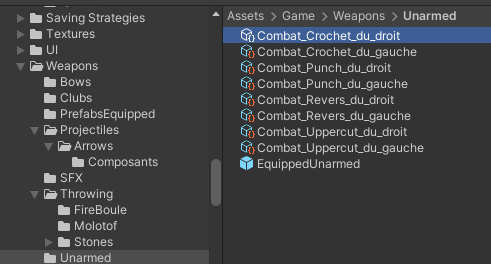
My unarmed Weapon Config have the eight animations:
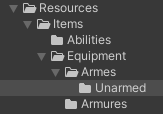
And it is in the resources folder:
My unarmed Attacks are in the Weapon section::
And looks correctly filled:
The enemy doesn’t attack me at all.
And surprisingly I don’t have any error message in the console
What have I missed ?
Thanks you.
François
The animator will only play states that are within the Animator itself… Then you’ll call that state by the name of the state.
I’ll try to put a quick example together tonight after work.
Hello Brian.
Thanks for the feedback.
I’m actually in holiways.
I’ll check that when i’ll be back
Have a nice day.
François
Hello.
I’m Back, I will check that tonight checking with double check between your project and mine.
Have a nice day.
François
Hello evryone (Hello Brian )
I’ve double check (triple with Nathan’s video) with your project and also with the GitHub and discovered is missing something in the PlayerTargetingState.
In the Git, section 17, in the Tick Method
public override void Tick(float deltaTime)
{
if (stateMachine.Targeter.CurrentTarget == null)
{
stateMachine.SwitchState(new PlayerFreeLookState(stateMachine));
}
FaceTarget(stateMachine.Targeter.CurrentTarget.transform.position, deltaTime);
Move(CalculateMovement() * stateMachine.TargetingMovementSpeed, deltaTime);
stateMachine.Animator.SetFloat(TargetingForwardSpeedHash, stateMachine.InputReader.MovementValue.y);
stateMachine.Animator.SetFloat(TargetingRightSpeedHash, stateMachine.InputReader.MovementValue.x);
}
there isn’t the “if (stateMachine.InputReader.IsAttacking)”
It’s available in your RPG project, it’s present like this.
if (stateMachine.InputReader.IsAttacking)
{
stateMachine.SwitchState(new PlayerAttackingState(stateMachine, 0));
return;
}
the return is not here too in section 17 (in the input reader IsAttacking).
Now I can taget and attack with combo my target.
My life has changed…
Actually the enemy don’t react to my attacks and don’t play any animation, like death.
I think you will deal with this later in the GitHub?
I notice in your weapon config you added a targetingRange variable:
[SerializeField] private float targetingRange = 10f;
It isn’t present section 19 weaponConfig change.
Do you add it later?
Thank you.
François
This should definitely have the return;, that was correct in the course, but an omission on my part in the rpg to third person wiki.
I caught this and updated it in the Combo Attacks commit.
Francois:
I notice in your weapon config you added a targetingRange variable:
[SerializeField] private float targetingRange = 10f;
It isn’t present section 19 weaponConfig change.
Do you add it later?
I added this in the section Projectiles, Part 2
Fun tip: From any Repository, open a file, and at the top of the page, click on the button marked “Blame”. From there, it will tell you the specific commit where a particular section of code was added. (I use it religiously as students ask me all the time “hey, when did [xx] get added?” and I can use it to point the way).
Francois:
Actually the enemy don’t react to my attacks and don’t play any animation, like death.
I think you will deal with this later in the GitHub?
The enemies will do nothing but stand there and look dumb and lazy until the Enemies section of the tutorial.
Cool thank you Brian.
I keep on in the inventory section at the end of the week.
Thank for your so good tips and tricks.
François
system
Closed
October 6, 2025, 12:06pm
37
This topic was automatically closed 24 hours after the last reply. New replies are no longer allowed.