Not able to push the code from Sourcetree in Mac

When I push the code it gives this error. what to do:

git --no-optional-locks -c color.branch=false -c color.diff=false -c color.status=false -c diff.mnemonicprefix=false -c core.quotepath=false -c credential.helper=sourcetree push -v --tags --set-upstream origin refs/heads/master:refs/heads/master 
Pushing to git@github.com:zkc08/BattleTank.git
git@github.com: Permission denied (publickey).
fatal: Could not read from remote repository.

Please make sure you have the correct access rights
and the repository exists.
Pushing to git@github.com:zkc08/BattleTank.git
git@github.com: Permission denied (publickey).
fatal: Could not read from remote repository.

Please make sure you have the correct access rights
and the repository exists.
Pushing to git@github.com:zkc08/BattleTank.git
git@github.com: Permission denied (publickey).
fatal: Could not read from remote repository.

Please make sure you have the correct access rights
and the repository exists.
Pushing to git@github.com:zkc08/BattleTank.git
git@github.com: Permission denied (publickey).
fatal: Could not read from remote repository.

Please make sure you have the correct access rights
and the repository exists.
Completed with errors, see above

plz help

Did you setup SSH?

Do you mean this:
zkc08@Advits-Mac-mini ~ % ps aux |grep ssh
zkc08 1271 0.0 0.0 4297808 592 ?? S 9:50AM 0:00.05 /usr/bin/ssh-agent -l
zkc08 8620 0.0 0.0 4268284 568 s000 R+ 6:17PM 0:00.00 grep ssh

I mean this
https://help.github.com/en/github/authenticating-to-github/connecting-to-github-with-ssh

Still getting error :sob: :sob: :sob: :sob::
git --no-optional-locks -c color.branch=false -c color.diff=false -c color.status=false -c diff.mnemonicprefix=false -c core.quotepath=false -c credential.helper=sourcetree push -v --tags --set-upstream origin refs/heads/master:refs/heads/master

Pushing to git@github.com:zkc08/BattleTank.git

git@github.com: Permission denied (publickey).

fatal: Could not read from remote repository.

Please make sure you have the correct access rights

and the repository exists.

Pushing to git@github.com:zkc08/BattleTank.git

git@github.com: Permission denied (publickey).

fatal: Could not read from remote repository.

Please make sure you have the correct access rights

and the repository exists.

Pushing to git@github.com:zkc08/BattleTank.git

git@github.com: Permission denied (publickey).

fatal: Could not read from remote repository.

Please make sure you have the correct access rights

and the repository exists.

Pushing to git@github.com:zkc08/BattleTank.git

git@github.com: Permission denied (publickey).

fatal: Could not read from remote repository.

Please make sure you have the correct access rights

and the repository exists.

Completed with errors, see above
@DanM

I think it might just be easier to use HTTPS instead of SSH. Change your git remote url from

git@github.com:zkc08/BattleTank.git

to

https://github.com/zkc08/BattleTank.git

I am not able to do it.

Did you connect your GitHub account?
https://confluence.atlassian.com/get-started-with-sourcetree/connect-your-bitbucket-or-github-account-847359096.html

an error comes on startup:
git log’ failed with code 128:'fatal: bad revision ‘master’

I see your repository in github has 2 commits now - did you succeed in the end, or still having this issue?

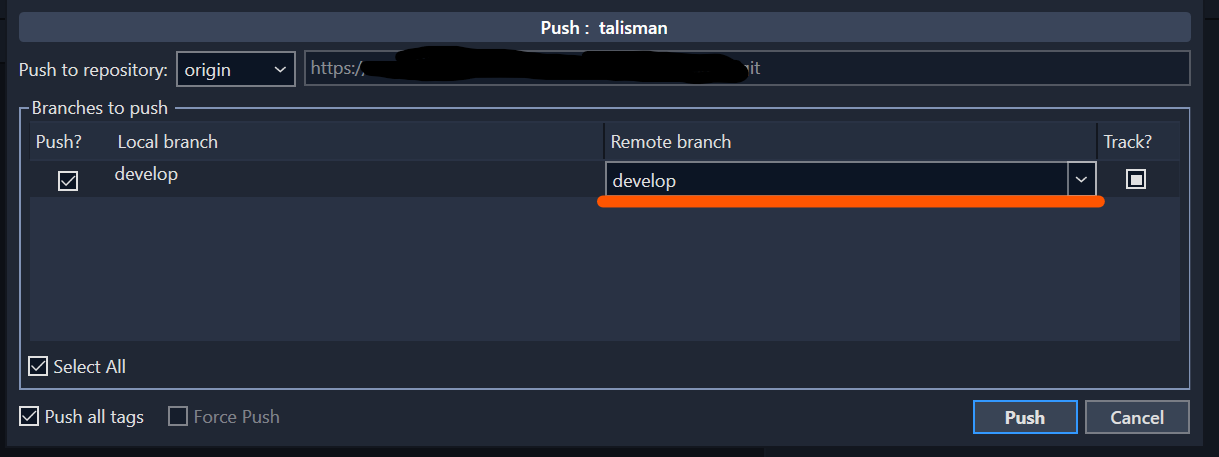
If you succeeded, I am guessing your repository was empty but sourcetree got stuck on populating the “remote branch” in the push and branch tracking dialog with the name of the branch “master”, which can lead to this error. It seems on that first push before the branch exists on the remote, the field should be empty.

I’m talking about this field and dialog:

Once you have pushed to a branch you are tracking remotely, then it should be populated.

If however you are still having a problem, and those commits on github are there for some other reason (i.e. created manually/directly on github itself for example), let us know because if so, you will technically now have 2 incompatible repositories for now with different histories, and it wouldn’t be possible to update the one in github from a repository on your machine that has other commits, unless you were willing to force overwrite them (a decision not to be taken lightly).

I have not succeeded.

Can you open the terminal and do

git status

And post the output?

ok I will do it after my Xcode get reinstalled.

This came:

zkc08@Advits-Mac-mini BattleTank 4.25 % git status
On branch master
nothing to commit, working tree clean
zkc08@Advits-Mac-mini BattleTank 4.25 % 

and sometimes this also comes in source tree:
‘git log’ failed with code 128:'fatal: bad revision ‘master’

Could you also post the output of

git log
# and
git remote -v

Acctualy i found a way we can make an git hub repo from vs code so i am getting this now but still not able to push the files:

zkc08@Advits-Mac-mini ToonTanks % git log
commit 4338dc1d676b9d4c7929f8ad089f472367fa4e5c (HEAD -> master)
Author: Advit Soni <zkc08@outlook.com>
Date:   Tue Jul 7 17:01:25 2020 +0530

    adding spring arm and camera

commit d5046219604b5982d00edb2a2550da906b4ed9e5
Author: Advit Soni <zkc08@outlook.com>
Date:   Tue Jul 7 16:36:08 2020 +0530

    two new files

commit ef3201eddcfc13f12328a4ec4f6490960bbcfce5
Author: Advit Soni <zkc08@outlook.com>
Date:   Tue Jul 7 16:28:26 2020 +0530
:

And when i do git remote -v :

zkc08@Advits-Mac-mini ToonTanks % git remote -v
Toon_Tank       https://github.com/zkc08/Toon_Tanks (fetch)
Toon_Tank       https://github.com/zkc08/Toon_Tanks (push)
Toon_Tanks      https://zkc08@github.com/zkc08/Toon_Tanks.git (fetch)
Toon_Tanks      https://zkc08@github.com/zkc08/Toon_Tanks.git (push)

And what do you get doing

git push ToonTank master

(lack of ‘s’ is important here)

fatal: 'ToonTank' does not appear to be a git repository
fatal: Could not read from remote repository.

Please make sure you have the correct access rights
and the repository exists.
zkc08@Advits-Mac-mini ToonTanks % 

Sorry I missed the _

git push Toon_Tank master