My version of Block Breaker

I had been browsing through the showcase and then I remembered that I hadn’t shared my version of Block Breaker ( I had shared earlier only in Udemy Q/A or discussions).

So, here it is
Click here or link - https://www.gamebucket.io/game/ecc99f34-82fb-4f4b-89fa-69d3fbb6ff5f

Here are some of its features:
a. Added a “Simulation Mode” in “Settings + Extras”.
b. 4 types of bricks.
c. The ball rotates when hit
d. The initial ball is launched according to the horizontal half it is located.

Additional Note: There is a surprise element in the 3rd level and beat it if possible :sunglasses:

Last but not the least, bug reports and suggestions are always most welcome and very much appreciated. So, don’t hesitate to comment.

P.S: Try to reach Level - 3 and post screenshots of it (if possible :smirk:)

Happy Gaming!!

EDIT: Additional Note - Project is already shared on github, here or link - https://github.com/Plaban9/Game_Block_Breaker

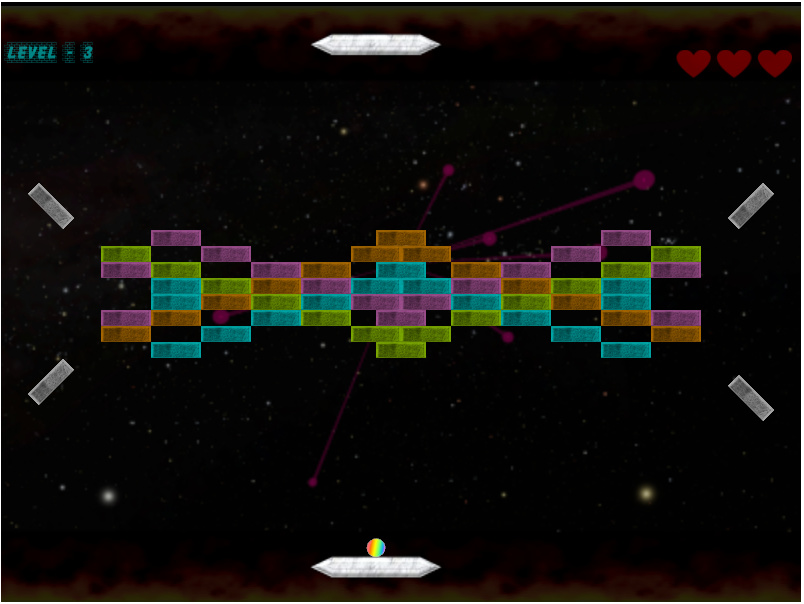
2 Likes

Okay, now that was unexpected :laughing:

I really like your take on Block Breaker. The graphics are nice, the lore is nothing short of awesome, the settings screen is also quite handy.

My only complain is a lack of neon and VHS filter. Such a waste of Blood Dragon soundtrack :upside_down_face:

Thank You @PNSeeRU for playing the game. Really appreciated.

Initially, I wanted to make the art style like Glow Hockey (hence the Blood Dragon Theme) but after banging my head for 2-3 days I couldn’t figure out. I was a novice back then and this being my first real game (with physics and particle system), I couldn’t figure out how to execute the neon style. So, I kept the music (feels like an adrenaline rush) but changed the style to “stones and their texture” and focussed more on gameplay and design of blocks.

Now, I am quite comfortable with Unity and have introduced some neon like effects in my 2nd game Space Invader (which is also posted in the Unity showcase).

Additional Note: The Paddle is made in MS Word using basic shapes and texture applied is marble.

Again, Thank You for playing.

1 Like

Wow. That is amazing!

how did you fix 2 Problems ?

    • if you loose a life, you spawn back on the panel, and can start the Ball again.
      i try it no chance .(
    • how did you take the Stats from level to level ?

Well Gameplay, nice !!!

Thank You @TheNightFlier for playing,

Regarding your queries,

1. Reset ball position

(Step by step explanation)

a. When a ball goes out of play area (Loss condition)

ball.ResetPosition() is called from LoseCollider.cs to Ball.cs component.

b. In Ball.cs, there is a method called ResetPosition()

 public void ResetPosition()
 {
        Vector3 resetVector = paddleToBallVector;
   	resetVector[1] = launchY;  //resetVector is the for resetting
     	paddleToBallVector = resetVector;
    	hasStarted = false;
 }

paddleToBallVector is the relative displacement from paddle to ball position, it is described as
paddleToBallVector = this.transform.position - paddle.transform.position; //as described in the course
What I did was to store the Y-value of the initial vector because Y-axis remains constant pre launch.
I named it as launchY.
In Start(),
launchY is set as the 2nd element of the vector.
launchY = paddleToBallVector[1]; //2nd element is the Y-axis value

Now, I just changed the value of resetVector’s Y-value to launchY.
Then, I changed the value of paddleToBallVector to resetVector
After that, I reset the boolean value of hasStarted to false to make it enter the “shoot mode”.
The “shoot mode” is the same state before we shoot the ball from paddle (as we have seen in the course).

2. Stats from level to level.

(Step by step explanation)

a. Select a script that is present in the three levels and keeps track of the ball going out of play, If not present then create a custom script. (I chose LoseCollider.cs as the script)

b. Declare a static variable
public static byte lifeCounter = 3;
Key here is a static variable which is a variable of a class as opposed to an instance of the class. This will help you to persist the value of variable across scenes in Unity.
So, whenever the ball went out of play, the life counter decremented and called a method for displaying appropriate sprite for lives.

In case you want to see the flow as a whole, then I have shared the project on GitHub (link shared above).

If you couldn’t understand certain aspects, feel free to contact me.

Thank you.

Hello Plaban9.

Very thank you for this Explaining, i think the most Parts i understand
the only Thing is:

paddleToBallVector[1] ← what is the [1] good for ?

best Greetings.

PS: my Version you can see here:

Hello, @TheNightFlier again,
Regarding your query for paddleToBallVector[1];
paddleToBallVector is a variable of Vector3 type i.e., as evident from the name, a vector is used to describe a position by dividing the value into components describing the direction of magnitude in space.

The ‘3’ signifies the no. of components(directional elements) in the space (here, it is 3 elements - x,y,z).

Here, Vector3 is stored as an array of 3 elements (i.e., size of the array is 3)

Which can be visualized as,

,.,.,.,.,.,.,.,.,.,.,.,.,.,.,.,
|…x…|…y…|…z…|
‘’‘’‘’‘’‘’‘’‘’‘’‘’‘’‘’‘’‘’‘’‘’‘’‘’‘’‘’’
|…0…|…1…|…2…| //Indices

As seen from the above representation,
1st element is indexed at 0.
2nd element is indexed at 1.
3rd element is indexed at 2.

To access a particular value, we need to retrieve it via its index,
We do it using variableName[index].

To access ‘y’ value, we need to access it via its index i.e. 1, and it can be accessed as,
paddleToBallVector[1]; //1 is the index of y

We need the value of y-axis because it will help us to readjust the ball to the same height (because before launching, the height of ball remains constant).

Hope, it helps.

EDIT: @TheNightFlier, I played your game, it seems that your ball resetting problem is resolved (I had played earlier when the ball simply launched itself after going out of playspace area.)

Hello Planban9

Thank you for you explining me this [1] now i clearly understand it :slight_smile:

yes, Nina help me the Eavening befoure, to fix this :slight_smile: so now the Reset Problem is gone.
I think about to develep it for future, but one Problem for example is, that the new spawning
balls also respawn in the Area.

i dont know why. i got a extra ball, but i can not spawn it this time, i only can spawn the
players ball, dont understand why, it s not so mad - it s a cool bug, i just
need to redesign 2 Levels a little, and the Bug will make a lot of Sence.
because: the blue “flying balls” are really cool to control the Megaball hm.

very thank you for Playing, it is not so perfect like yours ( i like your Fire under the Paddle much, dont know hot to do such things ) but it have his own style, made with my knowledge until today, and i think this is a cool thing :slight_smile:

Hi @TheNightFlier,

To be honest the fire was a headache. When the Idea of fire bed came into my mind, I got a video of horizontal fire bed and tried to put the video but it is not possible in Unity Personal Edition.

Then I got a gif of fire bed but that too wouldn’t work. So, I converted the gif into individual frames (got .png images) and then created a custom script called PlayGif.cs (it works as the same logic as bricks shown in course by using an array but I tuned it further to autoplay with custom speed by introducing delay) to play the fire bed scene.

Then I made the PlayGif.cs a little more generic to be used in different areas of the game.

Here is the link to the script,

Although it was exhausting, it got the job done.:smile:

Now, after completing the Space Invader I realized that the fire can be implemented in a much better way by using animator.

Hope this helps.

EDIT: I have made several custom scripts for different behaviours of the game (I have tried to make them generic for future use). You can go through them on GitHub.