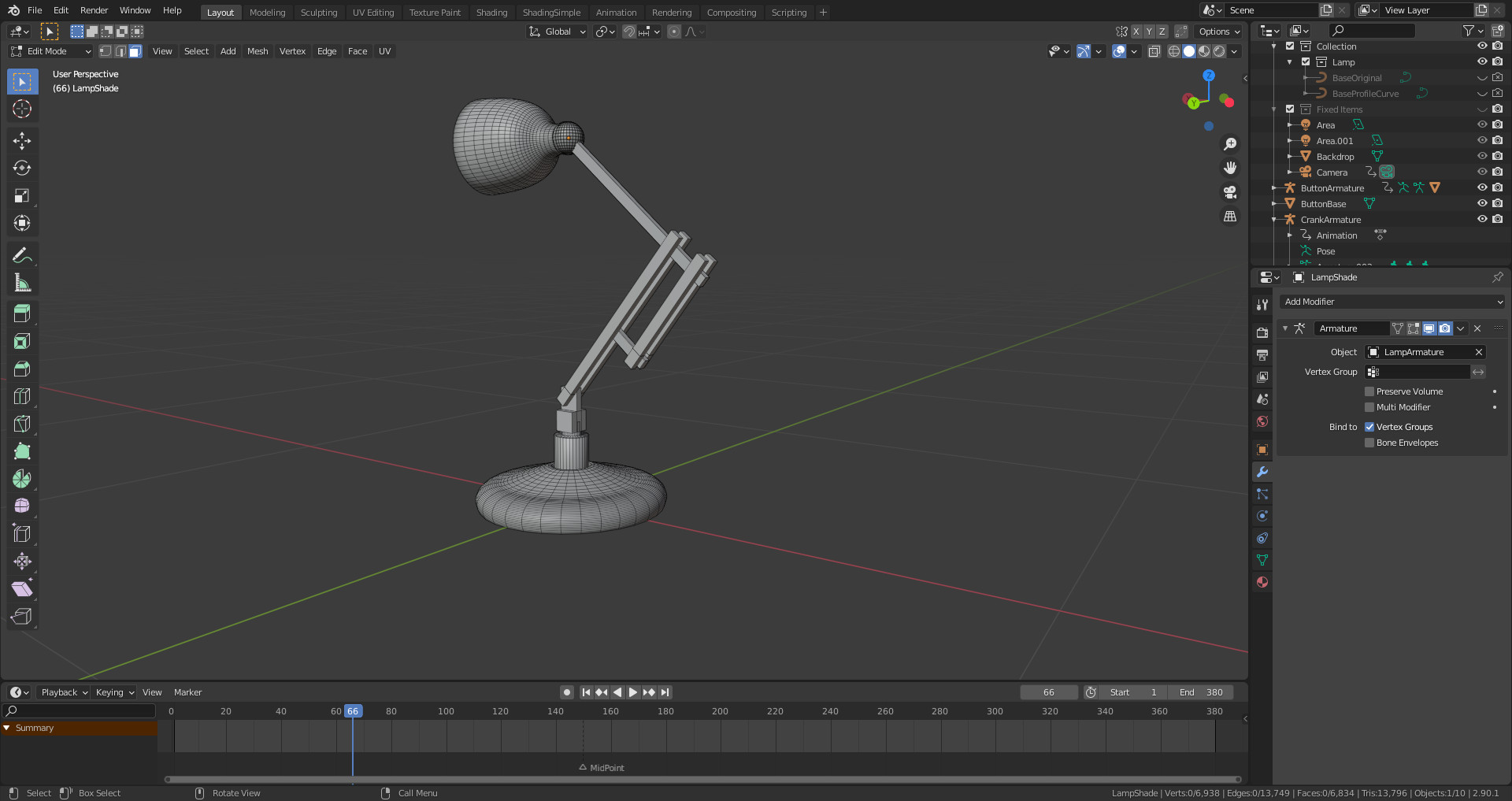
I have a somewhat more complicated rig than Mikey’s simple one with seven mesh objects (LampShade, UpperArm etc.) and nine bones excluding the main rig IK control bone. It all goes horribly wrong when I add the Armature modifier.
Thanks. I had a browse but I couldn’t see anything appropriate. I’ve looked at the posts and they’re all about the rigging of a much more complicated & beautiful lamp than mine. However, my rig works perfectly; it just goes horribly wrong when I try to prepare the lamp for export. All is fine unparenting & making the lamp a single object but applying the armature modifier is a disaster as a don’t have a simple 1 bone : 1 mesh object model.
Thanks for offing your expertise again. After tinkering for a bit, I may have a vague idea about might be going on so I’m going to have a play to see if I can work it out. I’ll post again when I have had time to mess about a bit.
Ok… I hade a couple of unapplied bevel modifiers which may or may not haver been relevant. I also had a typo on a vertex group. It is looking better now but a couple of components are rotated incorrectly in object mode - to the rotation of the rest pose which matched the position in edit mode. In Edit mode the lamp looks ok. My lamp position at the start of the animation is not the rest pose - maybe relevant.
I think I’ve done the steps correctly (thanks Kurt from the Udemy Q&A):
.Remove Parents from all parts
.Create Vertex Groups for each part by selecting all in edit mode and assigning to the vertex
.Each Vertex group must have the same name as each part (e.g. LampBase and LampBase)
.Select each part and join them all (ctrl J)
.Select the single lamp object
.Add a modifier (deform > Armature)
.In the modifier settings select your armature
All of my rotation constraints are set to local - there is one world space Copy Location which breaks the model if changed to local space. I’ve been messing about some more and I’m nearly there; the model looks fine now after adding the Armature modifier but the base doesn’t move with the rest of the lamp during the animation. The trouble is I’ve mess about so much I’ll have to go back a couple of steps to work out what I’ve done. Originally the base was still a bezier circle rather than a mesh so at some point I converted it to a mesh and deleted the curve. Similarly, I deleted the bezier curve that was the lampshade before I converted it to a mesh ages ago.
Unfortunately it’s time to stop having fun and get organised for the day job. Thanks again for your help and I’ll keep you posted with developments.
I seem to have solved it although I’m not sure which of the bits of messing around did the job. I converted the base bezier curve to a mesh and reparented it to it’s bone. I then deleted both old bezier curves for the Base & LampShade. I applied any unapplied modifiers (lust one bevel). With a nice tidy hierarchy I checked that everything was as it should be in terms of bone name, mesh object names and vertex groups. I then saw that the bone for the base was not called ‘Base’. I renamed it & went through the steps listed in my earlier post et Voila! it works perfectly.
I guess the lesson to take from this is to keep things tidy as one goes along and be very careful with names. Thank you very much for taking the time to look at this problem and for pointing me in the right direction.
• Thinking through it first before starting (this can save days of work)
• Working systematically through
• Naming bones, modifiers and constraints appropriately as soon as I make them (also renaming original assets and developing my own simple naming convention)
• organising them into identifiable collections
• moving stuff off into new collections to be hidden away
Keeping it tidy while working on it instead of leaving it for later is something I’ve found incredibly important for me (and something I’m not naturally good at myself being the typical scatter-brained artist-type) but it just saves a ton of time later on and helps keep things in order in my mind, like naming conventions and hierarchies etc because if I can’t view it clearly in my mind, my brain just can’t keep it in order because I’m not logically minded at all.
Glad you got it figured out! I guess you’ll be animating it soon right?
Looking forward to seeing what you make of it!