There’s a bracket missing at the end of the code, so we can’t see your picture. Try uploading it again.
Hey Sara,
I can’t quite tell what is wrong by just looking at it.
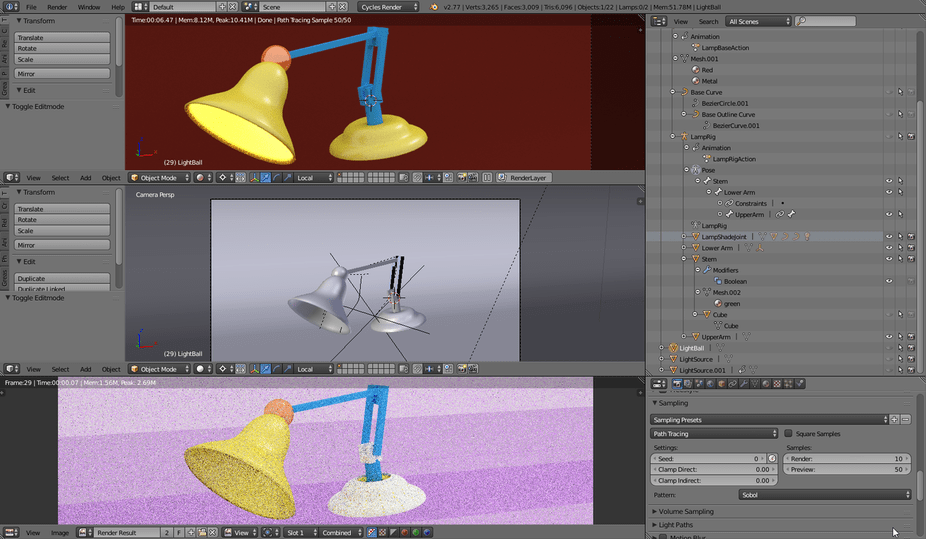
Make sure you always check the Outliner for what is set to be viewable (eye icon) and renderable (camera icon).
You could try to increase your Render samples under Sampling to the bottom right of your screen shot to see if that helps. Otherwise, it might be a node issue.
If you could post some extra screenshots of maybe your nodes or any settings you changed, that would help. Or even if you are able to upload your blend file.
Hope that helps~
The lamp on the bottom is white because the light hitting it is too strong/ too close.
As for the background, could you post a picture of your materials page and world page? It seems like the red is just a place holder and the pinkish background you have is what’s actually selected.
I also agree with @James_Ran, increasing your sample rate will get rid of the noise and possible sharpen the picture enough to make your background and lamp base look better.
Try Unticking renderable(Camera Icon) on your outliner window in front of your curves. The Curves might be overlapping the mesh underneath.