I don’t have an issue on my end but it seems the recent update to Visual Studio broke things for some people.
Someone in the Udemy Q&A posted a solution.
Open the Visual Studio Installer from your Windows Start Menu. Then Modify then go to Individual Components and select to installer an older toolchain
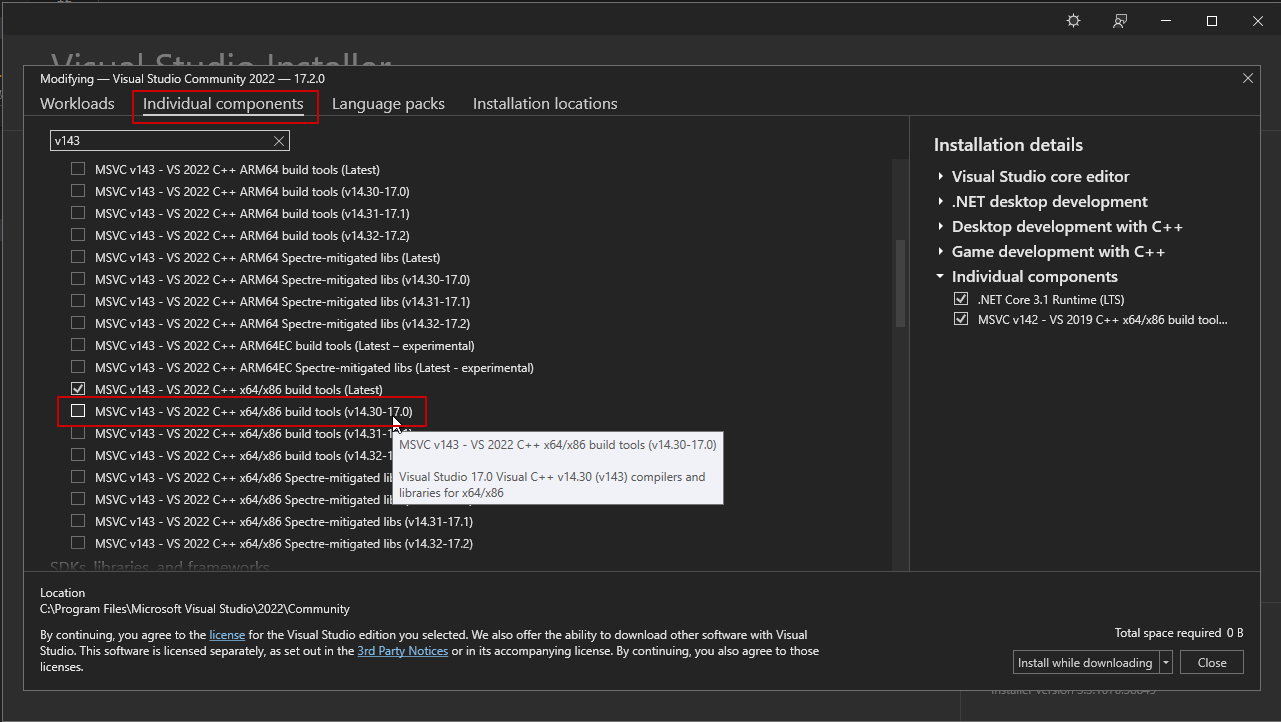
Then update the BuildConfiguration.xml to use that. Open File Explorer and use the address bar (or alternatively Win + R) and go to
%APPDATA%/Unreal Engine/UnrealBuildTool/
Then open the BuildConfiguration.xml file in a text editor like notepad or VS Code and edit its contents so that the following is within <Configuration> </Configuration>
<WindowsPlatform>
<Compiler>VisualStudio2022</Compiler>
<CompilerVersion>14.30.30705</CompilerVersion>
</WindowsPlatform>
e.g.
<?xml version="1.0" encoding="utf-8"?>
<Configuration xmlns="https://www.unrealengine.com/BuildConfiguration">
<WindowsPlatform>
<Compiler>VisualStudio2022</Compiler>
<CompilerVersion>14.30.30705</CompilerVersion>
</WindowsPlatform>
</Configuration>
After installing an older compiler listed above you will need to do a full rebuild. To ensure that you have done that and not an incremental build please delete the Binaries and Intermediate folders before compiling.