I butchered the third person controller and AI controller to make a wolf enemy or companion (not sure which yet)
7 Likes
I like the idea of the wolf being a companion @Stephen_Crookes, in the same way you have the move towards / attack radius, you could have the wolf be a helpful companion and be able to “sniff” enemies from a distance etc… give the player a little heads up towards impending danger! 
2 Likes
I think I might go with both companion and enemies. I think having wolves loping out from the side of the road, maybe from behind some trees would make a good game moment.
I’ve been working on the mechanics of having a companion follow and then stand besides the player. Lots of tweaking and refactoring still required.
2 Likes
I’m really liking this @Stephen_Crookes, and the idea of both companion and enemy is quite cool actually, as you could have a bit of back story as to how he/she became your companion… perhaps the player rescued it as a cub or that kinda thing, now it’s awesomely loyal…
With regards to the video… the wolfs speed looks good when its up to speed but it always seems to lag behind a bit, would have thought he may stay closer and perhaps have slightly faster acceleration. Where the little guy slides when he gets near the player, are you setting its target as the player’s transform but then using the radii to keep it a set distance away? If so, how about using the player transform, but with an offset to the side and then a radius? Just a thought…
1 Like
Thanks @Rob, the backstory idea is a good one.
I’ve made an empty nested inside an empty to create the offset with a script similar to the camera follow. The wolf targets the player until he’s within a radius then he targets the offset and rotates to look at another empty ahead. See screensoht of gizmo below.
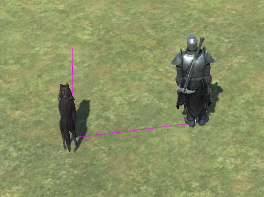
I think the sliding comes about because I’m attempting to have it run until it reaches a certain distance from the player and then walk to the empty. I’m trying to use a blend tree for the first time in the animator and it needs some tweaking or I need to think about another way to get the animations right.
I’ll definitely be looking into the acceleration as you’re right, it lags behind too much.
Thanks for all your feedback, it’s really useful.
1 Like
@Stephen_Crookes Nicely done!
Btw not sure if you know but in the knight are weapons that you can put in his hand, Its a fiddle to do mind and mostly he breaks his own legs when running lol.
One issue i found with the acceleration being turned up is they tend to iceskate as well after stopping and returning to idle animation. Something i am yet to tweak.
2 Likes
Thanks @Marc_Carlyon,
I wasn’t aware of the weapons thing. The model is just a placeholder until I can model my own but it might be fun to play with the weapons, maybe create a melee attack animation.
The skating is also something I’ve noticed on bumpy terrains too, even without added acceleration, which is why I’m now prototyping on a flat plain. If your tweaks also handle issues on gradients then I’d be very interested to know how you solve it. 
1 Like
I’ve had a look at the skating I’ve been experiencing on bumpy terrains and I’ve found it was due to a setting on the Third Person Controller called Gravity Multiplyer. It was set to 2 so I moved it done to 1 and my character no longer slides when coming to a stop on uneven surfaces.
Hope this helps anyone who is have the same issues.
1 Like
Companions a nice idea for a A-RPG
Looks great. Thanks for the idea.
1 Like