I have a start button in my main menu, which is an instance of UnityEnige.UI.Text. I want to increase the font size when the user hovers her mouse over the object.
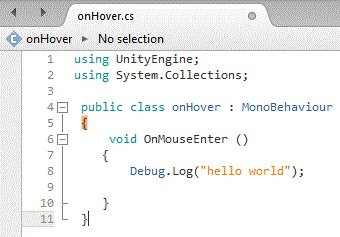
So I looked up the manual and found a function called OnMouseOver() which should do exactly this (see reference ) . I added a script (see screenshot) and I made sure that my start button is a raycast target.
The script simply does not check where the mouse is and prints nothing to the console. Does anybody know what I did wrong and how to fix it?
(I realise my printscreen uses OnMouseEnter(), but I have tried both functions.)
(I use Unity version 5.6.1f1)
The reason for this not working is that the UI Text object is not a GUIElement.
There are several ways you can work around this, depending on what you want to achieve would dictate really the best approach. You could;
use Raycasting to determine what is being hit by the ray, toggling the size of the font accordingly
use Event Triggers to call your own methods, you can use Enter and Exit - but there isn’t any support for Over
use the Event System directly to determine if the mouse pointer is over a game object
I have provided a zip file with an example using the Event Triggers approach which I am sure will meet your needs. It was created in Unity 5.6.0f3, so you may be prompted to update it using 5.6.1.
Note, in this example, I have created a separate game object to attach the script to, you could potentially just add it to the text/button object, or, perhaps include the code in another object such as a GameManager / LevelManager that type of thing.
Thank you so much! Your explanation and the added scene were very useful. And my button works now! Thanks again! I spend a good hour yesterday being utterly confused !
 Thanks again! I spend a good hour yesterday being utterly confused !