fairly familiar with GIMP made a looping animated sprite with transparancy as a gif and it exported well only to find that format doesn’t seem to be supported in Unity. I guess I’m getting ahead of myself but can you point to directions where i can take my multilayer sprites and use them in a simple animation?
Hello @walshg,
I am new to sprite-animation in Unity (thats the current section i am learning in “GlitchGarden” atm).
Dont know if thats what you mean, but somebody made a plugin for gimp which sounds like what you are asking for :
http://registry.gimp.org/node/20943 .
Save the result as a png (to keep transparency) and use the “sprite-editor” in Unity to split your image into your single frames.
Hope that helps.
Chris
THanks I may have to push through with what is available for now, although I do wonder if a looping emitter (never done in anything but the old Unreal editor) might work well.
I tried that Gimp plugin and can’t seem to get it to work so I’ll just make it manually. error:
Execution error for ‘Create From Layer Groups’:
Error: ( : 1) Procedure execution of gimp-item-get-children failed
Hm, strange.
This plugin seems to be very old, but its working for me (gimp 2.8 on OpenSuse Leap 42.1)
Going from this:
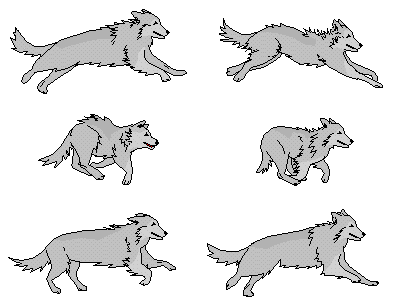
…to this with one click.

Was that, what you were askin for?
Chris
The Trick to using this script is that you have to put all the layers into a layer group: its easy, just make a layer group under layers, drag them all in and then the script will run
BTW New version of Gimp just released
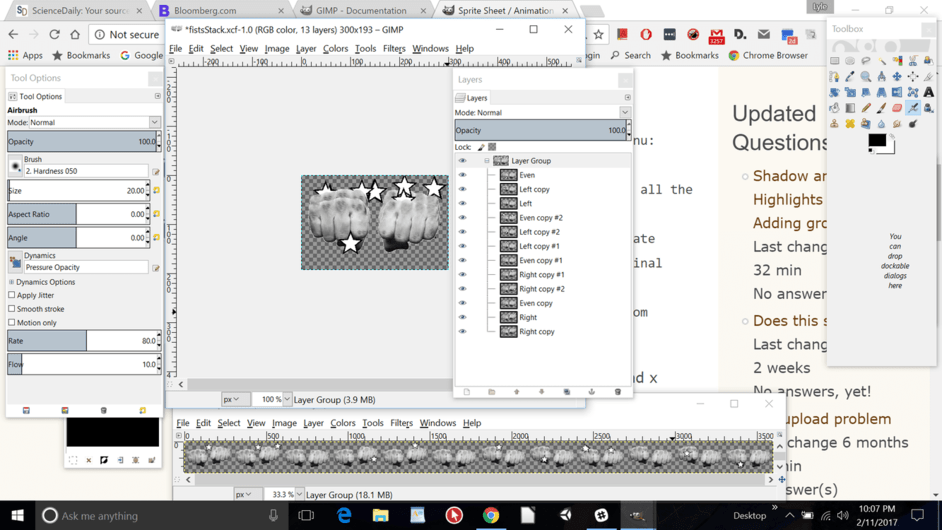
OK so I have the alpha’d strip, sliced it by grid, looks good BUT It still isn’t animating when assigned a sprite. What do I do to animate it in Unity?
SOLVED:
open up the tag (right arrow) on the animated sprite, next select all the sprites you want in your animation loop and drag the group into the scene (ctrl click each or click first then shift click the last one in your strip). You will be prompted for a name for you animation. It should animate now when you play. Now if there isn’t one there, add a animator (not animation) component and move it up under your sprite renderer in the inspector. Your prefab sprite should be pointing to the first image of the strip (eg fists_0) where _0 is the first of the strip. Now drag the prefab icon into the space in the Animator named controller. Last just delete the sprite you temporaritly made from the scene.