Application.LoadLevel is depricated now
so what is the replacement for this function
currently using UNITY 5.5.0f3 version
1 Like
you will have to use the new SceneManager instead.
details are here
The main points are the following;
at the top of your script you must include another NameSpace;
using UnityEngine.SceneManagement;
then when you want to load a scene, you could use the following
SceneManager.LoadScene(0);
Now you will see the 0 inside the brackets, that is the build index of the scene, pretty much used in the same way in this form.
hope that helps.
2 Likes
Hey @ben, this doubt is very common over here and I don’t recall this being addressed in this section of the course, do you think that it is worth to attach a small video explaining this change on the scenemanager?
If updating the videos is a p.i.t.a then maybe something could be added to the resources for this type of thing?
Potentially you could add a URL which is the search on the forum for the relevant terms which then lists all of the many responses this question (and others) has had.
Thought only
1 Like
Thanks it worked!!!
2 Likes
I think it is time to insert some “Differences in Unity 5” videos in each section, good plan. This is on our backlog, thanks.
4 Likes
Ok, so I assume (0) in .LoadScene (0) is an int? So how do you pass the int variable into .LoadScene ( … )?
This isn’t working:
public void LevelLoad(int 0)
	{
	Debug.Log("Level load requested: " + name);
	SceneManager.LoadScene(0);
	}
And Unity scripting reference has this:
public class ExampleClass : MonoBehaviour {
    void Start () {
        // Only specifying the sceneName or sceneBuildIndex will load the scene with the Single mode
        SceneManager.LoadScene ("OtherSceneName", LoadSceneMode.Additive);
    }
}
thank you.
Hi @EmpoweringArts,
Try these;
public void LevelLoad(int sceneIndexToLoad) {
    Debug.Log("You requested scene build index " + sceneIndexToLoad + " to be loaded."):
    SceneManager.LoadScene(sceneIndexToLoad);
}

public void LevelLoad(string sceneNameToLoad) {
    Debug.Log("You requested scene name " + sceneNameToLoad + " to be loaded.");
    SceneManager.LoadScene(sceneNameToLoad);
}
Be careful with using the scene build index, if you don’t have your scenes in the correct build order you may run in to problems.
You can check their order and index under File / Build Settings…
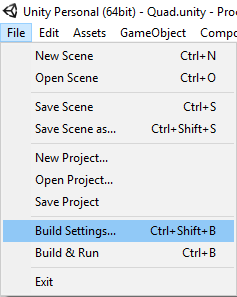
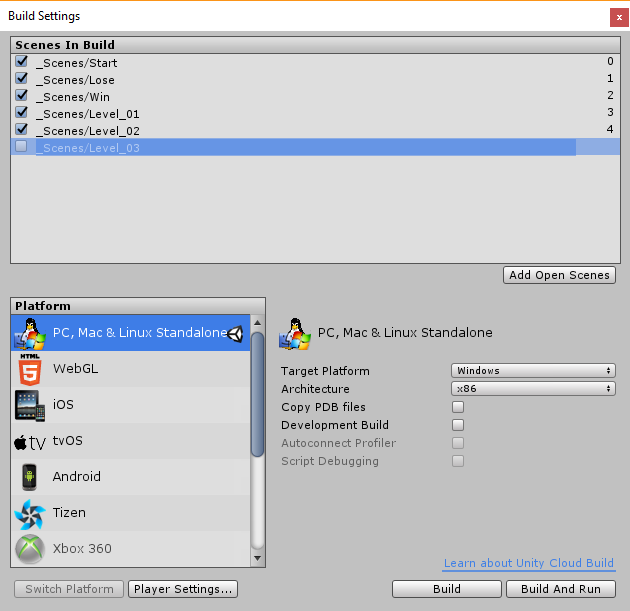
Note: Your order may vary depending on how you manaage the loading of your levels
1 Like
[Solved] Found it - for some reason there was an ‘EventSystem’ game object missing in the ‘Game’ scene.
I can’t recall how it was created in the first place.
Thanks, Mark
1 Like
EventSystem gets added when you drop the UI.Text GameObject in, which in turn creates the UI.Canvas if there isn’t one already.
1 Like