I’m using the Rect Tool to resize just one side of my square. Is there a way to make it snap to the grid? I have snap working for the Scale Tool but then I have to resize both sides of my square at the same time. It would be nice to just lengthen the square from one side and have it snap to the grid. Any idea how to do that? Thanks.
Hi,
The grid is irrelevant for UI elements because they do not exist in the world space but the screen space. They are just within the same window because Unity programmers decided to do it this way.
What exactly are you trying to achieve? Maybe anchors and pivot points can help you align elements perfectly.
See also:
- Unity Manual: Basic Layout
Ok, It’s helpful to know that the grid is a feature of the world space and not screen space. I was able to use the grid in screen space with the move tool to move an image. I set the Snap Setting to Move X = 50 and Move Y = 50 and then used the control key while dragging the arrows on the Move Tool. This allowed my image to snap to every half unit. I love building this way because I can do things quickly and keep them precise.
With the Rect Tool, however, this didn’t work. When I press control and drag one of the sides of the image with the Rect Tool it seems that it’s maintaining a constant area or something as it stretches one side. In any case it doesn’t snap. What I was trying to do was play my square image and then lengthen it by stretching just one side and have it increase by discrete units like the Move Tool does with the control key. I don’t think Anchors and Pivots will allow me to resize elements by discrete amounts.
The anchors and pivot point will align the element relative to the edges of the canvas/screen. Then you can assign precise pixel values in the Rect Transform component.
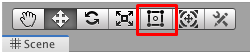
Theoretically, you should be able to grab one edge to resize your UI element. Select the RectTransform tool, the one with the square and the circle in it.
This topic was automatically closed 24 hours after the last reply. New replies are no longer allowed.