Hi. When I’m modeling for example a car - should I really care about the sizes in real life? For example:
If a car is 4m long in real life, should I care about this while modeling?
Thanks!
1 Like
Yes and no… Its not so important while modeling, but is important while rendering.
Because physically-Based Rendering tries to mimic the real world, if your dimensions are wrong, things like refractive indices and light power will also seem wrong.
BUT, because you can always tweak the global units of your scene (or asset), and Blender will respect this when you append it to your main scene, you don’t need to worry too much about it while modeling. But by the time you want to use the model as an asset, you should care about the dimensions.

So provided your main scene is scaled to roughly the right dimensions, then imported assets should respect that scaling.
Edit: This is incorrect. See clarification below.
2 Likes
On the whole yes. You should model in life sizes.
Apart from the reasons Jaco gives, any good model will be using refeence. If you need to get parts of your car the right size, in proportion, with the whole model you might be able to find out the dimensions of a part but no photo suitable for ‘by eye’ guessing.
Also real size makes whatever you make compatible with everything else. Say you make a car, and then lots of things for a street scene, lamp posts, bins, people, house/shop fronts, weeds, paving. If they were all random sizes, every one has to be adjusted to fit the final scene. One bit of relative scaling out and people will notice ‘something’ is odd instinctively.
5 Likes
An important not regarding @Jaco_Pretorius’s post. When using the Unit Scale feature, not everything will be affected. I remember one individual posted a problem with their chess set looking horrible and they couldnt figure out what was going on. It ended up being that they had set their Unit Scale to something like 0.001 and then modeled the set at actual size. The result was they had a chess set built to 1/1000th scale and the lighting was overpowering everything cause the point lights weren’t affected by the Unit Scale setting.
So, in short, modeling to the correct scale is very important. Always try to model at real size, but remember, there are times when that’s not possible (i.e. modeling insects or large structures like buildings and bridges). Those are the times you need to change the Unit Scale because you lighting will treat the object as if it is the size the Unit Scale makes it.
5 Likes
That was an issue in 2.7x and was fixed in Blender 2.80 and onward. Lights respect the scale… so in the case mentioned, you would expect a 10W light to overpower a micro-meter scale chess-set, so it is currently physically correct. The dimensions are in the side-panel and will change with the scene scale, so you can check the overall dimensions after scaling there…
Proof:
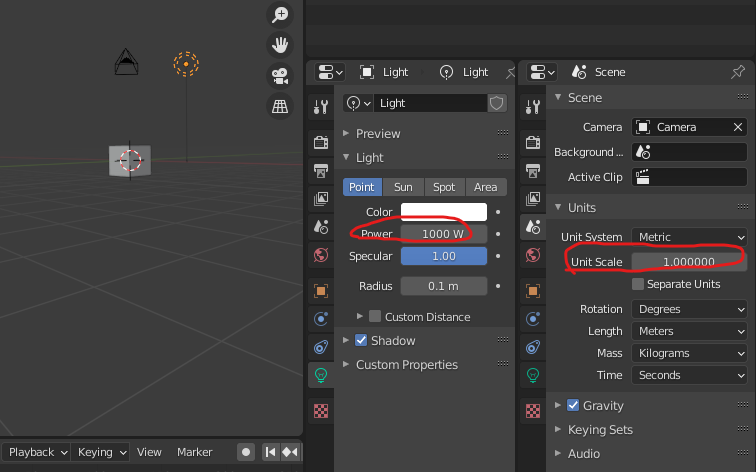
After changing only the unit scale to 0.1:

… The power scales automatically as you would expect. (1000W*(0.1^2) = 10W - cos of inverse-square-law)
But generally I agree, your assets should not really be messing with the scene’s unit-scale… it only really applies to your “master” scene, so try keep your scales correct for things you intend to use as assets.
…I was confidently incorrect here - You still need to re-apply the unit-scale when you import individual objects from another scene with a unit-scale that isn’t 1.0, so the general advice from @NP5 and @Capricas_Kirito to keep to scale where possible is correct.
3 Likes
Thanks guys for help. A lot of useful informations right here. I have one more question about exporting the model to the game engine. So if I make for example gun for my game and the model is proportional, but too large for my scene. Does it make problem if I scale it to the right size in game engine or should I fix this in Blender?
you should fix it prior to export.
This topic was automatically closed 24 hours after the last reply. New replies are no longer allowed.