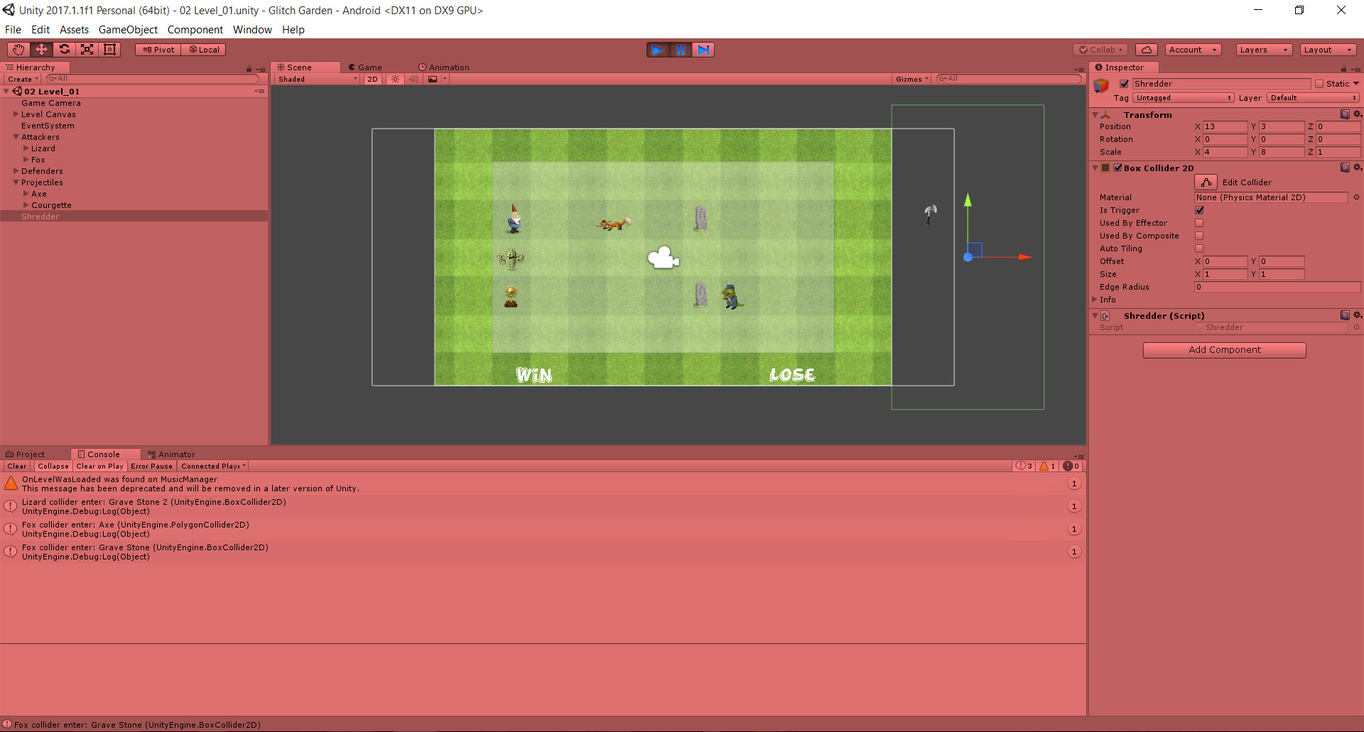
I am at lecture 162.
And I am stuck at making the Shredder work. For some odd reason it isn’t logging a trigger collision after a projectile hits it.
Here is the Shredder script:
        using System.Collections;
        using System.Collections.Generic;
        using UnityEngine;

        public class Shredder : MonoBehaviour {

    	    void OnTriggerEnter2D(Collider2D collider)
    	    {
    		   Debug.Log(name + " hit by " + collider);
    		   Destroy(collider.gameObject);
    	    }
       }
I added a log statement to see if the projectiles collide with the Shredder.
The image below shows the console after the Axe has crossed the fox and the Shredder.
The axe logs out the collision with the fox but not with the Shredder. The axe has clearly gone into the shredder but Shredder does not log anything out.
Your post title has [solved] in it so have you fixed the issue now? If so you should add an update to explain how you managed this in case students in the future have this issue and come across your post
Yes, the problem’s solved.
Actually, for some odd reason, unity didn’t do anything with the script. But after I restarted both Unity and my PC, it worked. The projectiles were getting destroyed by the shredder.
I guess it had something to do with Unity bugging a lot. Either that or my PC is slow to apply changes.
Sometimes the Unity Editor isnt reacting to Script Changes. But thats not only a problem of Unity i saw this in other Engines to. Not sure whats the problem behind that but if you have not reacting scripts. Or sometimes you have an Error even theres no Error. Just Restart Unity first in many cases that helps already.
The problem is over the Time ur Editor load more and more and he need alot of Ressources. If you start your Game probally the Editor uses more then 50% of your CPU Power to Run a Game in Debugging Mode. If you stay now long in Unity there will come some conflicts and thats what happen to you. Maybe he use a old Behavior because he not refresh or something like that.