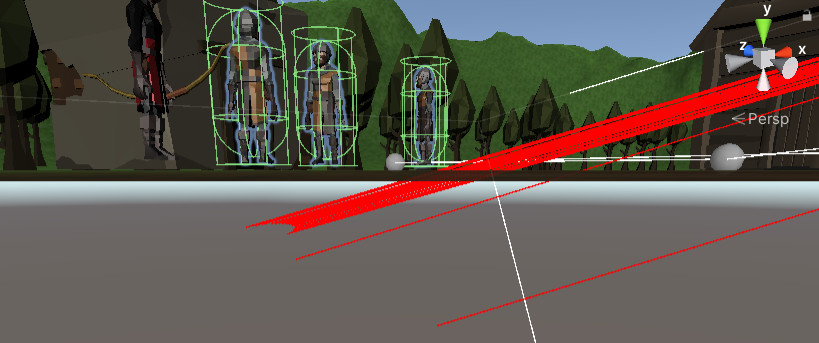
Hi all I seem to have gotten stuck on this bug in my game and I’m lost trying to fix it.
Unfortunately, it’s very inconsistent, which makes it hard to debug.
Basically, sometimes the raycast won’t register when the mouse is over the enemy. I’ve tested this just using Debug.Log(), printing the name of every enemy it hit.
The distance between the camera and the enemy doesn’t seem to matter.
The bug seems to happen more frequently, the more the player has moved in that play session, even if they are not moving in the moment. Maybe the moving cinemachine camera is dislocating something or messing with the raycast? However, the player still seems to move to the exact location clicked when just clicking on the terrain.
Changing the rigidbodys’ collision detection to continuous seems to help the problem but not 100% of the time. Also, sometimes the player character just doesn’t attack, even when the messages in the console say that I am mousing over an enemy.
Like I said this is a very inconsistent bug and I have no idea what to do at this point.
I’m considering just deleting the project and downloading the instructors’ off Github.
If anyone has any ideas on what I could do I would greatly appreciate it.
Make sure that there is a capsule collider on the enemy at the root level. The characters sometimes come with coliders on a few body parts, and these may be what you’re raycasting and hitting now… trouble is that these things move, while a Capsule collider will always stay pretty close to the center of the enemy.
I am very confused on where the promblem lies. The fact that it is more likely to happen the more the character has moved makes me think it has something to do with Cinemachine, but I did some testing and it looks like it might have something to do with my colliders.
I added the Debug.DrawLine and after a bit of movement the raycast seemed to hit the enemies when the mouse was pointed down towards the ground.
bool InteractWithCombat()
        {
            Debug.Log("Raycast!");
            RaycastHit[] hits = Physics.RaycastAll(GetMouseRay(), 100f);
            foreach (RaycastHit hit in hits)
            {
                CombatTarget target = hit.transform.GetComponent<CombatTarget>();

                if (target == null) continue;

                Debug.Log("Hit: " + target.name);
                Debug.DrawLine(Camera.main.transform.position, hit.point, Color.red, 4f);

                if (!fighter.CanAttack(target.gameObject)) continue;
                if (Input.GetMouseButton(0))
                {
                    fighter.Attack(target.gameObject);
                }
                return true;
            }
            return false;
        }
Another possibility is the hotspot on your cursor.
In a later lecture, we’ll be changing the RaycastAll to a SpherecastAll. This may also resolve your issue.
Apparently I just messed up with my rigidbody. “Use gravity” was set to true while “Is kinematic” was not. I don’t know why but seems to have been the problem, not Cinemachine.