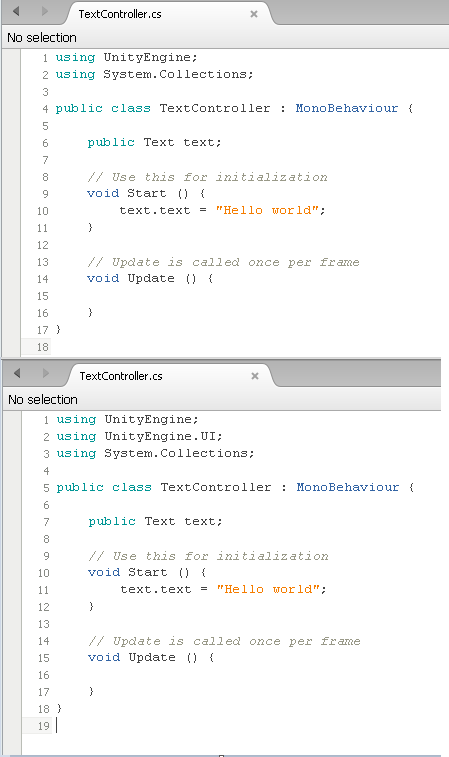
So my program is running fine along with the video however when I write the “public Text text;” with or without “using UnityEngine.UI;” it does not change color and stays black after saving. I want to make sure this is working before moving on.
I have tried everything I could find in Google with no luck. Highlight identifier references is checked in my preferences. semantic highlighting is checked. I have tried different color schemes. I don’t think other errors are even being highlighted all the time either.
OK, solved my own issue. Not sure why it was happening, maybe because I had Unity 5 installed before I downloaded and installed Unity 4.6. But basically you need to go Unity>Preferences>External Tools. Monodevelop will be selected, but you need to drop down and navigate to the Monodevelop app in the Unity 4.6 folder.
I had the same issue to the above mentioned issue. I literally looked at the above response from michaelzero and the description of what was done to achieve the system recognizing the Text to turn to blue after UnityEngine.UI; was added is far too vague. I literally just restarted monodevelopment after closing the project and then closing monodevelopment. It seems that reloading certain scripts and saving your progress is crucial when working between two seperate programs. I hope this simple fix helps others as it helped me.
I then ran into a different issue after the above mentioned fix worked. Now I seem to have different line endings that need to be kept or trimmed. I decided to trim them and see what happened. The program then had the ability to save which it was not doing for me before, but I now lost the blue appearance on the Text text portion of my code. I have changed the optimization of the code from unix to windows but that has not changed the Text to blue as of yet. I am not in need of help once again.