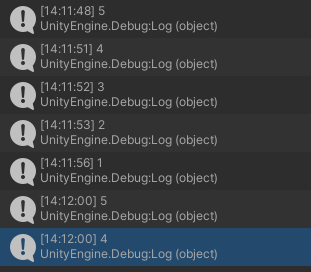
I have a problem in my QuizMaster game from the “Complete C# Unity Game Developer 2D” course, I’ve followed the videos and for some reason in my game, after I press “Play again?” button, my game starts from question number 2 (as if 1st question was already answered) that way, I have only 4 questions rather than 5.
I added Debug.Log(questions.Count) at GetRandomQuestion method to see if for some reason the questions list starts with 4, and you can see that Debug.Log runs twice at the same second so it “skips” a question.
I don’t know why is that, it doesn’t seem to happen in the videos.
Don’t know even what should I share from code.
Not sure if this is the problem, but you are defaulting this to true so when this script loads, it thinks the first question was answered early. I think. Perhaps default it to false and check again
I’ve tried and it didn’t change the outcome, I was really hoping that was really the case.
The thing is, it completely skips the first question, not only the “allow answering” part.
You have a race condition between the Quiz script and the Timer script
The Update method in Quiz checks timer.loadNextQuestion and then loads the next question. It then sets timer.loadNextQuestion to false.
The Timer on the other hand sees that its timerValue is less than 0 (it defaults to 0 when the scene starts and is then decremented by Time.deltaTime) and the player is not currently answering a question, so it sets loadNextQuestion back to true
Give me a few minutes and I’ll let you know what to do to fix it
The problem is that the Quiz update method runs before the Timer update. The simplest way I found to fix it is to change the Quiz script’s update a little
In the first if, add a check to isAnsweringQuestion
if (timer.loadNextQuestion && timer.isAnsweringQuestion) // <- here
{
...
}
I think this is ok. I tested it and it looks fine. When the update runs, the Timer hasn’t set itself ‘ready’ yet, so the Quiz script does nothing. Once the Timer has run it’s first update, all will be good to go