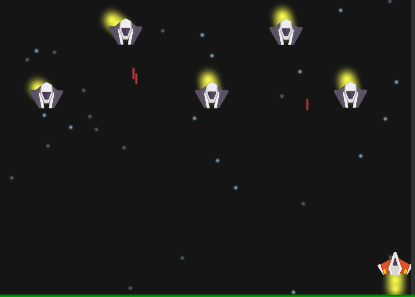
So I’m trying to make a thruster effect, like this
And I was pretty successful on making a thruster for the player! But there is an issue when I try to do the same with the enemies.
The position on the enemy thrusters are off. I think it is either because the thrusters can’t keep up with the enemy ship speed, or I’m just instantiating it with the wrong coordinates.
Code:
Obs:
I tried something like this on the EnemyFormationController class, to make the thruster speed keep up with the ships, but I did not reach the behaviour I wanted. I suppose it happened because by changing the thruster’s speed I also affect the ship’s speed.
You don’t have to move the thrusters since you have made them children of the ship, any change made in the transform of a parent will be passed to their children.
You should good to go with only the first script, if it isn’t enough and the problem persists, then the problem probably is within either the ship sprite gameobject (could have an offset) or with the particle gameobject
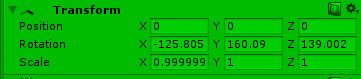
This is the transform of the first ship from left to right
This is from the third ship from left to right
I thought the values I passed on the Quaternion.LookRotation method were supposed to stay unchaged, but the rotation values are different from the ones I passed.
    thrusterRotation = new Vector3(-90f, 76.076f, 77.62099f);
    thrusterEnemy = Instantiate(thrusterEnemyPrefab, this.transform.position, Quaternion.LookRotation(thrusterRotation)) as GameObject;
    thrusterEnemy.transform.parent = this.transform;
As a child of the parent game object, which is being animated, I would expect the particles to be being rotated also - this may explain your differing rotation values?
If you don’t give them any offset at all, and they are just at 0,0,0 within the parent - what does a screenshot of that look like? From what I could gather from your first post I think you suggested that they were, effectively, upside down, e.g. the particles needed to go the other way for the thrust to look correct.
I used a different approach for the player, I did not make the thruster its child, I made a code component for the thruster. It makes sure the thruster position is the same as the player’s.
public class ThrusterBehavior : MonoBehaviour {
private PlayerController playerShip;
private Vector3 shipPosition;
// Use this for initialization
void Start () {
	playerShip = GameObject.FindObjectOfType<PlayerController>();
}

// Update is called once per frame
void Update () {
    GetThrusterPosition();
}

void GetThrusterPosition()
{
    shipPosition = new Vector3(playerShip.transform.position.x, this.transform.position.y);
    //shipPosition = playerShip.transform.position;
    this.transform.position = shipPosition;
}
}
and I adjusted its velocity on the PlayerShip class, so that their speed would be the same
 private void MoveSpaceShip(){
        if (Input.GetKey(KeyCode.LeftArrow))
        {
            this.transform.position += Vector3.left * speed * Time.deltaTime;
            thrusterBehavior.transform.position += Vector3.left * speed * Time.deltaTime;
        }
        else if (Input.GetKey(KeyCode.RightArrow))
        {
            this.transform.position += Vector3.right * speed * Time.deltaTime;
            thrusterBehavior.transform.position += Vector3.right * speed * Time.deltaTime;
        }
        //newX é a posição X, mas com o valor limitado pelo xMin e xMax.
        float newX = Mathf.Clamp(this.transform.position.x, xMin, xMax);
        this.transform.position = new Vector3(newX, this.transform.position.y, this.transform.position.z);
        thrusterBehavior.transform.position = new Vector3(newX, thrusterBehavior.transform.position.y, thrusterBehavior.transform.position.z);
    }
I could not do the same for the enemy because the moveSpaceShip function is not on the enemy prefab but on the EnemyController class.
At first I tried doing everything on the enemyControllerClass, but some bugs happened, like the thruster on the first position acting weird and being out of position, and also since the animation is a component of the enemyShip object and not of the enemyController, the thrusters do not follow the animation, only the left and right movement.
So I tossed all of that away and tried this other solution xD
I think at this point I would need to see the project properly to see if there were any further suggestions I could make which may help.
I’m happy to take a look at it for you if you are happy to zip the project up and make it available to download. The forum here will support .zip files, I think the limit is still 10mb though. Failing that, DropBox, GoogleDrive etc…
Hey @Rob_W thanks for replying on this, it made it pop up for my attention and I’ve just realised that I have utterly let @Daniel_Libaneo down here by not responding!
Really sorry Daniel - please let me know if you are still experiencing the issue or whether in the last 20 days you have managed to resolve it yourself. Again, really sorry - not entirely sure what happened to make me lose sight of this one.