I get null references when i kill an enemy mostly and not always also sometimes can exist even during combat.
when i take that out : if(!GetComponent().CanMoveTo(combatTarget.transform.position) && !GetIsInRange(combatTarget.transform)) {return false; }.
You’re on the right track! You’re going to want to null check the CombatTarget before you get to this line. If it is false, then we know by definition that we cannot attack the character.
Theory question that I expect not solution but theory answer. Would be able if you go deep into an programming language into the low level code, make null reference restore themselves but still get a debug error but without breaking the game?
In C#, no. Once it’s been destroyed, there’s no bringing it back. If it’s just a matter of the code losing the reference, but with the object still there, you could search for it.
If Destroy() is called, it will be tagged as destroyed and Unity will always treat it as null until the Garbage Collector finishes the job and re-allocates the memory. If you try to access an object that has been marked as destroyed, Unity will always treat it as null or a missing reference and throw an exception. Even if you had a clever low level solution, you would have no guarantee how before the Garbage Collector frees up it’s location and something else goes in it’s place (and you would have no way of knowing that this had happened!).
Otherwise, as long as some object maintains a reference to an object (say a cache), it is safe from the Garbage Collector, and you could try to re-aquire it, either from the cache or by searching with FindObjectByType.
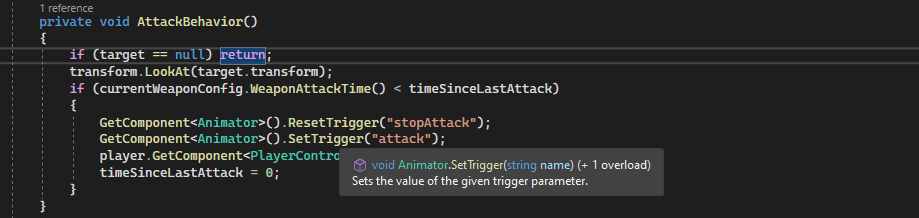
Fixed the problem i added that target == null at attack behavior at first also made a double null check at update ( maybe the second null check isnt neccesery but i doubt it will matter ? So brian whats your oppinion on this?
Context always matters (and of course, as I mentioned in another thread, code formatted text over screenshots).
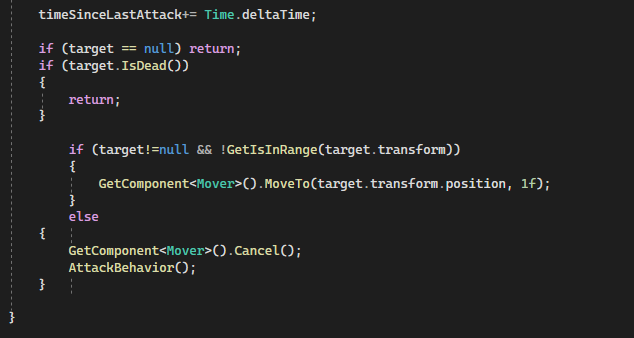
The 2nd screenshot is the Update() method, which is actually called before the 1st paste, AttackBehaviour.
In the Update() method, you’re actualy checking the target twice, once at the beginning, and once in the range check. Since you’re blocking at the beginning of the method, no further null checks on Target are required for the remainder of the method (Unity is, by default, NOT multi-theaded). This means you can remove the target!=null from the if statment and simply use
if(!GetIsInRange(target.transform))
Theoretically, AttackBehaviour() is only called in Update(), and at the point that it is called, target has already been null checked. Your screenshot confirms 1 reference… so theoretically, a null check is not required here.
Well i completely forgot about here and did it on stealth system, yeah i got nullphobia😛 after all that nulls I got during my training, but i will remove the one that makes double null check .
The inventor of the null pointer regrets introducing nulls, and once referred to it as his “Billion Dollar Mistake”… (I think he’s missing a 0)… Nulls can lead to wasted energy.
My general rule of thumb is if it can be null, then it must be null checked. This rule applies on a per-method basis unless it is in a coroutine. If it’s in a normal method, Unity doesn’t do true threading, so unless you call a method that can make it null, you’re generally safe. If it’s in a coroutine, then it may need to be null checked after every yield return instruction (because you have no idea whatsoever what may be happening between your yield return instruction and control being returned to the coroutine.
Oh, that’s a good question… and the answer may have been even worse. No matter what, we’re always faced with the notion that our data is no longer valid.
Then you’re just obscuring the null…
In truth, null references can be valuable…
For example, in Fighter, we simply use the existence of a target to serve as the mechanism to know you have a target… That’s pretty powerful.
In methods where things shouldn’t be null, a null reference can lead us to hunt down that condition… simply exiting gracefully isn’t always the answer there (I often pop a Debug when something is null so I know I need to hunt down a null reference somewhere).