i can’t seen Gizmos wire cube in Unity … but it still work normal , every thing still work normal
i using windows 10
how i see it
what is press button keyboard for see wire cube Gizmos ???
help me !!!
1 Like
Had the same problem but figured out on the line
public void OnDrawGizmos ()
I had only typed Gizmo instead of Gizmos
Gave no errors at all when building said successful but wirecube didn’t show up in editor
Hope this helps you or others. Cheers
3 Likes
yes i will try
1 Like
so i was tried
void OnDrawGizmo(){
	Gizmos.DrawWireSphere (transform.position, 1);
}
}
and i got problem big more than
i not see position
i not see wire cube  it’s so sad
could i ask you ? what your using your Unity version ??
i use 4.7.2f1 and windows 10
1 Like
Hi @HihaMata,
As @durpadurp suggested, check the spelling of the method name;
private void OnDrawGizmos()  // note the spelling "Gizmos"
{
	Gizmos.DrawWireSphere(transform.position, 1f);
}
1 Like
yes i make sure spelling syntax my script but …
my link my project Laser Defender : https://drive.google.com/open?id=1ocPtmOeLy7U4qRDhuR1EfiFovYk9ChT2
and i use Unity 4.7.2 and Windows 10
thankyou very much for all help me !!!
1 Like
I have just opened your project in Unity 4.7.2 using Windows 10.
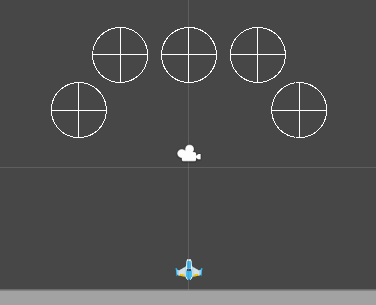
I see Gizmos…
This is with the Game scene open and nothing selected in the Hierarchy, just literally opening the scene.
If you do not see these Gizmos, check whtether you have them disabled under the Gizmos dropdown menu in the Scene view;

In this case, position needs to be ticked.
Hope this helps. 
1 Like
yes, i ticked all Gizmos
but i no see wireCube Gizmos
i don’t know help me
1 Like
The positions are using WireSphere, and those appear.
It is the EnemySpawner which uses WireCube, so if we take a look at your code in EnemySpawner.cs;
public void onDrawGizmos(){
	Gizmos.DrawWireCube (transform.position, new Vector3 (width, height));
	// cai nay de nam cac enemy di chuyen cung 1 luc trong 1 khung day hinh vuong
}
What we can see here is that you have spelt the name of this method incorrectly, C# is case-sensitive, as such;
onDrawGizmos
is not the same as
OnDrawGizmos
Correct your code to this;
public void OnDrawGizmos(){
	Gizmos.DrawWireCube (transform.position, new Vector3 (width, height));
	// cai nay de nam cac enemy di chuyen cung 1 luc trong 1 khung day hinh vuong
}
Hope this helps 
1 Like
oh cool !!!
it’s my faulse
just type O capital to OnDrawGizmos everything become good work
thankyou very much Rob,i love you !!!
i solved !!
1 Like
You’re very welcome
It’s an easy mistake to make, so don’t beat yourself up over it. Just remember going forward that C# is case-sensitive, so any methods from the Unity library have to be named exactly as per their documentation.
1 Like
ok you that right
i is on the way for game Laser Defender go on
and i hope so got a little problem for me
and agian i thankyou very much
1 Like
This topic was automatically closed 24 hours after the last reply. New replies are no longer allowed.