My Unity hub doesn’t have an Installs tab. Does anyone know how I can install new build options?

Hi,
I don’t think you have Unity Hub open, it looks like you have Unity open, as per the tool bar across the top, “Unity 2018.2.15f1”.
Unity Hub should be it’s own application/install, default installation path (Windows) is;
C:\Program Files\Unity Hub
Executable is named : Unity Hub.exe
Hope this helps 
See also;
- Unity - Manual : Installing Unity using the Hub
1 Like
Thanks so much! I guess I missed a step early in the course, and the two looked so much alike, I never noticed the difference.
So now I have the Hub installed, but it still doesn’t give me the option to install a new component. The three dots to the right of the preferred version only show “Set as preferred” (grayed out) and “Remove from list.”
However, I did get WebGL downloaded: I had the option in Unity itself under File – Build Settings – WebGL. And my game is up on sharemygame.com.
Rob, a thousand thanks for catching my mistake!
Ken
Hi Ken,
You’re more than welcome.
You should have the Add Component option when you click on the ellipsis next to any of the Unity installations listed under Installs, which were installed via Unity Hub, but check that you are also looking at the On My Machine view, not Official Releases or Beta Releases;
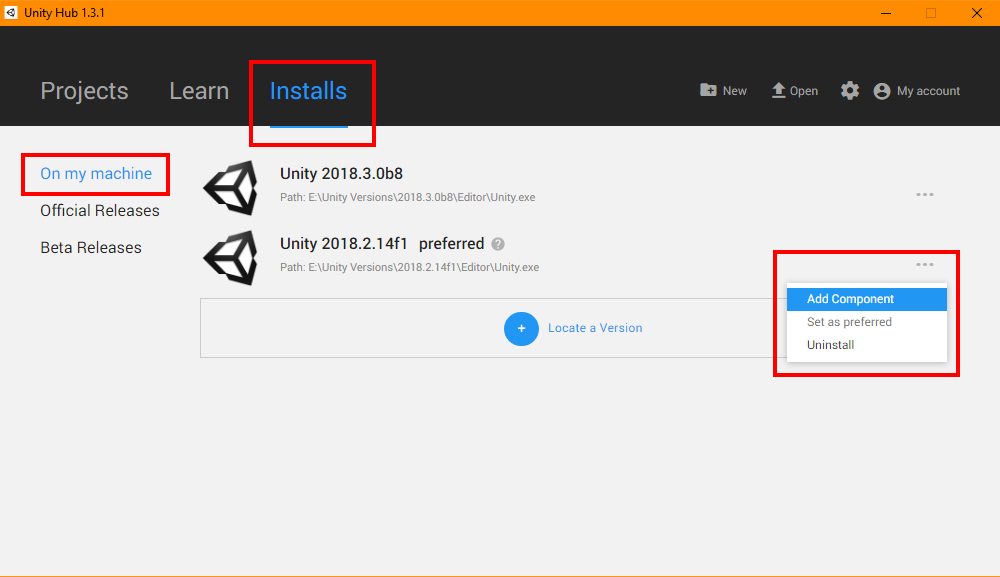
Note - you will only see this option if you have installed the version of Unity in question via Unity Hub, if you used Locate a Version, this feature will not be available to you.
In order to add components to a version of Unity you downloaded separately, try Windows’ Add/Remove Program and look for the Modify option. If that doesn’t work, I’d suggest uninstalling and then reinstalling via Unity Hub so that things are more streamlined moving forward.
Hope this helps 
This topic was automatically closed 24 hours after the last reply. New replies are no longer allowed.