After creating and including header file HiddenWordList my whole programm isn’t working anymore. I have put my 3 files of code down below. Sometimes it shows 4000 errors and sometimes only 2 and sometimes 5. I have tried the option “rebuild project solution”, but it didn’t work and I can’t open it in unreal
My HiddenWordList.h:
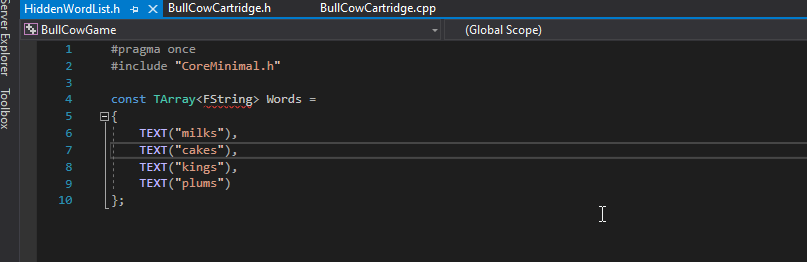
#pragma once
#include "CoreMinimal.h"

const TArray<FString> Words = // here I get error saying "variable FString is not a type name"
{
	TEXT("milks"),
	TEXT("cakes"),
	TEXT("kings"),
	TEXT("plums")
};
My BullCowCartridge.h:
// Fill out your copyright notice in the Description page of Project Settings.

#pragma once

#include "CoreMinimal.h"
#include "Console/Cartridge.h"
#include "BullCowCartridge.generated.h"

UCLASS(ClassGroup=(Custom), meta=(BlueprintSpawnableComponent))
class BULLCOWGAME_API UBullCowCartridge : public UCartridge
{
	GENERATED_BODY()

	public:
	virtual void BeginPlay() override;
	virtual void OnInput(const FString& Input) override;
	void InitGame();
	void EndGame();
	void ProcessGuess(FString Guess);
	bool IsIsogram(FString Word) const;

	// Your declarations go below!
	private:
	FString HiddenWord;
	int32 Lives;
	bool bGameOver;
};
My BullCowCartridge.cpp:
// Fill out your copyright notice in the Description page of Project Settings.
#include "BullCowCartridge.h"
#include "HiddenWordList.h"

void UBullCowCartridge::BeginPlay() // When the game starts. Here I get syntax error saying "void should be preceded by;"
{
    Super::BeginPlay();
    InitGame();
}

void UBullCowCartridge::OnInput(const FString& Input) // When the player hits enter
{
    if (bGameOver)
    {
        ClearScreen();
        InitGame();
        PrintLine(TEXT("Nr. of possible words: %i"), Words.Num());
    }
    else
    {
        ProcessGuess(Input);
    }
}

void UBullCowCartridge::InitGame()
{
    PrintLine(TEXT("***  WELCOME TO BULL COWS GAME!!! ***"));

    HiddenWord = TEXT("milks");
    Lives = 4;
    bGameOver = false;

    PrintLine(TEXT("Guess the %i letter woed!."), HiddenWord.Len());
    PrintLine(TEXT("Please enter..."));
}

void UBullCowCartridge::EndGame()
{
    bGameOver = true;
    PrintLine(TEXT("Press Enter to play again. Hidden word was: %s"), *HiddenWord);
}

void UBullCowCartridge::ProcessGuess(FString Guess)
{
    if (Guess == HiddenWord)
    {
        PrintLine(TEXT("You have won"));
        EndGame();
        return;
    }


    if (Guess.Len() != HiddenWord.Len())
    {
        PrintLine(TEXT("Wrong. %i lives remaining. Word lrngth is: %i"), Lives, HiddenWord.Len());
        return;
    }

    if (!IsIsogram(Guess))
    {
        PrintLine(TEXT("No repeating letters, guess again"));
        return;
    }

    --Lives;
    PrintLine(TEXT("Life Lost"));// sometimes I get error here saying "this declaration has no storage class or type specifier"

    if (Lives <= 0)
    {
        PrintLine(TEXT("Game Lost"));
        EndGame();
        return;
    }

    PrintLine(TEXT("%i Life Left"), Lives);
} // here I get an error "expected a declaration!"

bool UBullCowCartridge::IsIsogram(FString Word) const
{
    for (int32 Index = 0; Index < Word.Len(); Index++)
    {
        for (int32 Comparison = Index + 1; Comparison <= Word.Len(); Comparison++)
        {
            if (Word[Index] == Word[Comparison])
            {
                return false;
            }
        }
    }
    return true;
}
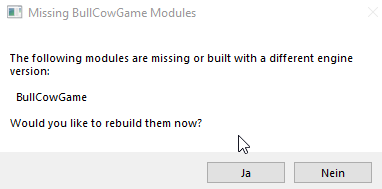
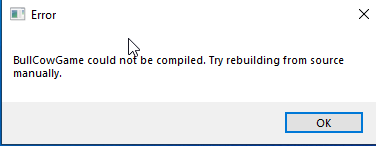
I am using Visual Studio 19 Community Edition with Unreal Engine 4.26. I don’t know how to refresh VS19 project in unreal since I can’t enter unreal. I get following messages:
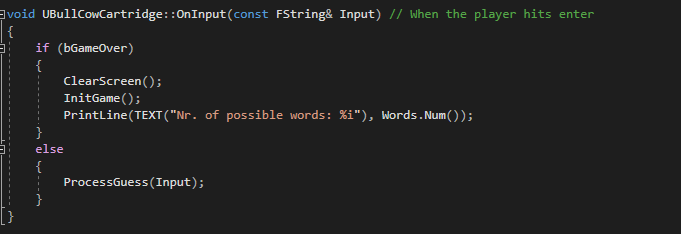
this is my start of the file(line 5 is the start of the definition void UBullCowCartridge::BeginPlay()):
// Fill out your copyright notice in the Description page of Project Settings.
#include "BullCowCartridge.h"
#include "HiddenWordList.h"

void UBullCowCartridge::BeginPlay() // When the game starts
{
    Super::BeginPlay();
    InitGame();
}

void UBullCowCartridge::OnInput(const FString& Input) // When the player hits enter
{
    if (bGameOver)
    {
        ClearScreen();
        InitGame();
        PrintLine(TEXT("Nr. of possible words: %i"), Words.Num());
    }
    else
    {
        ProcessGuess(Input);
    }
}
Then that’s a bit confusing since I’m not seeing any missing semicolons.
However the fact that you’re getting an underline for FString in this screenshot
Makes me think you saved the HiddenWordList.h somewhere else. Could you hover over the tab so it shows the path?
It should be under “Source” and if you didn’t change the path when creating the file it’s most likely under “Intermediate”. It needs to be in the same location as BullCowCartridge.cpp (in Source).
Yeah, VS Community will default to that path for Unreal projects, most likely due to the generated files that are created. There should be a note about this in the course.
he mentioned that vs will default save it somewhere else then its supposed to, but I wasn’t prompted to set the location to which I want it to be saved, so I just hoped for the best. Is there any way I can fix this