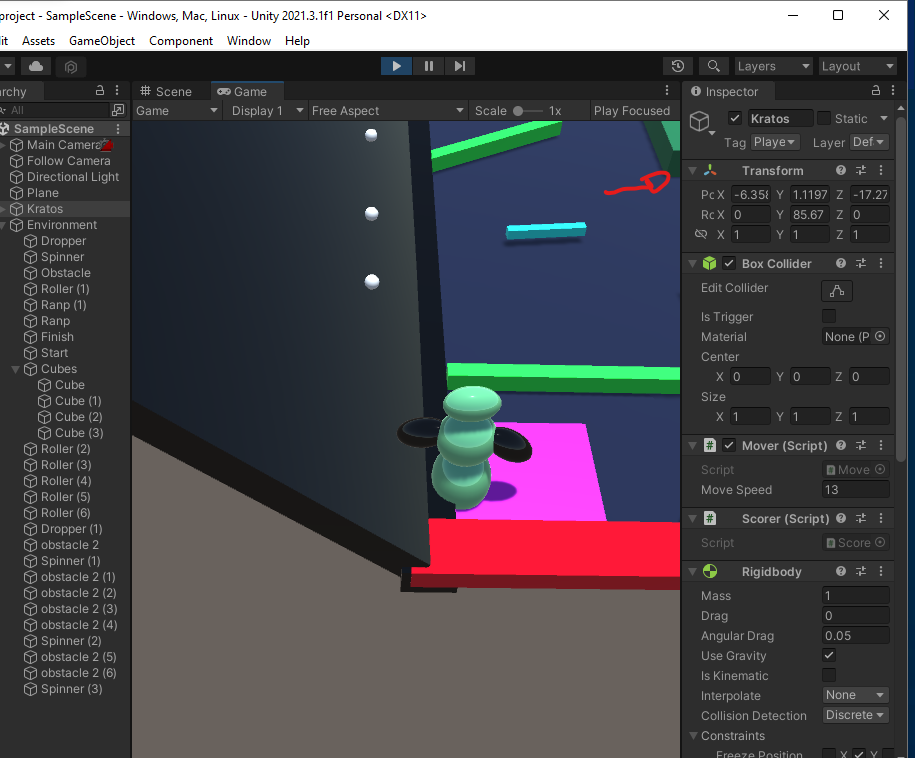
Hi, I am making the obstacle course game and the WASD seems to be inverted. Any ideas why this is happening? Also I feel like I messed up my input settings after trying to fix it on my own.
Thanks!
Hi, I am making the obstacle course game and the WASD seems to be inverted. Any ideas why this is happening? Also I feel like I messed up my input settings after trying to fix it on my own.
Thanks!
Hi,
If the movement is inverted, the reason is often a negative scale in the Transform component of either the camera or the player.
If you cannot spot any issue there, check your code. Maybe there is a minus?
Hello, sorry for the late reply. I can see the transform in the inspector but don’t know what should be negetive or not. Here is a screenshot
As for the code, there is no minus. This is how my code looks, void movePlayer(){ float xValue = Input.GetAxis("Horizontal") * Time.deltaTime * moveSpeed; float zValue = Input.GetAxis("Vertical") * Time.deltaTime * moveSpeed; transform.Translate(xValue,0,zValue); }
That looks fine. What about the camera?
If you cannot find the issue, log the xValue and zValue into yout console to see if the values make sense. W and D should increase the respective value, A and S should decrease it.
I remember messing with the camera, but don’t really know how this came about. How do I log xValue and yValue into the console?
For example, like this: Debug.Log("Your meaningful message: " + xValue);
Got it, but now I feel like I don’t exactly know where Debug.Log() should be. Is it under void Update() or under void Start()? It’s giving me an error that reads, “The name of the ‘yValue’ does not exist in the current context”
I understood that your problem is the inverted movement. The player gets moved in the movePlayer() method. For this reason, it makes sense to place Debug.Logs there to see if the problem is really caused by the code or if it might be somewhere else. Furthermore, since the two suggested variables are declared within the movePlayer() code, they do not exist outside this scope. This means that you are able to check the values only within this method code block and after the variables were declared.
Generally, when debugging, never assume that something is working just because it looks as if it is/was working. There is so much going on during runtime that we can never be sure unless we verify our assumption. Your code looks fine to me but who knows what values you are getting at runtime.
Thank you for the help, I’m sure it’s something to do with the camera or something.
What makes you sure? Did you verify with Debug.Logs that your movePlayer() method does what it is supposed to do?