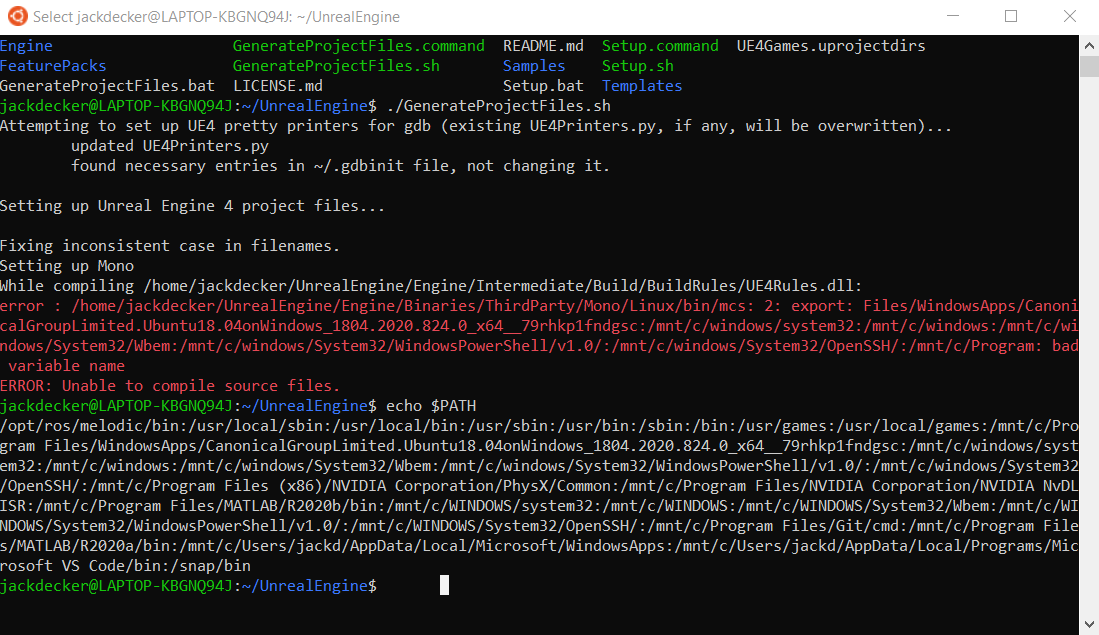
I was following the steps in “Build Unreal From Source (Linux)” and I cannot figure out an error that I am getting. Here is the error:
error : /home/jackdecker/UnrealEngine/Engine/Binaries/ThirdParty/Mono/Linux/bin/mcs: 2: export: Files/WindowsApps/CanonicalGroupLimited.Ubuntu18.04onWindows_1804.2020.824.0_x64__79rhkp1fndgsc:/mnt/c/windows/system32:/mnt/c/windows:/mnt/c/windows/System32/Wbem:/mnt/c/windows/System32/WindowsPowerShell/v1.0/:/mnt/c/windows/System32/OpenSSH/:/mnt/c/Program: bad variable name
ERROR: Unable to compile source files.
Going by the error I’d say it is trying to use parts of the Windows Build. I assume this is being done on a proper install and not WSL2 or a Virtual Machine?
I wouldn’t expect it to work with WSL - I’ve had issues with GUI apps in WSL and only have VS Code running - mainly run .net core apps on it for testing.
I know there are others trying this but honestly, if you’re running Windows, use the Windows version. If you try and use WSL, it’s going to be slower anyway because it is virtualised.
If you are determined, then I think your best bet for questions like this is look through UE AnswerHub, or Unreal Slackers Discord.
So I am a little new to computer terminals. Should I install Windows Terminal and just use that? The title of the video says: Build Unreal From Source (Linux), so I thought I should be using wsl