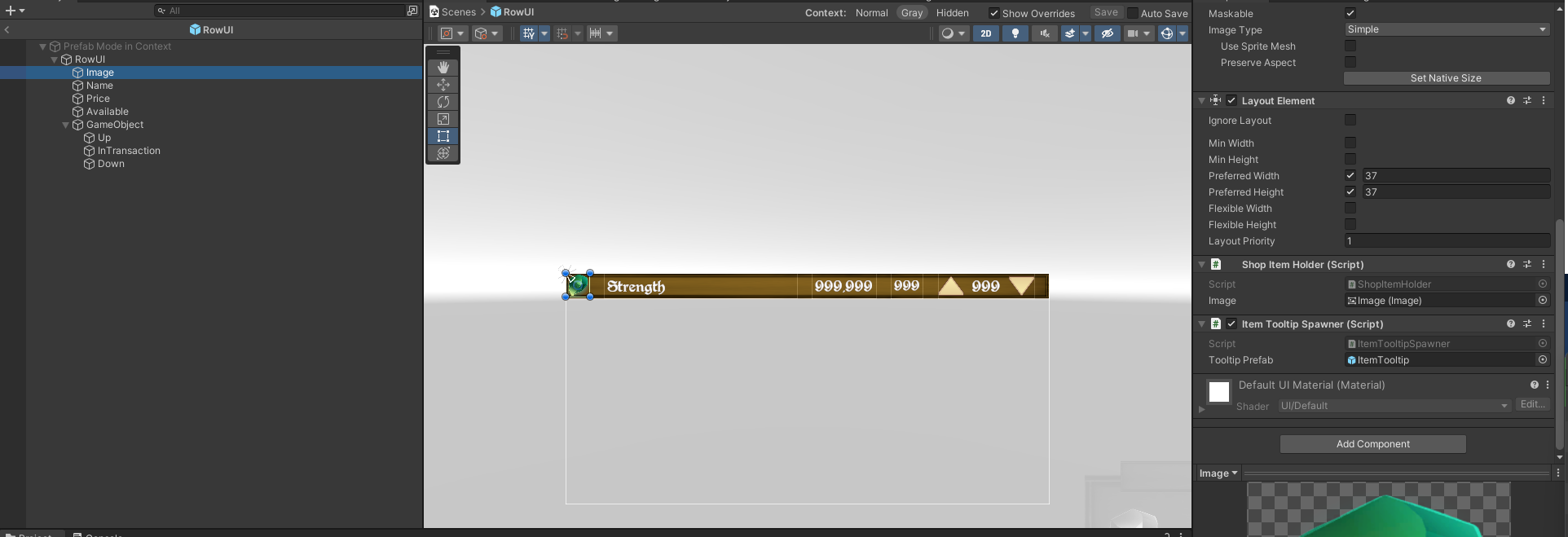
Hello, I just realized when I tested my mini game with a friend that the ItemTooltip info no longer appears on the Shopkeeper item list. I tryed to look on my UI to check if any element was blocking the raycast. But i cant find anything. Anyone can help me please ? (Edit : Not even sure it was doing that before now)
We may need some more information, as to how you have the tooltip setup for the Shopkeeper.
I think seeing the heirarchy of the shop item prefab, along with the inspectors for each element, so that I can see where your ItemTooltipSpawner is located in relationship to everything else.
Hi. I dont had setup it. Was thinking it was working same as for item. But i see that is not.
I supposed it was possible to use the item tooltip prefab for item in the shop.
I made these change in the rowUI.cs script ( adding IITemHolder interface )
I have The ItemTooltip.cs from inventory and the ItemTooltipSpawner
using System;

using System.Collections;

using System.Collections.Generic;

using RPG.Shops;

using UnityEngine;

using TMPro;

using UnityEngine.UI;

using GameDevTV.UI.Inventories;

using GameDevTV.Inventories;

namespace RPG.UI.Shops

{

    public class RowUI : MonoBehaviour, IItemHolder

    {

        [SerializeField] Image iconField;

        [SerializeField] TextMeshProUGUI nameField;

        [SerializeField] TextMeshProUGUI availabilityField;

        [SerializeField] TextMeshProUGUI priceField;

        [SerializeField] TextMeshProUGUI quantityField;

        Shop currentShop = null;

        ShopItem item = null;

        public void Setup(Shop currentShop, ShopItem item)

        {

            this.currentShop = currentShop;

            this.item = item;

            iconField.sprite = item.GetIcon();

            nameField.text = item.GetName();

            availabilityField.text = $"{item.GetAvailability()}";

            priceField.text = $"{item.GetPrice():N2}" + " Golds";

            quantityField.text = $"{item.GetQuantityInTransaction()}";

        }

        public void Add()

        {

            currentShop.AddToTransaction(item.GetInventoryItem(), 1);

        }

        public void Remove()

        {

            currentShop.AddToTransaction(item.GetInventoryItem(), -1);

        }

        public InventoryItem GetItem()

        {

            return item.GetInventoryItem();

        }

    }

}
Then in the Row Prefab i added the ItemTooltipSpawner and linked the Itemtooltip prefab. It works. But i will have to change the place of the spawn instance.
It is possible to change loc of the tooltip plz ?
It places the tooltip based on the location of the container it’s attached to. Try putting a Holder script and ItemTooltipSpawner on the icon instead of on the overall row. Then in setup, Get the Holder component and give it the reference to the item.
I 'm trying , but in the row.cs i have a reference to the item.
In my new ShopItemHolder.cs , how can i get the item please ?
Is this a good way ?
i added this method in rowUI
public ShopItem GetShopItem()

        {

            return item;

        }
here is my code that i will put on icon :
using System.Collections;

using System.Collections.Generic;

using GameDevTV.Inventories;

using GameDevTV.UI.Inventories;

using UnityEngine;

namespace RPG.Shops

{

    public class ShopItemHolder : MonoBehaviour, IItemHolder

    {

        public InventoryItem GetItem()

        {

           return gameObject.GetComponent<RowUI>().GetShopItem().GetInventoryItem();

        }

    }

}
It’s likely that the icon is not on the same GameObject as the RowUI (as the RowUI should be on the overall row, with the icon being a child of the row.
Try return gameObject.GetComponentInParent<RowUI>().GetShopItem().GetInventoryItem();