Invoke() Is not Working

My Invoke() Is not working, I have the delay time set to 2f, I tested everything that I know but nothing worked for me
Code :

using System;

using UnityEngine;

using UnityEngine.SceneManagement;

public class CollisionHandler : MonoBehaviour

{

    [SerializeField] float levelLoadDelayTime;

    void OnCollisionEnter(Collision other)

    {

        switch (other.gameObject.tag)

        {

            case "Finish":

                StartSuccessSequence();

                break;

            case "Friendly":

                Debug.Log("Bro, I am friendly");

                break;

            default:

                StartCrashSequence();

                break;

        }

    }

    private void StartSuccessSequence()

    {

        GetComponent<Movement>().enabled = false;

        Invoke("LoadNextLevel", levelLoadDelayTime);

    }

    void StartCrashSequence()

    {

        GetComponent<Movement>().enabled = false;

        Invoke("ReloadLevel", levelLoadDelayTime);

    }

    void LoadNextLevel()

    {

        int currentScene = SceneManager.GetActiveScene().buildIndex;

        int nextScene = currentScene + 1;

        if (nextScene == SceneManager.sceneCountInBuildSettings)

        {

            nextScene = 0;

        }

        SceneManager.LoadScene(nextScene);

    }

    void ReloadLevel()

    {

        int currentScene = SceneManager.GetActiveScene().buildIndex;

        SceneManager.LoadScene(currentScene);

    }

}

Hi Hammad,

Have you already tried to add Debug.Logs to your code to see what is going on during runtime? Maybe the code block with Invoke never gets called.

I used debug.logs into my code and It seems to be running but for some reason the Invoke’s delay isn’t working

using System;
using UnityEngine;
using UnityEngine.SceneManagement;

public class CollisionHandler : MonoBehaviour
{
    [SerializeField] float levelLoadDelayTime;

    void OnCollisionEnter(Collision other)
    {
        switch (other.gameObject.tag)
        {
            case "Finish":
                StartSuccessSequence();
                break;
            case "Friendly":
                Debug.Log("Bro, I am friendly");
                break;
            default:
                StartCrashSequence();
                break;
        }
    }

    private void StartSuccessSequence()
    {
        GetComponent<Movement>().enabled = false;
        Invoke("LoadNextLevel", levelLoadDelayTime);
        Debug.Log("Invoked LoadNextLevel!");
    }

    void StartCrashSequence()
    {
        GetComponent<Movement>().enabled = false;
        Invoke("ReloadLevel", levelLoadDelayTime);
        Debug.Log("Invoked ReloadLevel!");
    }

    void LoadNextLevel()
    {
        int currentScene = SceneManager.GetActiveScene().buildIndex;
        int nextScene = currentScene + 1;

        if (nextScene == SceneManager.sceneCountInBuildSettings)
        {
            nextScene = 0;
        }

        SceneManager.LoadScene(nextScene);
    }

    void ReloadLevel()
    {
        int currentScene = SceneManager.GetActiveScene().buildIndex;
        SceneManager.LoadScene(currentScene);
    }
}

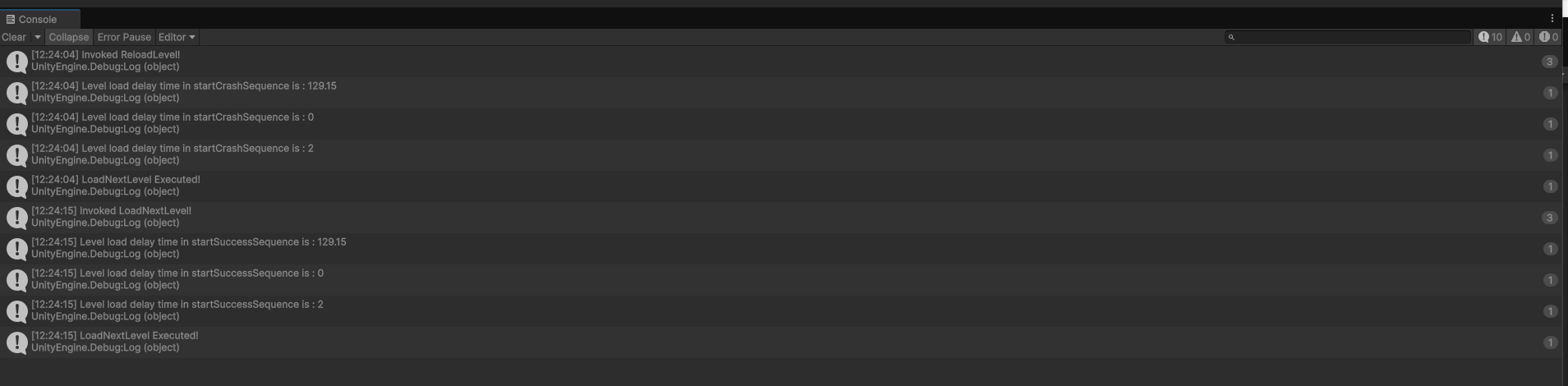
OUTPUT

What’s the value of levelLoadDelayTime? Have you tried to log it into your console? If not, do that, please.

Also add a Debug.Log to your ReloadLevel method to see if Invoke works.

The value of levelLoadDelayTime represents seconds in the context of the Invoke method. If levelLoadDelayTime is, for example, 120, that’s 120 seconds = 2 * 60 seconds = 2 minutes, which is very long. If you have to wait for such a long time, it might feel as if the code did not work at all even though it does work.

Are there any other messages in your Console when ReloadLevel is supposed to get executed?

Sorry for the late reply,
I added debug.logs in both of the methods,

using System;
using UnityEngine;
using UnityEngine.SceneManagement;

public class CollisionHandler : MonoBehaviour
{
    [SerializeField] float levelLoadDelayTime;

    void OnCollisionEnter(Collision other)
    {
        switch (other.gameObject.tag)
        {
            case "Finish":
                StartSuccessSequence();
                break;
            case "Friendly":
                // Debug.Log("Bro, I am friendly");
                break;
            default:
                StartCrashSequence();
                break;
        }
    }

    private void StartSuccessSequence()
    {
        GetComponent<Movement>().enabled = false;
        Invoke("LoadNextLevel", levelLoadDelayTime);
        Debug.Log("Invoked LoadNextLevel!");
        Debug.Log("Level load delay time in startSuccessSequence is : " + levelLoadDelayTime);
    }

    void StartCrashSequence()
    {
        GetComponent<Movement>().enabled = false;
        Invoke("ReloadLevel", levelLoadDelayTime);
        Debug.Log("Invoked ReloadLevel!");
        Debug.Log("Level load delay time in startCrashSequence is : " + levelLoadDelayTime);
    }

    void LoadNextLevel()
    {
        int currentScene = SceneManager.GetActiveScene().buildIndex;
        int nextScene = currentScene + 1;

        if (nextScene == SceneManager.sceneCountInBuildSettings)
        {
            nextScene = 0;
        }

        SceneManager.LoadScene(nextScene);
        Debug.Log("LoadNextLevel Executed!");
    }

    void ReloadLevel()
    {
        int currentScene = SceneManager.GetActiveScene().buildIndex;
        SceneManager.LoadScene(currentScene);
        Debug.Log("LoadNextLevel Executed!");
    }
}

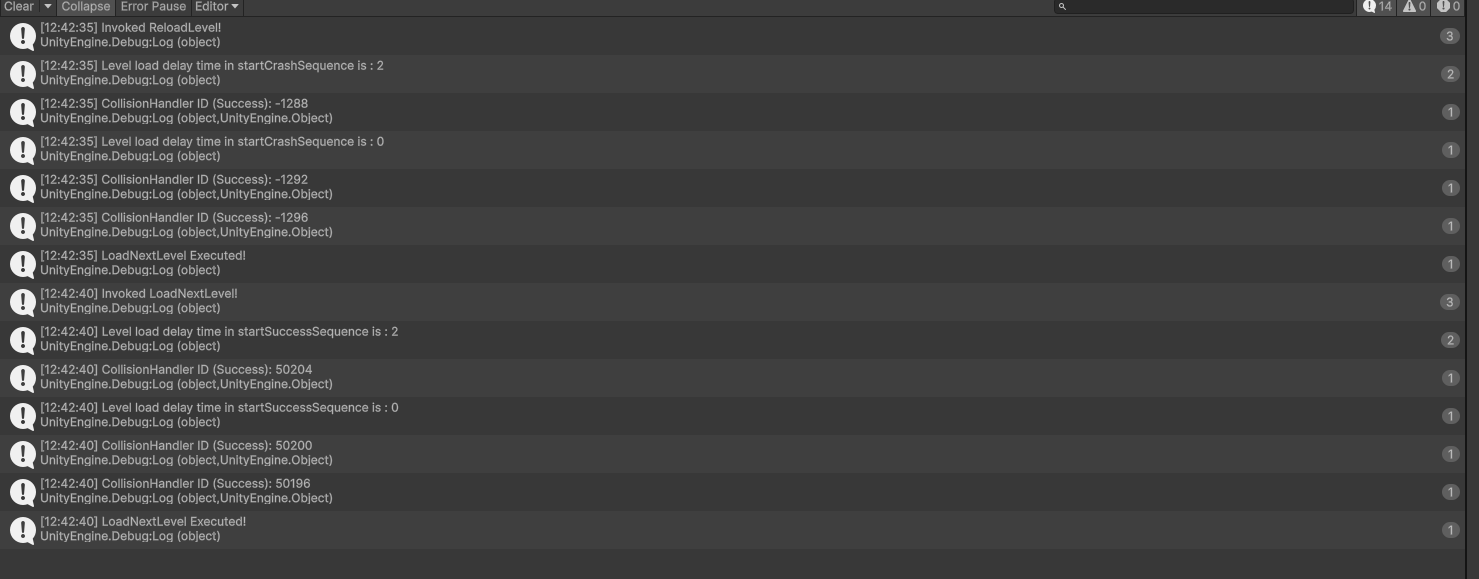
Heres the output :

It looks like the invoke keep changing its values and I have set the delaytime value to ‘2’ in the inspector

Good job so far. :slight_smile:

I cannot see any code where the value of delaytime gets overridden, so maybe there are multiple CollisionHandler objects in your scene? A quick way to check that is another Debug.Log:

Debug.Log("CollisionHandler id: " + GetInstanceID(), gameObject);

The second parameter allows us to click the message once, and the corresponding game object (which is assigned to gameObject) gets highlighted in the Hierarchy.

Two different ids means two different objects. The same ids means the same object. Maybe you could modify the last Debug.Log in StartCrashSequence() accordingly. If you get the same id, you are right, and the value of levelLoadDelayTime gets changed somewhere.

If you see two different ids, you have two different levelLoadDelayTime variables. Not in the same class, of course, but two variables of the same name means two objects.

If you see three different ids, there are three different objects. And so on.

I added that debug.log in both of my invoke methods,

    private void StartSuccessSequence()
    {
        GetComponent<Movement>().enabled = false;
        Invoke("LoadNextLevel", levelLoadDelayTime);
        Debug.Log("Invoked LoadNextLevel!");
        Debug.Log("Level load delay time in startSuccessSequence is : " + levelLoadDelayTime);
        Debug.Log("CollisionHandler ID (Success): " + GetInstanceID(), gameObject);
    }

    void StartCrashSequence()
    {
        GetComponent<Movement>().enabled = false;
        Invoke("ReloadLevel", levelLoadDelayTime);
        Debug.Log("Invoked ReloadLevel!");
        Debug.Log("Level load delay time in startCrashSequence is : " + levelLoadDelayTime);
        Debug.Log("CollisionHandler ID (Success): " + GetInstanceID(), gameObject);
    }

Heres the output :

Now click the messages that show the id. Which game objects get highlighted? Is there a game object that is unexpectedly highlighted? If so, remove the CollisionHandler component from it.

Also make sure that each of the “correct” game objects has got only one CollisionHandler component attached.

This topic was automatically closed 24 hours after the last reply. New replies are no longer allowed.