Course shows a solid magenta fill when adding a TextureRect and selecting a ‘placeholder’ texture but I see a mottled black and magenta texture. Also, in my view there is a flat black material where in the lesson there is a ‘normal’ material editor with a white sphere (not shown in my screenshot, sorry)
Almost all of the colors in the Visual Shader editor are different as well as the menu organization, which is not a big issue, but nevertheless makes following along difficult.
After importing a texture for testing (the red damage image shown) you can see the behavior is very different in the lesson editor vs v4.6. In 4.6 the mottled magenta/black placeholder is still visible whereas it is not in the lesson.
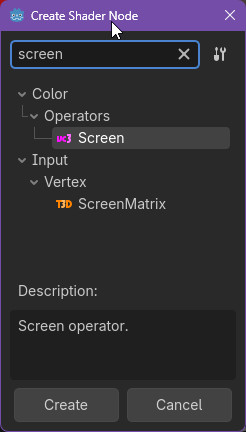
In the lesson, a node is added to the shader: Input / screen_uv which does not exist in v4.6. So even if I remove the placeholder, when I run the game there is no Input (screen) so there is nothing to blur.
In the Shader Editor’s (bottom panel) top menu, there is a dropdown menu near the left. This is probably set to Vertex; make sure that’s set to Fragment for all the shaders you make in this course. Whatever you built in the Vertex Workspace will also need to be cut and moved to the Fragment Workspace (a given shader Resource can work with both at the same time, but as you’ve probably guessed by now, they are responsible for very different things). This should account for most of what you’re experiencing here - definitely #4.
The default used to be Fragment, but the engine changed it to Vertex at some point, and this has indeed thrown off a number of students since that change was made.
Unfortunately, I don’t have any information about possible course updates, so there’s really not much I can do there.
Have you considered reducing the video speed? By clicking the gear icon in the bottom-right of the player, you can change it to 0.75x, or even 0.5x if you want to feel like you’re in the Twilight Zone =)