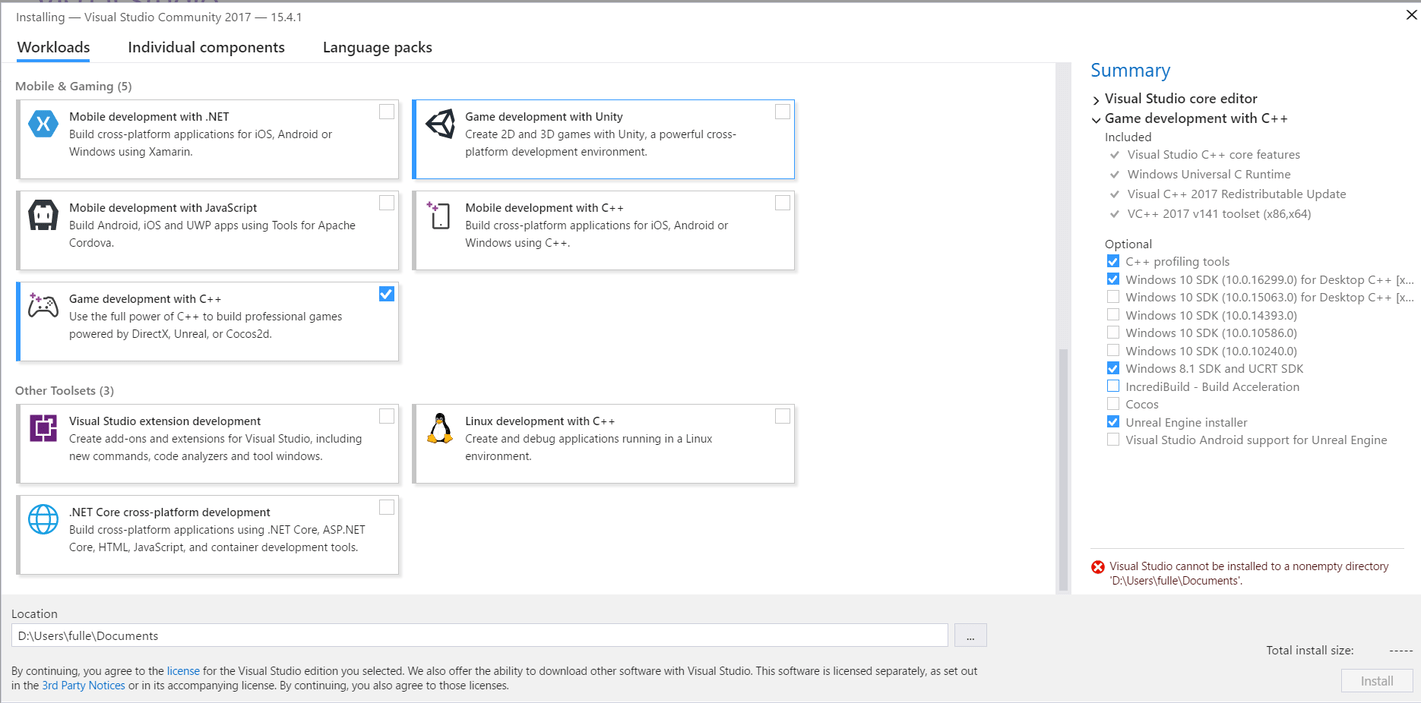
Installation on a gaming laptop D: drive NOT default 128GB SSD C: Drive
Hello everyone.
Can I take this time to thank all who reads this cry for help… “HELLLLLLLLLPPPPP!”
As you can see in the screen grab I took, I’m trying to install Visual Studio Community 2017 and the latest version of Epic Games Unreal Engine 4.18 on to my Acer Nitro 5 15.6 In FX9830 8GB 128GB 1TB RX550 Laptop.
The problem I’ve seen is that when I have installed the above software on the SSD GB drive and tried to run a basic demo in unreal using VSC 2017 there is a compilation error coming back from Unreal saying that the location isn’t suitable to compile what it needs to compile! So I had to re-factory set the entire laptop. Today after creating a new folder in the D: Drive where the 1TB is located and tried to install the VSC2017 it comes up with the error that is seen in the screen grab!
As was classically stated by Robocop II when he said “I’m having TROUBLE!” Well I’m having serious trouble trying to install both IDE and Epic Games Unreal Engine onto the D: drive NOT the C drive. As the D: drive is where the Terra-byte harddrive is and the C: is where the 128 GB SSD is located! I’ve tried to relocate the appropriate folders onto the D: drive and it still came up with the same error! “I’m having trouble!” Can anyone help.
By the way due to my physical disability I’m unable to do two things at once because it might involve going into the BIOS and config the system from that, so I can travel as I have a car anywhere in the country. Can anybody help?
Try creating a Folder within the Documents Folder itself - call it something like Unreal Engine (Version Number) or what ever you fancy - then try installing it with this folder
Jack’s Advice should work, From what i remember visual studio assumes it is getting an empty directory when it installs so its made that way on purpose not by a bug or issue.
There may be some permission differences between the Documents directory and for example, the Program Files directory. I would be wary of installing to Documents personally and would instead suggest creating an empty directory within the Program Files directory and installing there.
I’m quite surprised that, by default, it isn’t just prompting this in the first place. Every installation of Visual Studio I have done I believe does this, e.g. defaults to C:\Program files(x86)\ and then pops the Microsoft Visual Studio directory on the end for the intended empty install directory, creating this directory in the process of installation.
If this was the same error that you were seeing on the C drive I would suggest trying again on the C drive with the Program Files path first so that you can keep all of your programs together, additionally, you’ll benefit from the SSD which was presumably part of your plan in the first place?
Additionally, when you come to save your projects, consider having a short root directory, such as c:\dev\ or d:\dev\ as Visual Studio can complain when you reach a filepath length which it deems to be excessive.
Hi Rob
Thanks for your reply regarding problems I was having with my previous laptop. Yes you read correctly, “Previous” laptop as I had to return it back because it was causing me serious problems with the C: Drive being the 128GB SSD drive. I went out to to purchase a new laptop with all the features that will allow the smooth running of Unreal Engine with VSC 2017 all functional and operating correctly.
Saying that I think there is a problem with building a compiled program with VSC 2017, because when I build and compile the program, it creates 2 visual studio documents, one with the original source file and one without. It didn’t happen before UE 4.18? The second version of the source file can only be described as a copy (a ghost) of the original compiled document! Have you experienced this when building and compiling a basic code program?
Apart from that I’ll keep going through the tutorials from udemy and build up my knowledge using what I know and what I need to learn!
I replaced my laptop without a 128 GB SSD drive, as it was installing the software on that drive and not on the D: drive that was the 1TB drive!
Hopefully my new laptop will enable me to complete the course set by udemy so that will allow me to become a better programmer and a better gamer all round. So far I’m loving the course it’s very detailed and explicit in its detailed explanations.
Be ordering my courses in the coming months, to heighten my knowledge in Unreal Engine with Visual Studio Community 2017!
Many thanks for the reply and assistance in this matter!
Best regards
Brandon
I phoned the laptop company who had stated that the the files couldn’t be partitioned because it was the functional requirements of the laptop, so it had to be returned and I brought a new laptop without the SSD because I found that its become the norm to place the SSD on a C:\ drive. This new laptop has no SSD drive so the C:\drive is normal to install the various software on the C: drive with minimal problems!
Thanks for your reply will be posting more concerns and worries regarding the course in the coming days, weeks and months!
It would have worked if they would have swapped the hardwarre over but they wasn’t prepared to do that, so it had to be returned. Granted what I’ve seen in the new laptop is slow on boot-up but it’s quick once it gets going; installing the software was pretty much straightforward, apart from the minor hiccups with UE4.18 duplicating source files when it comes to Visual Studio Community 2017. Hopefully that won’t stop me from learning what needs to be learned!
So it’s just about getting down to understanding the basics of the videos to move forward!
Thanks for your reply it will be most helpful when help is needed once again!
Best regards
Brandon
As you have probbly read - I got rid of the laptop and brought a suitable laptop that can now successfully compile and code (with minor problems regarding duplication of two documents of the same file - which needs to be looked into by all concerned, being Epic Games and Microsoft as it never happened before! Unless there is a setting in Windows 10 that allows only one MAIN source file to open that main file. What I’ll do tomorrow is take a screen grab and ask if there is a way around this? Hopefully there is so that I can continue learning from Udemy.
Many thanks for your response in this matter. Hope your weekend goes well and that the cold nights are kept at bay?