I’m trying to import new characters to my RPG course. I want to have multiple characters to the game and not simply stick to the ones given by the course.
I’m running into problems with the animations since the the imported assets have different rigs. I’m using Maximo from adobe since it provides free characters with free animation packs. I made a new animator controller and there’s no avatar that came with the pack, so i’m trying to setup locomotion and trying to change all the parameters it’s not just working as it should, i don’t know anything about avatars and i’m trying to google solutions but it’s not getting proper results, the animations are jittery or freezes at certain points and just glides over the terrain.
The course only explains how to use it’s own assets but never help out when wanting to spread out to other sources since other sources do not come with the same setup as the course.
Do you have access to CUD-2D? if so it might be worth checking out the Glitch Gardon Section. In the original version of the Complete Unity Developer course the Glitch Gardon section covered creating animations in Unity. Not sure if that’s still true in the new version but it’s worth a look.
Yes I have completed the unity 2d section and the glitch garden section, I’m familiar with creating animations, although in 3d it’s a bit more complicated by setting up rigs and control points and so on.
My issue is not creating the animation, I imported a full animation pack from Maximo as animating is not my learning focus at this stage. And i did manage to make it work eventually, however i had to create a new animator controller and i had to mess about with avatar(although i’m not sure if i needed to do that, i honestly don’t understand what avatar is at this point or what it’s needed for in unity)
My question is if there’s a way to use the same animator controller for 2 separate avatars or more? or do i have to resetup everything again? This isn’t an issue at an early point but if i want to add extra functionality later on, it will be more chaotic to implement all of them in all the controller. I’m checking to see if i’m doing this correctly or if there is a more efficient way to do this.
In Unity, humanoid animations with different rigs use Avatars to map the characters to the standard “humaniod” rig. Most humanoid characters will ahve certain things in common… While the basic overall architecture is common, the exact names of the bones will differ from model to model, and sometimes some bones will even be missing.
The Avatar acts as a bridge between these differences. Think of it like a dictionary lookup… like “hips = mixamorig:hip”, etc. This allows the animator to use animations from different models on each other.
What this means is that when we bring in a 3rd party model like Mixamo models, we need to do a little extra work to prepare the model to be used with in Unity. (Most models you’ll get from the Asset Store will already have this work taken care of).
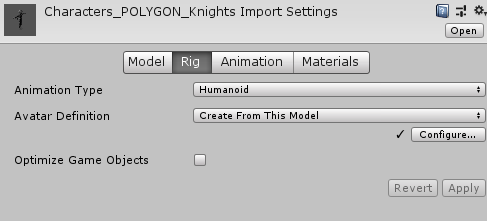
When you import that FBX file for the Mixamo character, you’ll need to click on the fbx file anc change the Animation Type to Humanoid. Leave the Avatar Definition as “Create From This Model”. You’ll also need to do the same thing with all Mixamo animations when you import them. Unity will do it’s best to match the skeleton up with the humanoid skeleton.
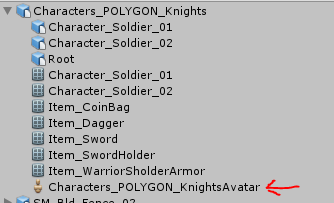
Once this is done, inside the fbx you’ll now find an avatar which contains the mappings.
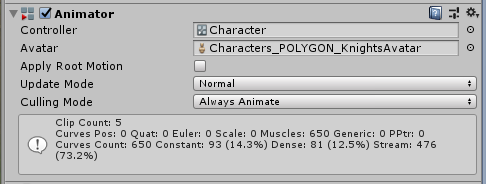
Within the Animator on the character, this is the Avatar that you want assigned in the Avatar field. This is what will tell the Animator what bones to look for with the animation.