The problem that I have found is that one of my latest projects has to be in UE5, so I am using this version to follow the course, but I have two questions:
1 - I can not find the “File → Open Visual Studio Code” button, does anyone know where is it? (It is not under “Tools” either)
2 - If I can not open my VSC from Unreal, can I open the project from VSC itself? I tried to “File → Open folder” in VSC and select the root folder of the Unreal project, and I can see the same information that is shown in the course (lesson 42), but somehow, all the #include libraries are underlined in red, so I guess they are missing. Is there a way to load properly the Unreal project directly from Visual Studio Code?
Than you all, wonderful Unreal developers! It is great to read you interesting comments, hopefully I will jump in the conversations soon. Best!
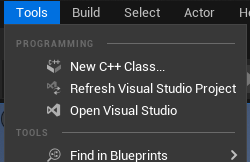
It is in Tools → Programming but you’ll need a Visual Studio project in your UE5 project first.
This will probably involve installing .NET Core 3.1 Desktop Runtime if you’re on Windows as well. It didn’t let me package or create a C++ project otherwise.
As you can see, it’s Visual Studio for me but I guess VSCode will appear in the same spot.
That sounds more like an intellisense issue, but check first if you can open VSC from UE5.
By the way, The Compile button is this little fella in the bottom right half of the window:
Had to look it up because it’s hard to find, so here it is for future reference.
I still wouldn’t follow the UE4 courses with UE5. You can have both UE5 and 4.2x installed at the same time unless you’re low on disk space. At least that’s what I do.
First of all, thank you for your time and answer!! It pointed me in the right direction
As you said in your comment, the “Open Visual Studio” is under Tools menu, but somehow, when using Visual Studio Code, this button disappears, and you can only “Refresh…” but not open the VSC. But if I open the VSC and open the project folder and try to compile, the terminal returns something like: Impossible to determine UE4/UE5 version… which essentially means that UE5 is not fully compatible with VSC (yet).
On the other hand, and answering to my second question: Yes, I can open Visual Studio Code, load the folder path, and everything is working fine (without opening the VSC from Unreal) if you use any version of UE4, but not UE5. Again, as you mentioned, the issue was with the Intellisense itself and the include paths (everything solved as per Lesson 43).
So… back on track with the course Thank you very much for you time!


 Thank you very much for you time!