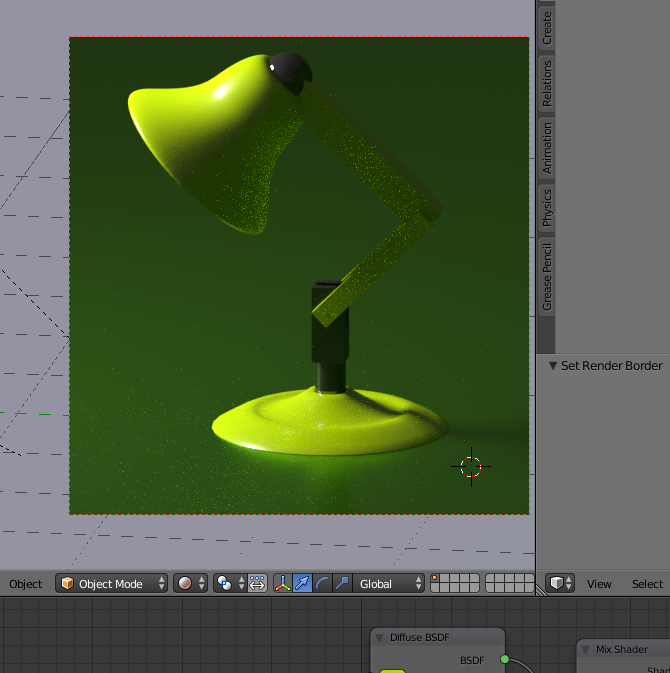
So I’m getting an awful lot of white speckles while rendering in Cycles;I’m previewing at 100, same as in the videos, and my scene and materials are broadly the same as the tutorials too, but there’s a lot more grain/noise in mine than there are in the video:
My render settings are pretty much default; 1080p at 50%, 100 samples preview. I’m using a single light source, an emissive plane, white with an emission strength of 52. My materials are quite reflective; is this just a case of needing MUCH higher sample count if you’re running a lot of particularly shiny surfaces?
One of the things Micheal will discuss later in the section is the limitations of Emission type materials in relation to the “Noise” in the render. While turning up your sample count will certainly help, you can also adjust the way the light bounces around in your scene through the Render settings in the properties pane. Turning the direct and indirect bounces down to 1 or 2 will likely eliminate the noise in your scene. Another trick is to reduce the level of your emission surface and add a spot or hemi light to help bring out details.
2 Likes
Thanks very much. It’s fixed now. The only problem I’m having now is when rendering an animation, I can’t seem to change the number of samples after the first time it renders; no matter what I change the samples to, every time I press Render or Render Amimation it gets stuck to the exact same image.
Remember that when rendering animations, the changes between frames will usually be subtle. If they are not then your final product will be jumpy and look like a badly done Claymation movie (think animation from the early 1930’s). Take some time to go through the animation sequence by advancing your timeline 1 frame at a time, this will allow you to see just how subtle the movements between frames are.
After seeing your post with your animation in it I realized I had misinterpreted you comment about not being able to change your sample settings so I have deleted the original reply to that and instead will ask… “Have you tried exiting Blender and then relaunching?” A lot of the troubles I have had disappeared when I did that.