Godot 3D FPS Errors - Need help

Original post:
I’ve been trying for now literal weeks to fix this and it’s driving me genuinely actually mad so finally just posting it everywhere until I find the solution. I still haven’t figured out how to even share this information correctly to get solutions which is why I have taken so long to ask for help.

Course: Complete Godot 3D: Code Your Own 3D Games In Godot 4!
Section Robo Rampage

The error:

E 0:00:17:111   enemy.gd:61 @ look_at_target(): Node origin and target are in the same position, look_at() failed.
  <C++ Error>   Condition "p_pos.is_equal_approx(p_target)" is true.
  <C++ Source>  scene/3d/node_3d.cpp:1067 @ look_at_from_position()
  <Stack Trace> enemy.gd:61 @ look_at_target()
                enemy.gd:50 @ _physics_process()

The exact function it’s calling this error:


func look_at_target(direction: Vector3) -> void:
	var adjusted_direction = direction
	adjusted_direction.y = 0
	look_at(global_position + adjusted_direction, Vector3.UP, true)
		

What is happening in game?: Player walks close enough to the enemy causing him to be provoked and try to chase the player - he cannot reach the player due to level design set up. When the player stops moving the error begins to pop every frame.
Picture below, the enemy attempting to reach the player causing the debugger to go off is the one I have circled in red.
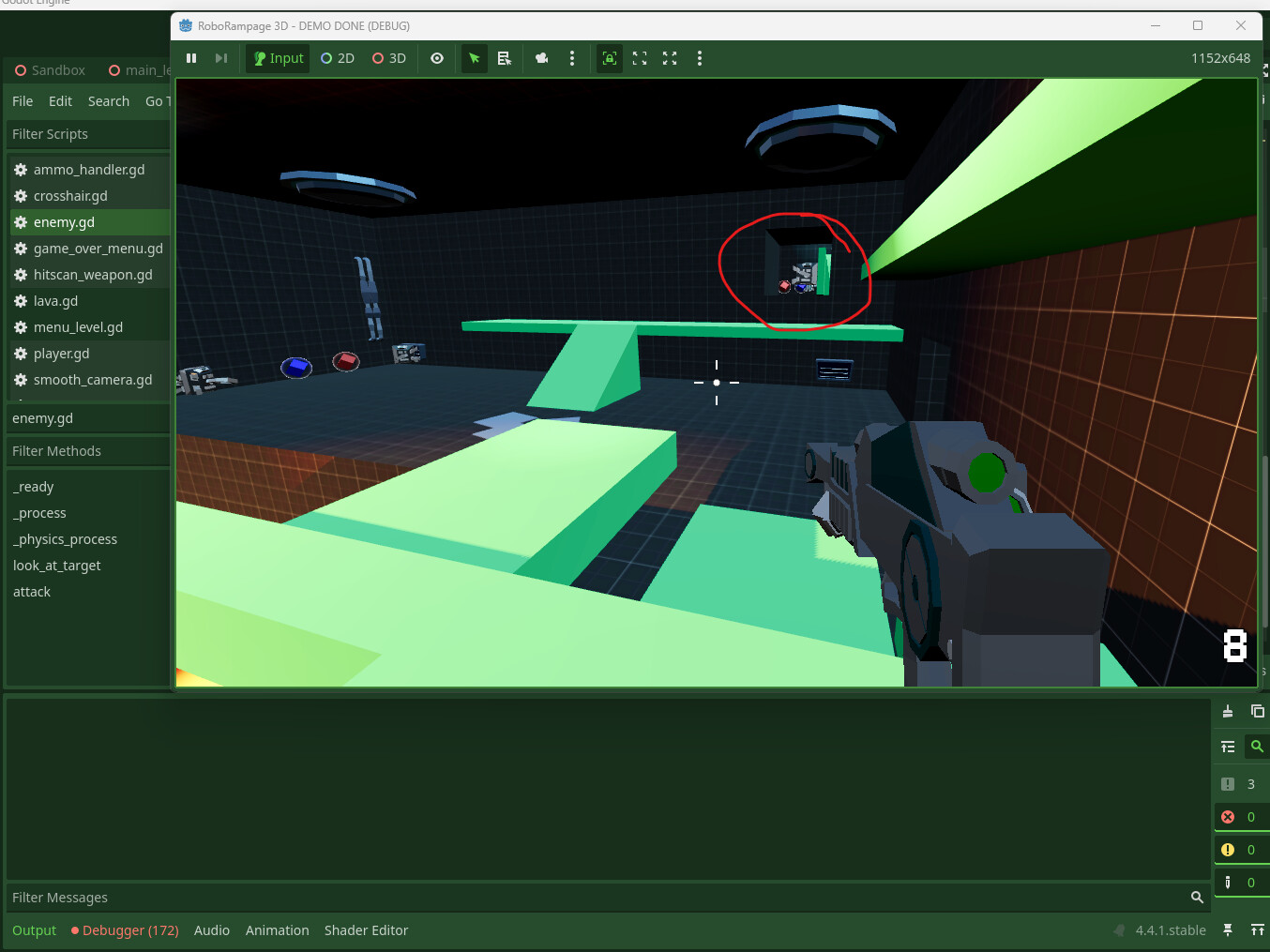
Here are the process and physics process functions, since this error comes every second I assume something in these might be able to get modified to fix the issue as well.


func _process(_delta: float) -> void:
	if provoked:
		navigation_agent_3d.target_position = Player.global_position


func _physics_process(delta: float) -> void:
	var next_position = navigation_agent_3d.get_next_path_position()
	# Add the gravity.
	if not is_on_floor():
		velocity += get_gravity() * delta
	var direction = global_position.direction_to(next_position)
	var distance = global_position.distance_to(Player.global_position)
	
	if distance <= aggro_range:
		provoked = true
	
	if provoked:
		if distance <= attack_range:
			playback.travel("attack")
			
	if direction:
		look_at_target(direction)
		velocity.x = direction.x * SPEED
		velocity.z = direction.z * SPEED
	else:
		velocity.x = move_toward(velocity.x, 0, SPEED)
		velocity.z = move_toward(velocity.z, 0, SPEED)
	move_and_slide()

I’ve done so many adjustments to the code trying to fix this with positions, directions, global positions, trying is_equal_approx, != to things, etcetcetc - I am sad this reads like it should be easy to fix and I cannot find anyone else dealing with this exactly in a way that they found or shared a solution that works.

Someone else in the GameDev discord brought up the fact they have this issue though today, and it reminded me I still haven’t fixed it; after spending almost two hours this morning on it - someone pretty please tell me they have resolved his already since the course is from gamedev?

Fair enough, but this looks good.

I remember you mentioning that you were on some pretty old hardware, but even so, it’s a little surprising to hear that this is actually causing an FPS drop. Either way, yes, we have a solution for this, and you aren’t the first student who encountered it. I’m certain there’s at least one topic in the Q&A about it, though if you’ve been at this for weeks, it’s possible you encountered it before the other student and haven’t checked again in the meantime.

In short, what’s happening is that the enemy’s position and target (perceived target anyway, once adjusted to be a reachable point on the navmesh) are so close together that it’s impossible to determine a direction between the two points, so you get an effect that can’t be resolved. It’s analogous to the “undefined” vertical slope you learned about in the functions section of algebra. look_at() itself is programmed to throw this error when the two points are within an epsilon (small value) of each other, the exact value of which actually scales depending on how large the floats involved are, because that’s how floats work (this is not specific to Godot; it goes all the way down to CPU architecture).

I imagine you wrote something like “if is_equal_approx(), don’t call look_at()” in look_at_target() (or physics_process()). That’s the right idea, and you were actually very close with this. The problem is, it doesn’t work reliably for this situation, probably because look_at() is actually doing exactly this internally (I dug into the cpp to check). I tested this solution a few weeks ago (either that or is_zero_approx() with the approach listed below) and it doesn’t solve the problem.

Instead, you need to subtract one vector from the other and check if the distance between the two points is larger than some constant value that you define yourself. This will cause you to “butt in line” against look_at()'s internal check and perform your own with a much larger epsilon, allowing you to bypass the error entirely.

I think I just threw some semblance of 0.1 in there as a quick-and-dirty test and it worked fine, but I don’t want to commit strongly to that value in case your results are different or it causes additional problems (it shouldn’t - if you get that close, the enemy will grind you to fishbait, lol).

Post an update if this isn’t enough to get it fixed =)

1 Like

This topic was automatically closed 24 hours after the last reply. New replies are no longer allowed.

Posted by @HobbyPirates on the course’s Q&A after this topic was solution-closed:

~

Just posting this here for anyone else in the course who might be dealing with this.

I was dealing with this error:
E 0:00:17:111 enemy.gd:61 @ look_at_target(): Node origin and target are in the same position, look_at() failed.

The enemy was provoked, but due to level design could not reach the player. When the player stopped moving, this error would pop every frame.

For Godot 4.4.1 in the end this is the written updated look_at_target function that finally got the error to stop popping in my debugger:

func look_at_target(direction: Vector3) -> void:
	var _target_position = global_position + direction
	var adjusted_direction = direction
	adjusted_direction.y = 0

	# Manually check if the distance is greater than our tolerance
	if global_position.distance_squared_to(global_position + adjusted_direction) > 0.1:
		look_at(global_position + adjusted_direction, Vector3.UP, true)
	

I tried some simpler variations, which were not working until using the distance_squared_to, not sure why in the end. Thank you so much Corey K! This wouldn’t have been possible without their direction as well. Good luck to everyone on their next projects.

2 Likes