I am going through the new UE5 course and I am currently on the blue print section.
I got a free asset pack from the epic store, one of the free for the month ones, and when I add the mesh to my level and check the simulate physics button the meshes don’t simulate physics and when I close out of playing it I get the following error.
Trying to simulate physics on ‘’/Game/UEDPIE_0_Main.Main:PersistentLevel.StaticMeshActor_11.StaticMeshComponent0’’ but it has ComplexAsSimple collision.
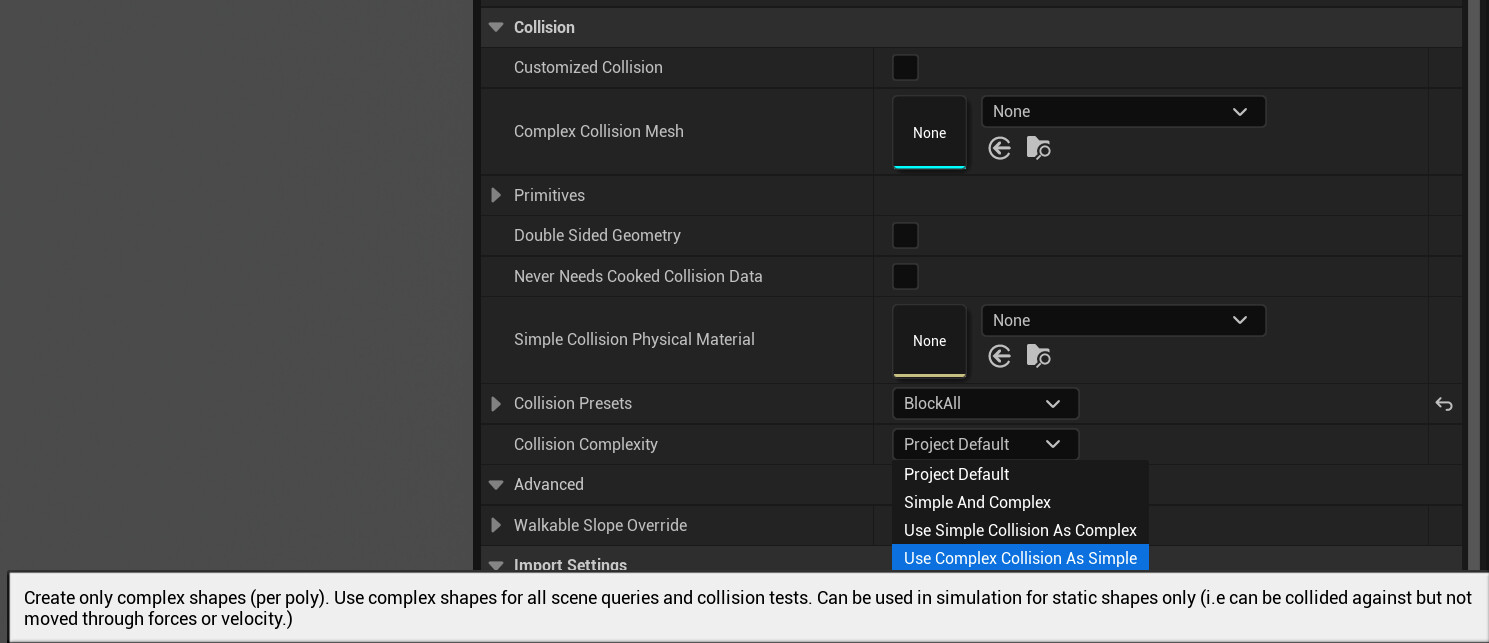
@Sean Open up SM_Book_4 or SM_Book_5 in the Static Mesh editor and find the Collision section in the details panel. Both of these meshes have “Use Complex Collision As Simple” set as the default value for Collision Complexity. As the tooltip below indicates, this setting is good for static objects in the world that have detailed geometry that we want to test collisions against but shouldn’t be affected by any physical forces (e.g. gravity, impulses, etc.).
This type of collision is useful for buildings, large boulders, caves, and other large detailed geometry, for example.
To fix the issue and have these objects react to physical forces, you can simply change that setting to Project Default, which is what the barrels from the Industry Props Pack are also set to. If you are curious where the default setting comes from, you can find it under Project Settings > Engine > Physics > Simulation > Default Shape Complexity. The project default should be Simple And Complex which uses either of them depending on the type of query.