Hi,
May I please have some help with my UI code?
Having completed the course I am working on fleshing out some additional areas. I have built a experience, health and mana UI display.
For example in the health bar, the size of the bar increases based on the max health the player has, with the fill amount based on the current health the player has.
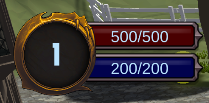
When the game loads the player is level 1 with the level 1 health:
As the player levels up and gains more health, the bar expands and the health fill changes:
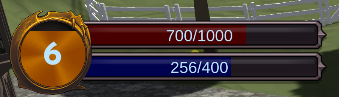
This all works fine when working with just the 1 scene.
However if I move to the next scene, everything seems to go back to the values held in the prefab:
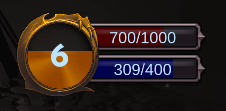
Then when I continue to level up, the bar does not seem to update its size further even though the values have changed (note the experience fill value also doesnt seem to update, which is odd as the fill value seems to still work in health and mana, I imagine its the same type of problem):
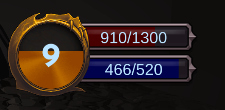
Potentially I need to be using the ISaveable system? Here is my code. Thanks in advance,
Health Display:
using UnityEngine;

using UnityEngine.UI;

using System;

using RPG.Stats;

using GameDevTV.Saving;

namespace RPG.Attributes

{

    public class HealthDisplay : MonoBehaviour

    {

        Health health;

        [SerializeField] Image cooldownOverlay = null;

        [SerializeField] float baseWidth = 200f;

        RectTransform rectTransform;

        private void Awake()

        {

            health = GameObject.FindWithTag("Player").GetComponent<Health>();

            rectTransform = GetComponent<RectTransform>();

            rectTransform.sizeDelta = new Vector2(baseWidth, rectTransform.sizeDelta.y);

        }

        private void Start()

        {

            UpdateHealthBar();

        }

        void Update()

        {

            UpdateHealthBar();

        }

        private void UpdateHealthBar()

        {

            cooldownOverlay.fillAmount = health.GetHealthPoints() / health.GetMaxHealthPoints();

            float widthMultiplier = health.GetMaxHealthPoints() / health.GetLevelOneMaxHealth();

            float currentWidth = baseWidth * widthMultiplier;

            rectTransform.sizeDelta = new Vector2(currentWidth, rectTransform.sizeDelta.y);

        }

    }

}
ExperienceDisplay:
using UnityEngine;
using UnityEngine.UI;
using System;
using GameDevTV.Saving;

namespace RPG.Stats
{
    public class ExperienceDisplay : MonoBehaviour, ISaveable
    {
        Experience experience;
        [SerializeField] Image cooldownOverlay = null;

        private void Awake()
        {
            experience = GameObject.FindWithTag("Player").GetComponent<Experience>();
        }

        void Start()
        {
            CheckExprience();
        }

        void Update()
        {
            CheckExprience();
        }

        private void CheckExprience()
        {
            cooldownOverlay.fillAmount = (experience.GetExperience() / experience.GetExperienceToLevelUp());
        }

        public object CaptureState()
        {
            return cooldownOverlay.fillAmount;
        }

        public void RestoreState(object state)
        {
            cooldownOverlay.fillAmount = (float)state;
            CheckExprience();
        }
    }

}
