Console error : Cannot load scene invalid scene name and invalid index -1
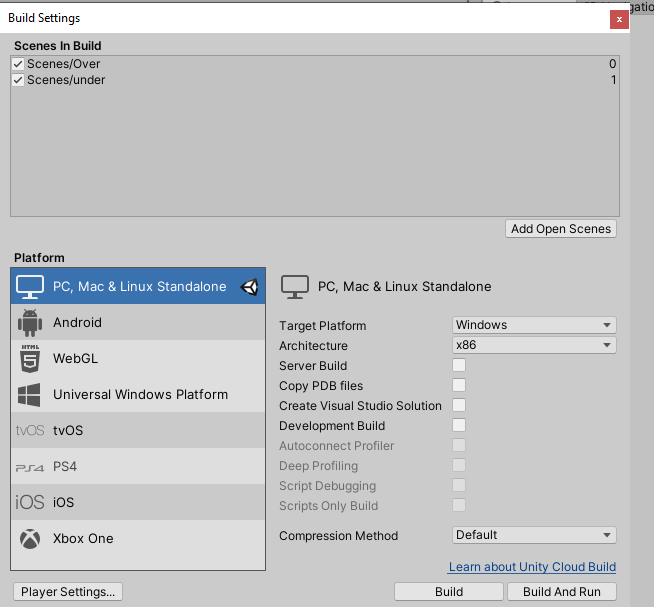
Although I added the scene in the build settings
Code : void ReloadLevel()
{
int index = SceneManager.GetActiveScene().buildIndex;
    SceneManager.LoadScene(index);
}Console error : Cannot load scene invalid scene name and invalid index -1
Although I added the scene in the build settings
Code : void ReloadLevel()
{
int index = SceneManager.GetActiveScene().buildIndex;
SceneManager.LoadScene(index);
}Hi there,
Are you working in a specific course/lecture?
If you debug.log the index you are getting from GetActiveScene, what is returned in the console?
It shows -1
Hi Hasan,
In which course and lecture are you?
What is the value of buildIndex at runtime? Please use Debug.Log to figure that out. Then let us know what the value is.
Also please share a screenshot of the Scene In Build list in the Build Settings.
Unity’s documentation suggests that a scene index of -1 is the result of loading a scene from an asset bundle, which I assume you are not doing here.
I agree with @Nina it would be helpful to see the build settings to make sure everything was added there correctly.
Otherwise, are you calling ReloadLevel() immediately after startup? It’s possible it could be an issue if you call it before the first scene is loaded correctly.
Your screenshot looks fine. However, it would be great if you could also answer our questions. What is the value of buildIndex at runtime? Unity can load 0 or 1 only because there are scenes associated with these indices. If buildIndex is neither 0 nor 1, that explains the problem you are experiencing.