Got to the end finally, but now before the final hurdle, the render does not match the viewport in background, lights or colour management.
As you can see from the screen grab. I have Follow Scene enabled. I am rendering in Cycles on GPU and I’ve tried a bunch of times. I’m lost as to what to check next if anyone has any pointers.
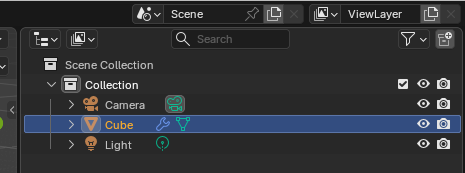
Ok so I started clicking things and I’m not 100% sure what I did but I think the only thing I did was I ensured that objects that were hidden (e.g. spares) were all unchecked now so will not render.
And now it’s working! I think that’s all I did - is that normal / feasible?
The eye means, visible in the view port
The camera means, will show in the renderer
The checkbox means, hide/show collection also for renderer
It is sometimes difficult to understand why something does not work as expected.
An object can block other objects.
Background environments can be disabled by the renderer to produce a transparent image.
Whether an object blocks another object during rendering (see camera options).
Post-processing options (manipulation of the rendered final result).
So much can go wrong. Especially during a learning process, when you are trying out things and/or concepts. It is then difficult to correct an error, certainly if you did not notice the steps that led to it.