In chapter 4.19 of the beginner 2D course, we create the second level of the game. However, my trap and exit collisions are not working, while the jump pad collisions are. There’s a discussion comment by Ocean and Corey Knecht that describes the exact situation I’m having, but it doesn’t resolve my issue. I’ve checked that the groups exist, but the signals are not being sent/received.
Ok then - I’ve had a look through that topic to refresh myself on what that issue and solution were. For convenience, here’s a link to that:
I see you’ve checked Groups. Have you implemented any of the changes in relation to the next_level @export variable? The level-changing solution presented in the lectures has caused a lot of problems for students; while it isn’t broken code, using change_scene_to_file() is a much safer alternative than change_scene_to_packed(). If you @export the PackedScene, you can use that directly with change_scene_to_file(next_level.resource_path). This will get level 2’s (or whatever level scene you @export in there) filepath for you so you don’t need to mess around with magic strings (hardcoded or @exported).
Also, to be clear, I’m assuming the issues are only happening on level 2 and later, not level 1 - is that right? Reason being, if it works on level 1, we can rule out causes like incorrectly-configured collision layers, which would prevent these things from working at all.
It would make sense to double-check the signal connections too of course, if you haven’t already (I’m sure you have, but I’d be remiss not to bring it up). Signal connections by GUI have a bad habit of continuing to display that green icon in the gutter even when something has broken their link to the callback function, such as renaming the function itself (I don’t know if that’s still a thing or not, but it certainly used to work this way). For that reason, it’s worthwhile to try disconnecting and reconnecting them.
Let me know how those things work out for you and we’ll go from there if needed =)
Thanks for taking time, Corey. My next_level var statement is
@export var next_level: PackedScene = null
and my line in _on_exit_body_entered is
get_tree().change_scene_to_file(next_level.resource_path)
Yes, Level 1 works fine. On level 2, only the jump pads work. exit, traps, and deathzone do not send a signal. I’ve put print commands in _on_trap_touched_player() and _on_exit_body_entered(body) and they do not trigger.
Signals are confusing me a bit. The only thing that looks like it’s emitting a signal in the scene list is jumppad. I thought since we were doing the others through code they would not have the indicator.
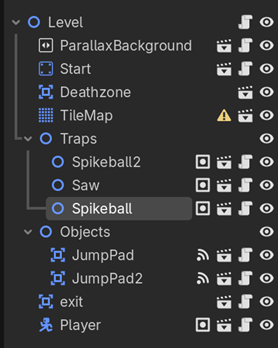
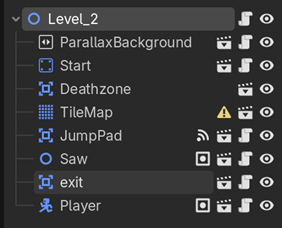
But when I click on the trap script when I have the level 2 scene selected, it looks like it’s connected.
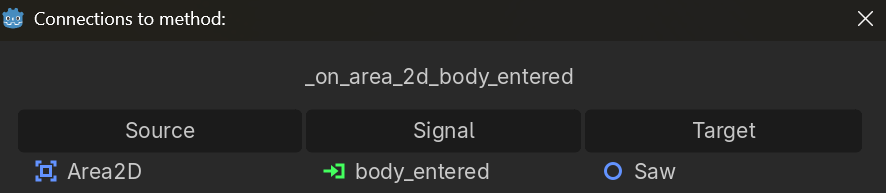
Yes, that icon in the Scene Dock only shows for connections wired up through the Signals tab of the top-right dock; it doesn’t consider connect() statements in scripts. In this case though, the reason you’re not seeing this indicator is because for the traps, the signal is on the Area2D child instead of the root Node2D of Saw or Spikeball scenes, so it won’t be shown here (unless you want to right-click a trap and select Editable Children temporarily).
I’m wondering if you’ve connected these signals on the instances in Level 1 rather than on the object scenes. In any case, I would still recommend disconnecting and reconnecting the signals, even though it seems redundant. If these two thoughts don’t lead to a fix, I’ll take a closer look at your project directly and work out what’s going on.
I think I have them connected properly. Disconnecting and reconnecting didn’t seem to do anything. I’m at a loss.
Ok then, I’ll check it out. Please zip up your project and upload it here for me: https://gdev.tv/projectupload
Squashed it. Oddly enough, I already talked about collision layers and dismissed them as a potential cause, but I hadn’t considered that you might have changed them per instance!
Your Player scene exists on layer 1 instead of layer 2. Because the traps are set up to mask against layer 2 only, they were ignoring collisions with your Player. However, your Player instance on level 1 is already on layer 2 - a deviation from the Player scene. That’s why it worked on Level 1 and not on Level 2. This sort of per-instance configuration flexibility is an intended design feature of the engine, but it does have the potential to create tricky issues like this one!
In general, per-instance configuration should be limited to Transform values and @export variables (which are specifically designed for per-instance configuration) unless you have a very good reason to do differently, as those sorts of changes then becomes very difficult to notice and/or keep track of later if something goes wrong. I’m sure your intention was to set collision layers on the Player scene instead of that one instance, so this is just one of those “gotchyas” to watch carefully for in future =)
facepalm I knew it would be something simple that I missed. I did not mean to instance the collision layers. Being sure where you are when making changes is one of the interface struggles I’m slowly getting comfortable with.
I fixed it in the player scene, which then broke the jump pads on level 2. Fixed those, and now everything is working. Thank you so much!
1 Like
For sure, it takes time! No stress; experiences like this one will help you get there. Glad everything’s up and running again =)