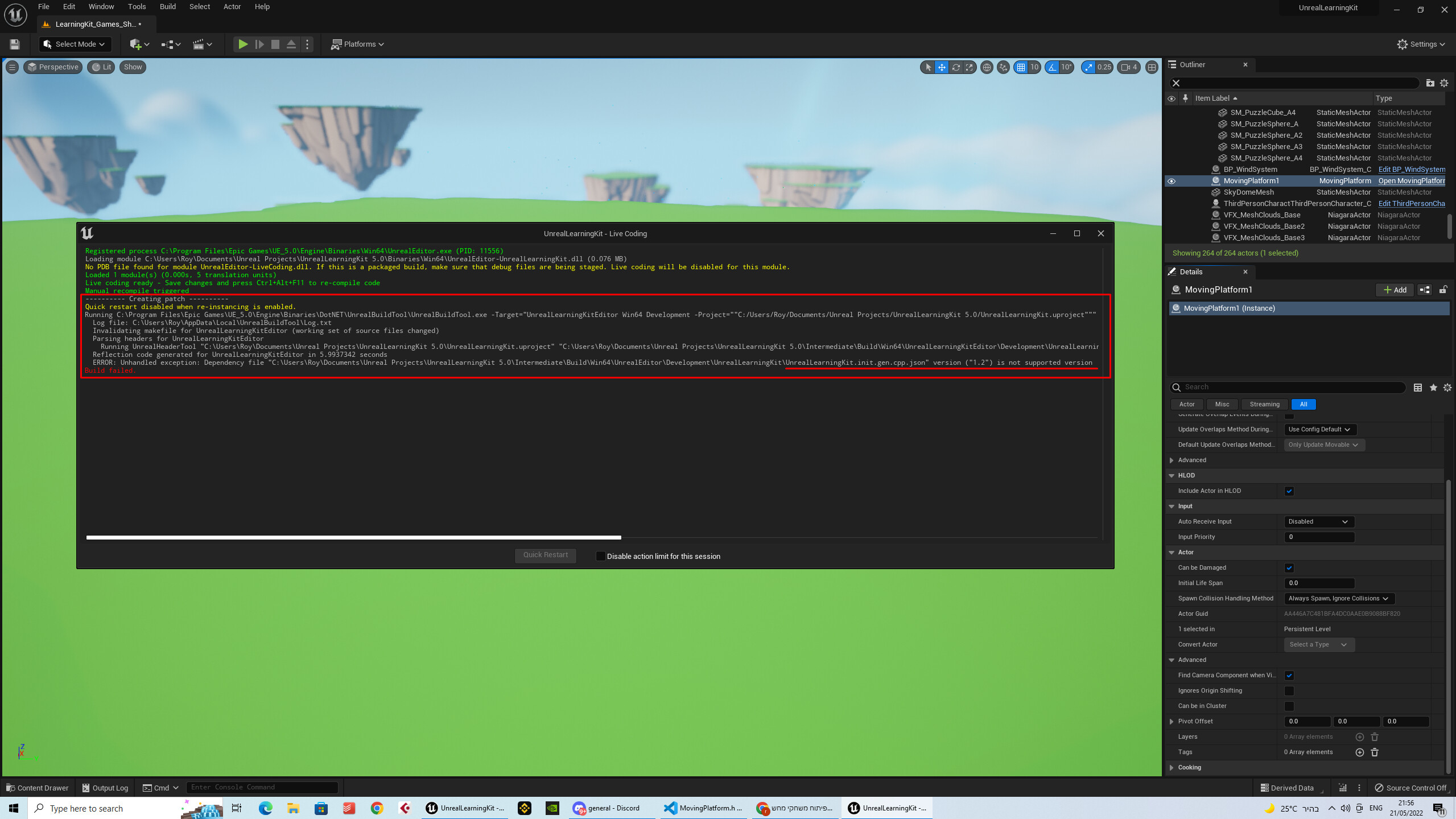
First Of all I want to say ty to GameDev.tv that creating for us such a awesome courses with low prices thank you very much you are amazing !! second The Question
I am doing the course of unreal in Udemy “Unreal Engine 5 C++ Developer: Learn C++ & Make Video Games”
and in section 3 we are starting to build some codes so i have some problem with that i will add a photo that will explain that
I marked the build and above the line there is the explain, i think so, so anyway thanks for the helpers !!
You need to change any instances of 1.2 back to version 1.1. I found a python script that easily does this on these forums. Just run this script before you compile:
# Fix compile error "ERROR: Unhandled exception: Dependency file "" version ("1.2") is not supported version"
# Run before recompiling (either in VS2022 or using Live Coding) from <project_root>/Intermediate/Build/Win64 directory.
# https://community.gamedev.tv/t/cannot-build-due-to-json-file-version-not-supported/200920/2

import os, fnmatch
def findReplace(directory, find, replace, filePattern):
    for path, dirs, files in os.walk(os.path.abspath(directory)):
        for filename in fnmatch.filter(files, filePattern):
            filepath = os.path.join(path, filename)
            print(filepath)
            with open(filepath) as f:
                s = f.read()
            s = s.replace(find, replace)
            with open(filepath, "w") as f:
                f.write(s)

findReplace(".", "Version\": \"1.2", "Version\": \"1.1", "*.json")
First of all thank you so much!! But should i copy it into the script i am using now? In visual studio code? Can u tell me where to put it exactly its very important to me
Create a new file using VS Code called script.py and save it in the folder mentioned in line 2. Run the script separately using the IDE of your choice: VS Code, PyCharm, etc.
This guide is a good starting point for running the script using VS Code:
Requested 1.5 GB free memory per action, 6.53 GB available: limiting max parallel actions to 4
Building 6 actions with 4 processes…
and when I am not doing it, it goes back to the old Message
ERROR: Unhandled exception: Dependency file “C:\Users\Roy\Documents\Unreal Projects\UnrealLearningKit 5.0\Intermediate\Build\Win64\UnrealEditor\Development\UnrealLearningKit\MovingPlatform.gen.cpp.json” version (“1.2”) is not supported version
The 1.5GB is in reference to memory (RAM) not disk space. 8GB of RAM is a small amount to run multiple processes as well as compile code. I recommend 16GB or more if compiling takes a long time.
As for the 1.2 error message you need to run the Python script every time before you compile your code.