Made some upgrades to my game and exported webGL.
you can play it here
Enjoy and let me know what you think 
Made some upgrades to my game and exported webGL.
you can play it here
Enjoy and let me know what you think
I’ve been clicking your link but it leads nowhere…sure you hyperlinked it correctly?
Also I’m very interested with how you did the lives. I’m going to look up later how to do that too as I’m quite curious and my game is far too difficult with no extra lives or continue screen.
Hi Aron,
Sorry about the broken link! Should be fixed now…
As for the lives, I ended up keeping track of them through a static variable (ballRemaining) attached to the level manager (which I made persistent through the DontDestroyOnLoad command). From there, I changed the code to only load the next level if balls remaining was less than 1. If not, the code simply decrements ballsRemaining and resets hasStarted to false (which returns the ball to the paddle).
I can share the exact code I used here, if you want… just let me know
Sounds interesting, but I wanted to also find a way to display it. I think I’m on the right track with a GUI text, however I’m struggling to find how to get the script or if I should create a new script to track the lives.
Gui text is definitely the way to go. I had the lose collider handle display… basically, any time a ball collided with it, the lose collided would update the gui text (eg ballCounter.text="balls remaining: " + ballsRemaining)
I’m having trouble with the lose collider handling it. I first implimented it on the background (and I’ve unticked it) but when I added it to the lose collider it doesn’t show…or do I have to delete the one I set to the background first?
Still having trouble with the GUI…it won’t listen to me.
Hi Aron,
Sorry for the late reply… its been a busy weekend and I wasn’t near my computer very much.
What does your scene hierarchy look like in unity and how are you coding it? And what version of unity are you running?
Hi Rich and thanks for getting back to me. I’ve been getting some help from Ben on this actually, but still stuck. Waiting for a response but in the meantime I’ll show you the Hiarachy. Also, I’m currently using Unity 5.
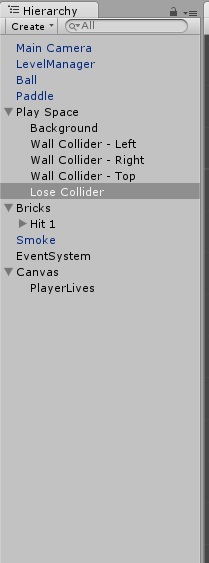
I’ve got most of it coded exactly like in the Udemy course (apart from areas that needed to be updated, due to version change, etc) and I have now found that I could use a text UI (which when I first tried was far too big, but it ok now due to the change in camra settings Ben helped me with) and I’ve been struggling with how to connect that text to the level manager and get it to keep track of the data and update as it goes.
I got the Text thing working, but how do I keep the lives between scenes, instead of the lives resetting for each level?
Hey Brady,
There are several ways to achieve this, depending how involved you want the solution to be…
You could just add a static field (variable), PlayerLives, to the LevelManager script. Itis a bit down and dirty as an approach, e.g. does it make sense that something that manages the “loading of levels” cares about the number of lives the player has? I would argue that it should just receive an instruction that says “load this level” at the current time and be solely responsible for that task.
Making the field static would mean that it belonged to the class not any specific instance of the class, thus the value would persist. However, you could also need to add some functionality to decrease, and perhaps increase, the numbers of lives. You would also need to consider checking how many lives were remaining before taking another action. For example, once the ball hits the lose collider, rather than loading the Lose scene, you may want to see if the player has lives left, if they do, reset the current scene (put the ball on the paddle, maybe centralise the paddle, tidying up etc). If the player doesn’t have any lives left, then load the lose scene.
You could consider creating a GameManager object, with a class of its own and give this a Player Lives property.
This would need to be integrated into the existing solution but would make more sense to have things that are relevant to the “game” in their own place. The LoseCollider could then just commuicate with the GameManager and say “Hey, a ball just hit me”, the GameManager can then run the checks to see if the player has enough lives to continue and call a Reset() method on the LevelManager which perhaps re-centres the paddle and aligns the ball.
If you go the GameManager route then you would want to consider whether to just use a static field again, or, perhaps consider the singleton approach as per the MusicPlayer, there only needs to be the one GameManager after all.
Depending where you take the game you could then slowly build out more extensible objects. For example, perhaps you let the player enter their name, which you later use on a score board, maybe at this point you take the PlayerLives field/property out of the GameManager and put them in their own Player class, then, in the GameManager you would just add a reference to the Player instead.
You will need to expand/tweak it a little, but something along these lines may get you started;
using UnityEngine;

public class GameManager : MonoBehaviour
{
    // private variable to hold the instance of our class
    private static GameManager _instance = null;

    // private variable to hold the number of lives
    private int _playerLives = 0;

    // singleton approach
    private void Awake()
    {
        if (_instance != null)
        {
            Destroy(gameObject);
        }
        else
        {
            instance = this;
            GameObject.DontDestroyOnLoad(gameObject);
        }
    }

    // use this for initialisation
    private void Start()
    {
        ResetPlayerLives();
    }

    // public property to expose the number of lives
    public int PlayerLives
    {
        get { return _playerLives; }
    }

    // increases player lives
    public void IncreasePlayerLives()
    {
        _playerLives++;
    }

    // reduces player lives
    public void DecreasePlayerLives()
    {
        _playerLives--;
    }

    // resets player lives - call at the start of a new game etc
    public void ResetPlayerLives()
    {
        _playerLives = 3;
    }
}
Note: In the above, the total number of lives is hard coded to three, this isn’t ideal, as you may later want to pull this in from some form of configuration, or allow a designer to specify it, again - it’s just here as an example.
Hope the above helps.
Note - the code above is for illustrative purposes and has not been tested, more just off of the top of my head… but if there are any errors give me a shout.