I was replicating the video for the audio, and I downloaded a different audio track than the one used in the tutorial. However, it didn’t work well; the audio got distorted. Can anyone offer assistance? Thanks a lot!
Hi Abraham,
In which course and lecture are you? And what do you mean by ‘distorted’?
In this case I am in " Multiple Audio Clips" from “Complete Unity c# Game developer 3D online course”.
What I mean by distorted is extremely distorted. Like the audio I am playing comes out with a lot of distortion. I found this video with the same problem:
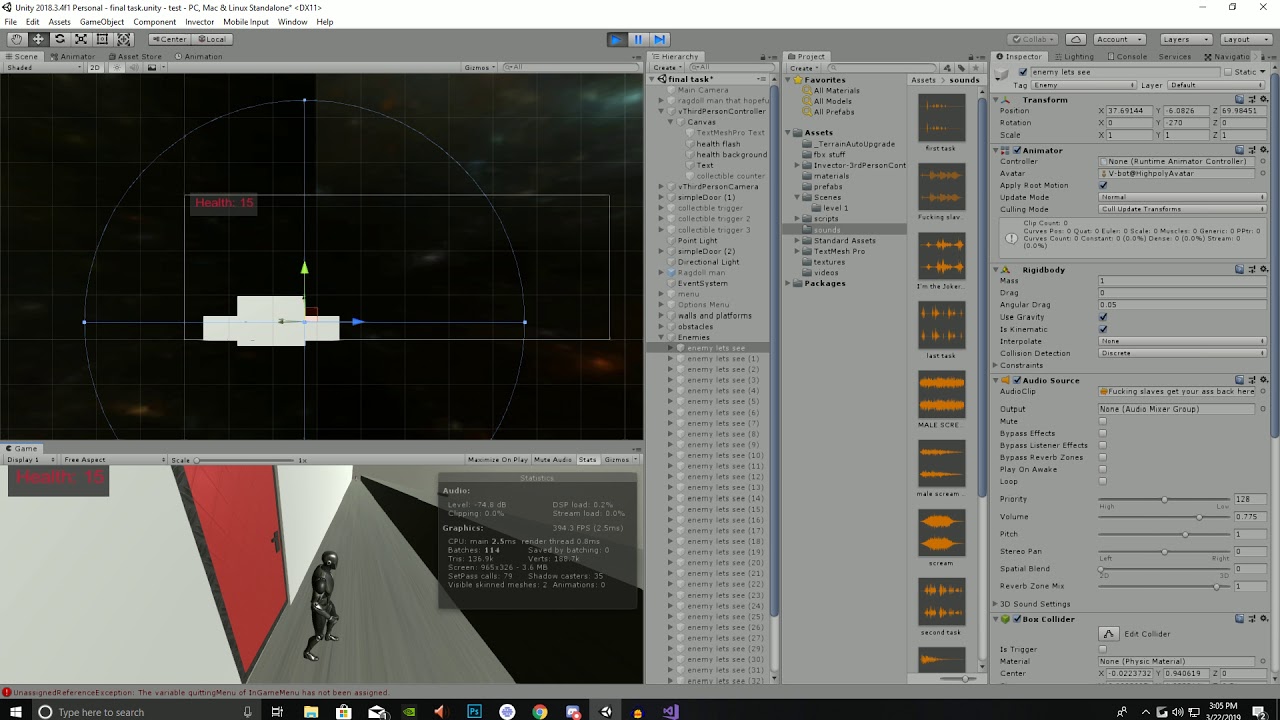
Oooooookay, now I know what you mean. ^^
I’m wondering if this is an issue with the code, for instance, an audio source gets started every few milliseconds. Or maybe the audio source gets slowed down. At some point, we set Time.timeScale to 0f.
Have you already compared your code to the Lecture Project Changes which can be found in the Resources of this lecture?
And did this issue occur in this lecture, or did it happen before? What happens if you play only one audio clip instead of multiple clips?
So, I’m like traying to adapt the code for my version of the game, having a separate script with the audios, I don’t want them into the main Player Script. Also I removed the switch and the Invoke, since I wanted to reduce redundant stuff. This is the code I have:
PlayerController:
using System.Collections;
using System.Collections.Generic;
using UnityEngine;
public class NewPlayerMovement : MonoBehaviour
{
[SerializeField] float speed = 5f;

[SerializeField]float jumpSpeed=5f;

private Animator Personaje;

bool isRunning;

[SerializeField] AudioClip sonido;

AudioSource audioSource;

EfectosDeSonido efectosDeSonido;
Rigidbody myRigidbody;
float movementUmbral = 0.1f;
float ySpeed;
void Start()

{

    Personaje = GetComponent<Animator>();

    myRigidbody=GetComponent<Rigidbody>();

    audioSource=GetComponent<AudioSource>();

    efectosDeSonido = GetComponent<EfectosDeSonido>();

}

void Jump()

{
//salto
     //Establece el valor del parámetro "isJumping" en el Animator

            if (Input.GetKeyDown(KeyCode.Space))

   {

    Personaje.SetTrigger("isJumping");

    myRigidbody.velocity=new Vector3(myRigidbody.velocity.x,jumpSpeed,myRigidbody.velocity.z);

    efectosDeSonido.PlayJumpSound();

   }

}
void Run ()
{

           // Obtener las entradas de teclado para el eje X y eje Y

   /* float horizontalInput = Input.GetAxis("Horizontal");

    float verticalInput = Input.GetAxis("Vertical");*/

    float xValue = Input.GetAxis("Horizontal")*Time.deltaTime*speed;

    float zValue = Input.GetAxis("Vertical")*Time.deltaTime*speed;

            //Vector3 velocity=movement

    // Determinar si el personaje está corriendo o no

    /*isRunning = (xValue != 0f || zValue!= 0f);*/

    isRunning=(Mathf.Abs(xValue)>movementUmbral || Mathf.Abs(zValue) > movementUmbral);

    //Establecer el valor del parámetro "isRunning" en el Animator

    Personaje.SetBool("isRunning",isRunning);

    // Calcular el desplazamiento basado en las entradas de teclado

    Vector3 movement = new Vector3(xValue, 0f, zValue) * speed * Time.deltaTime;

    // Aplicar el desplazamiento a la posición actual del objeto

    transform.Translate(movement, Space.World);

    efectosDeSonido.PlayRunSound(isRunning);

}

void Update()

{

    Jump();

    Run();

}
}
Sound Effects:
using System.Collections;
using System.Collections.Generic;
using UnityEngine;
public class EfectosDeSonido : MonoBehaviour
{
[SerializeField] AudioClip jump;

[SerializeField] AudioClip run;

AudioSource audioSource;

    public void PlayJumpSound()

{

    audioSource.PlayOneShot(jump);

}

    public void PlayRunSound(bool isRunning)

{

    if (isRunning)

    {

        audioSource.PlayOneShot(run);

    }

    else

    {

        // Si no está corriendo, detén la reproducción del sonido de correr

        audioSource.Stop();

    }

}

void Start()

{

    audioSource = GetComponent<AudioSource>();

}

void Update()

{


}
}
I know my code is very different, I like to be creative. But the audio source coding is being distorted for reasons I am not able to understand. I hope copying the codes can help. Thank you
Would you mind to format the code properly with the </> button?
The issue might be this line: efectosDeSonido.PlayRunSound(isRunning); (or rather the PlayRunSound method). For testing purposes, comment it out, then test your game again. If the issue is gone, take a very close look at the logic of your code. The problem is very simple. Use Debug.Logs to see how often relevant code blocks get executed. I’m sure you’ll quickly find the issue and the solution. 
I don’t understand what you mean with </> button.
I asked chatgpt how to format " efectosDeSonido.PlayRunSound(isRunning);" with the </> button and dont understand the question.
I tried what you said commenting the line efectosDeSonido.PlayRunSound(isRunning) and the character stops doing any running sound. I tried Debug.Log(“hola”); and it is doing it million times.
I still don’t understand the distortion on the audios xD
Here’s a screenshot:

Yes, you do. 
Quote: ‘I tried Debug.Log(“hola”); and it is doing it million times.’
Hint for the solution: Depending on where you placed the Debug.Log, try to make ‘hola’ appear only once in your console.
using System.Collections;
using System.Collections.Generic;
using UnityEngine;

public class NewPlayerMovement : MonoBehaviour
{
    [SerializeField] float speed = 5f;
    [SerializeField]float jumpSpeed=5f;
    private Animator Personaje;
    bool isRunning;
    [SerializeField] AudioClip sonido;
    AudioSource audioSource;
    EfectosDeSonido efectosDeSonido;


   Rigidbody myRigidbody;
   float movementUmbral = 0.1f;
   float ySpeed;


    void Start()
    {
        Personaje = GetComponent<Animator>();
        myRigidbody=GetComponent<Rigidbody>();
        audioSource=GetComponent<AudioSource>();
        efectosDeSonido = GetComponent<EfectosDeSonido>();
    }

    void Jump()
    {
 //salto
         //Establece el valor del parámetro "isJumping" en el Animator
                if (Input.GetKeyDown(KeyCode.Space))
       {
        Personaje.SetTrigger("isJumping");
        myRigidbody.velocity=new Vector3(myRigidbody.velocity.x,jumpSpeed,myRigidbody.velocity.z);
        efectosDeSonido.PlayJumpSound();
       }
    }

void Run ()
    {

               // Obtener las entradas de teclado para el eje X y eje Y
       /* float horizontalInput = Input.GetAxis("Horizontal");
        float verticalInput = Input.GetAxis("Vertical");*/

        float xValue = Input.GetAxis("Horizontal")*Time.deltaTime*speed;
        float zValue = Input.GetAxis("Vertical")*Time.deltaTime*speed;
                //Vector3 velocity=movement

        // Determinar si el personaje está corriendo o no
        /*isRunning = (xValue != 0f || zValue!= 0f);*/
        isRunning=(Mathf.Abs(xValue)>movementUmbral || Mathf.Abs(zValue) > movementUmbral);

        //Establecer el valor del parámetro "isRunning" en el Animator
        Personaje.SetBool("isRunning",isRunning);

        // Calcular el desplazamiento basado en las entradas de teclado
        Vector3 movement = new Vector3(xValue, 0f, zValue) * speed * Time.deltaTime;

        // Aplicar el desplazamiento a la posición actual del objeto
        transform.Translate(movement, Space.World);

        efectosDeSonido.PlayRunSound(isRunning);


    }
    void Update()
    {
        Jump();
        Run();
    }

}
using System.Collections;
using System.Collections.Generic;
using UnityEngine;

public class EfectosDeSonido : MonoBehaviour
{

    [SerializeField] AudioClip jump;
    [SerializeField] AudioClip run;

    AudioSource audioSource;

        public void PlayJumpSound()
    {
        audioSource.PlayOneShot(jump);
    }

        public void PlayRunSound(bool isRunning)
    {
        if (isRunning)
        {
            audioSource.PlayOneShot(run);
        }
        else
        {
            // Si no está corriendo, detén la reproducción del sonido de correr
            audioSource.Stop();
        }
    }
    void Start()
    {
        audioSource = GetComponent<AudioSource>();
    }

    void Update()
    {

    }
}
Thanks for sharing your code. Try to add a Debug.Log to the first if-block in the PlayRunSound method. Then let me know what happens and why you think that happens.
That didn’t work, it still sound very distorted. I am now trying to have two different Audio Sources, the run sound plays perfectly, however the jump sound not playing. I also don’t really understand how to change Unity identifies what AudioSource is, if they both have the same name.
using System.Collections;
using System.Collections.Generic;
using UnityEngine;

public class NewPlayerMovement : MonoBehaviour
{
    [SerializeField] float speed = 5f;
    [SerializeField]float jumpSpeed=5f;
    private Animator Personaje;
    bool isRunning;
    [SerializeField] AudioClip runSound;
    [SerializeField] AudioClip jumpSound;

    AudioSource audioSourceRun;
    AudioSource audioSourceJump;


   Rigidbody myRigidbody;
   float movementUmbral = 0.1f;
   float ySpeed;


    void Start()
    {
        Personaje = GetComponent<Animator>();
        myRigidbody=GetComponent<Rigidbody>();
        audioSourceRun=GetComponent<AudioSource>();
        audioSourceJump=GetComponent<AudioSource>();
        //efectosDeSonido = GetComponent<EfectosDeSonido>();
    }

    void Jump()
    {
        //Establece el valor del parámetro "isJumping" en el Animator
       if (Input.GetKeyDown(KeyCode.Space))
       {
        Personaje.SetTrigger("isJumping");
        myRigidbody.velocity=new Vector3(myRigidbody.velocity.x,jumpSpeed,myRigidbody.velocity.z);
        //Sonido saltar;
        if (jumpSound != null && !audioSourceJump.isPlaying)
        {
            audioSourceJump.PlayOneShot(jumpSound);
        }
       }
    }

void Run ()
    {

        // Obtener las entradas de teclado para el eje X y eje Y
        float xValue = Input.GetAxis("Horizontal")*Time.deltaTime*speed;
        float zValue = Input.GetAxis("Vertical")*Time.deltaTime*speed;
        // Determinar si el personaje está corriendo o no
        isRunning=(Mathf.Abs(xValue)>movementUmbral || Mathf.Abs(zValue) > movementUmbral);
        //Establecer el valor del parámetro "isRunning" en el Animator
        Personaje.SetBool("isRunning",isRunning);
        // Calcular el desplazamiento basado en las entradas de teclado
        Vector3 movement = new Vector3(xValue, 0f, zValue) * speed * Time.deltaTime;
        // Aplicar el desplazamiento a la posición actual del objeto
        transform.Translate(movement, Space.World);
        //Sonido
            if (isRunning &&  !audioSourceRun.isPlaying)
            {
            audioSourceRun.Play();
            }
        else if (!isRunning && audioSourceRun.isPlaying)
            {
            audioSourceRun.Stop();
            }
    }
    void Update()
    {
        Jump();
        Run();
    }

}
Debug.Logs don’t do anything but logging a message into your console. Did you do what I suggested? If so, what happened?
Currently, the PlayRunSound method plays a sound clip while isRunning is true and the player is running. With a framerate of 60, you play at least 60 sound clips per second. Simultaneously. After 2 seconds, 120 sounds clips are playing at the same time. And so on. That’s why we hear such a distorded sound at runtime. It’s not a single sound clip. It’s hundreds of sound clips being played at the same time.
And this is what you would have figured out with a Debug.Log in the if-statement of the PlayRunSound method because the message would appear thousands of times, and the only other thing that specific code block does is calling audioSource.PlayOneShot(run);.
I told you I put Debug.Log and the message replicates a million times, you are right, there was a million times doing the method. I tried moving things from a place to another and I didn’t make any change, the sound is playing million times. It is not that I havent tried, I didn’t say that anywhere. I did what you suggested, placing the code in the first if statement, but there is no more than one “if” statement so I don’t really understand what you mean by adding it at the first if block. I added it at the only If that was there and there was messages with Debug.Log again, not that many but many. Anyway I tried placing the sound there or something like that to see if maybe it was reproducing less times and It didn’t work, no sund at all, also the animations were playing bad, and This is something didn’t happend before. What I am understanding is that PlayOneShot is not for a continued use as for a Running action, and more of like a OneShot action, as for a collision crash o explosion.
I am traying now with two different audio Sources each one with an audio Clip, the run is working and I havent find the way to make the jump work just yet.
Unfortunately, I still do not know where you put the Debug.Log("hola");. Without this information, it is impossible for me to interpret ‘it is doing it million times’. I cannot find it anywhere in the code you shared.
What I meant is:
public void PlayRunSound(bool isRunning)
    {
        if (isRunning)
        {
            Debug.Log("PlayRunSound if-block got called.");
            audioSource.PlayOneShot(run);
        }
        else
        {
            // Si no está corriendo, detén la reproducción del sonido de correr
            audioSource.Stop();
        }
    }
May I ask who wrote this code? Did you use ChatGPT for this solution?
No, I’m just very unexperienced and not all of my ideas work obviously. The way you put the code is what I did, and reproduces the stance like 30 times per second, not a 1000 times, which is less. But despite of that, what do I do with that? I thought I had to put something in there, that is why you pointed out that place, so I tried changing the line audioSource.PlayOneShot(run) for audioSource.Play(); but didn’t play anything and even the animation was playing badly.
First of all, interpret the fact that the message gets logged 30 times per second into your console. If you do that, you will very likely find the root of the problem. That’s how you gain experience: by analysing the problem and by interpreting the information you get. Then you phrase your solution in simple words. Ignore C# and Unity.
Once you identified the problem, you’ll very likely know the solution. Maybe you won’t know how to write the code but that’s fine. You can ask me but I need to know what the problem is that you identified, and what solution you have in mind. Only then I will be able to help you. (I already told you the problem in one of my previous answers. The solution is basically the opposite of what happens.)
Why did you change audioSource.PlayOneShot(run); to audioSource.Play();? What was your idea?
Why did you change
audioSource.PlayOneShot(run);toaudioSource.Play();? What was your idea?
I thought PlayOneShot is for playing once, and running is playing on a loop that was my idea xD it is not working anyway. I am trying now having two different audiosources, one for run another for jump, and in this case is not a multiple audio tracks, it is your one track for one AudioSource, Run is working perfectly, no distortion playing million times. Jump doesnt work, and I think is because I can’t have 2 AudioSources, I have to have just one and change the track, however in this case I may want to be playing both at the same time and it makes sense to me to have 2 audio sources.
using System.Collections;
using System.Collections.Generic;
using UnityEngine;

public class NewPlayerMovement : MonoBehaviour
{
    [SerializeField] float speed = 5f;
    [SerializeField]float jumpSpeed=5f;
    private Animator Personaje;
    bool isRunning;
    [SerializeField] AudioClip runSound;
    [SerializeField] AudioClip jumpSound;

    AudioSource audioSourceRun;
    AudioSource audioSourceJump;


   Rigidbody myRigidbody;
   float movementUmbral = 0.1f;
   float ySpeed;


    void Start()
    {
        Personaje = GetComponent<Animator>();
        myRigidbody=GetComponent<Rigidbody>();
        audioSourceRun=GetComponent<AudioSource>();
        audioSourceJump=GetComponent<AudioSource>();
        //efectosDeSonido = GetComponent<EfectosDeSonido>();
    }

    void Jump()
    {
        //Establece el valor del parámetro "isJumping" en el Animator
       if (Input.GetKeyDown(KeyCode.Space))
       {
        Personaje.SetTrigger("isJumping");
        myRigidbody.velocity=new Vector3(myRigidbody.velocity.x,jumpSpeed,myRigidbody.velocity.z);
        //Sonido saltar;
        audioSourceJump.PlayOneShot(jumpSound);


       }
    }

void Run ()
    {

        // Obtener las entradas de teclado para el eje X y eje Y
        float xValue = Input.GetAxis("Horizontal")*Time.deltaTime*speed;
        float zValue = Input.GetAxis("Vertical")*Time.deltaTime*speed;
        // Determinar si el personaje está corriendo o no
        isRunning=(Mathf.Abs(xValue)>movementUmbral || Mathf.Abs(zValue) > movementUmbral);
        //Establecer el valor del parámetro "isRunning" en el Animator
        Personaje.SetBool("isRunning",isRunning);
        // Calcular el desplazamiento basado en las entradas de teclado
        Vector3 movement = new Vector3(xValue, 0f, zValue) * speed * Time.deltaTime;
        // Aplicar el desplazamiento a la posición actual del objeto
        transform.Translate(movement, Space.World);
        //Sonido
            if (isRunning &&  !audioSourceRun.isPlaying)
            {
            audioSourceRun.Play();
            }
        else if (!isRunning && audioSourceRun.isPlaying)
            {
            audioSourceRun.Stop();
            }
    }
    void Update()
    {
        Jump();
        Run();
    }

}
This is how the code looks now, and the components
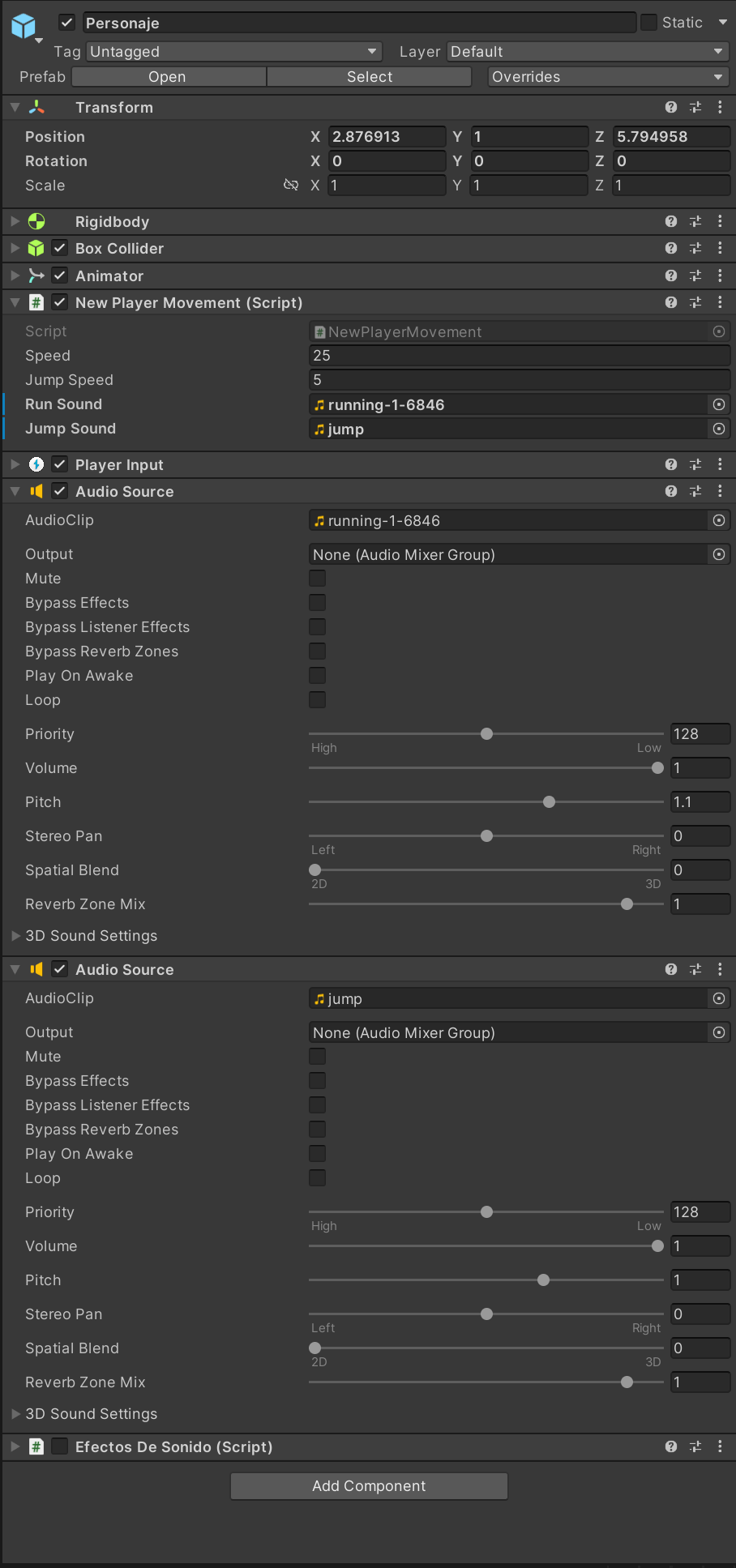
Good job! That’s exactly what I meant. You have to check if the audioSource is already playing before calling PlayOneShot or Play. This way, you ensure that PlayOneShot doesn’t get called ‘a million times’.
You can have two or more audio sources. And your idea with the looping should also work if you have a separate audio source for the ‘run’ sound. You just have to stop or pause the audio source once the player stops.
The only problem I see in your code are these two lines of code:
audioSourceRun=GetComponent<AudioSource>();
audioSourceJump=GetComponent<AudioSource>();
GetComponent returns the first instance of an object it finds, and we don’t know what ‘first’ is. These two lines of code very likely assign the same audio source to your variables, even if you have multiple AudioSource components.
In cases like this, we would use [SerializeField] and assign the audio sources manually instead of using GetComponent or one of Unity’s Find* methods. Give it a try. I’m sure you’ll be able to make your ideas work.