After loading project to unity 5.4, I am getting expected warning message like I should, but I do not have buttons underneath the message to be able to continue with upgrade.
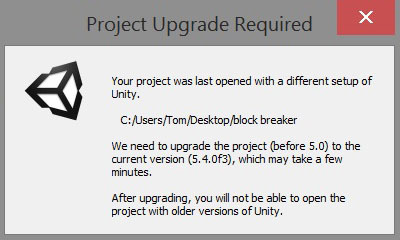
After loading project to unity 5.4, I am getting expected warning message like I should, but I do not have buttons underneath the message to be able to continue with upgrade.
Any kind of screen zoom going on there Tom? The dialogue window looks massive. Just wondering if the buttons have been pushed downwards within that little panel.
I seem to remember this coming up once before but having searched for about half and hour I can’t seem to find it. I will keep looking but let me know about the above.
Which version were you upgrading from btw?
Updated Fri Feb 17 2017 00:17
Just a thought, it says on Unity’s API Updater page about how the update process may stop if there are any script errors which the updater cannot resolve, as such it will wait until they have been before continuing.
“If your script has other errors, in addition to obsolete API uses, the API updater may not be able to fully finish its work until you have fixed the other errors. In this case, you’ll be notified in the console window with a message like this:”
Just wondered whether maybe something like this has happened behind your dialog window and hidden the buttons until the errors are resolved? Full screenshot perhaps Tom?
