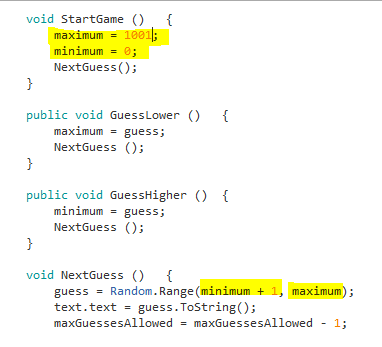
I believe that setting the max/min to guess and then using Random.Range is not 100% correct.
Random.Range returns a (min = inclusive, max = exclusive) number range.
Obviously, we can run in the situation where the computer picks the same number twice.
example 1:
my number: 762
computer guess: 655
click higher
AI can pick, according to old code: [655, 762)
computer can definitely pick 655 again.
example 2:
my number: 361
computer guess: 655
click lower
AI can pick, according to old code: [1, 655+1=656)
computer can definitely pick 655 again.
I noticed this as well! Your approach seems to work. However, I did notice a new issue with this approach. With the added 1 to minimum, you are actually able to push the range over 1000, by pushing the floor of the range function up by 1 each time you say it is higher. You should’nt be picking a number above a 1000, but anyway
you can simply add a cap level as well. this is code updated for Unity 5.x WebGL so SceneManager replaces Application.LoadLevel
using UnityEngine;
using UnityEngine.UI;
using UnityEngine.SceneManagement;
//using System.Collections;

public class NumberWizard : MonoBehaviour {

public Text guessText;
public Text countText;
//public int guessLimit = 16;
int guessLimit = 13;
int min, max, guess, count, cap;


void Start () {
    Startgame ();
}

void Startgame (){
    max = 1000;
    min = 1;
    count = 0;

    //random selector method does not allow max to be selected
    //this enables the max range to be available on guess #1
    max = max + 1;
    cap = max;
    NextGuess ();
}

// Update is called once per frame
//
void Update () {
    if (count == guessLimit +1) {
        SceneManager.LoadScene ("Win");
    }
}

public void GuessHigher () {

    //clip min to <= max at threshold values
    //to prevent user spam clicks
    if (min >= max) {
        min = max;
    }
    else {
    //min needs to be higher than the floor
    //else previous "too low" guess could be chosen again
        min = guess + 1;
    }
    NextGuess ();
}

public void GuessLower ()
{
    max = guess;
    NextGuess ();
}

public void GuessCorrect () {
    SceneManager.LoadScene ("Lose");
}

public void NextGuess () {
count++;
guess = Random.Range (min, max);

    // prevents cap being selected erroneously
    //
    if (guess == cap) {
        guess = cap -1;
    }

    // if statement catches the game from printing the next guess AFTER correct has being chosen
    //
    if (count != guessLimit + 1) {
        guessText.text = "Is your number " + guess + " ?";
        countText.text = (guessLimit - count) + " guesses left and you win..";
        //debug printing to display the available range +guess
        //
        print("[ " + min + " <= " + guess + " < " + max + " ]" + " @" + count);
    }

 }
}