I’m Ian from MoonyTech. I made Lumen Vault in Unity: place and turn optical pieces to guide colored beams into matching receivers. All 20 opening campaign puzzles are free, with no ads. No AI was used in the game.
I’d like first impressions from Android players, especially on learning the controls and reading the board. Please start at campaign puzzle one and try five puzzles, or stop sooner. Five is just a suggested short session; you can continue through all 20 free puzzles if you want.
A few sentences are enough: which puzzle did you reach, what was confusing, how did placing/turning pieces and moving the board feel, and did you want to continue? If something goes wrong, the phone model and game version help if you know them.
Android 8.0+. This is the public release. Extra campaign levels are optional one-time purchases outside this test. Participation is voluntary and unpaid; no purchase, rating, store review, recording, long report or test swap requested.
The game looks great. I liked the space theme. The customization options are cool. I’m not interested in games right now, but I hope to play this game in the future.
More details:
I think it’s worth starting the guide before the first level, but I figured it out easily. It’s a bit confusing that when you swipe at the top of the screen, the board rotates with your finger, but when you swipe at the bottom, the board rotates against your movement. It’s more convenient to move the game board with your fingers, I didn’t use the +/- buttons at all, the crosshair-shaped button is the most useful one here.
I wish the connected receiver looked more different from the turned-off one, and the wrong connection looks too much like the red receiver.
Also, it gets a bit annoying to constantly press the ‘lift piece’ button when you need to remove several objects at once.
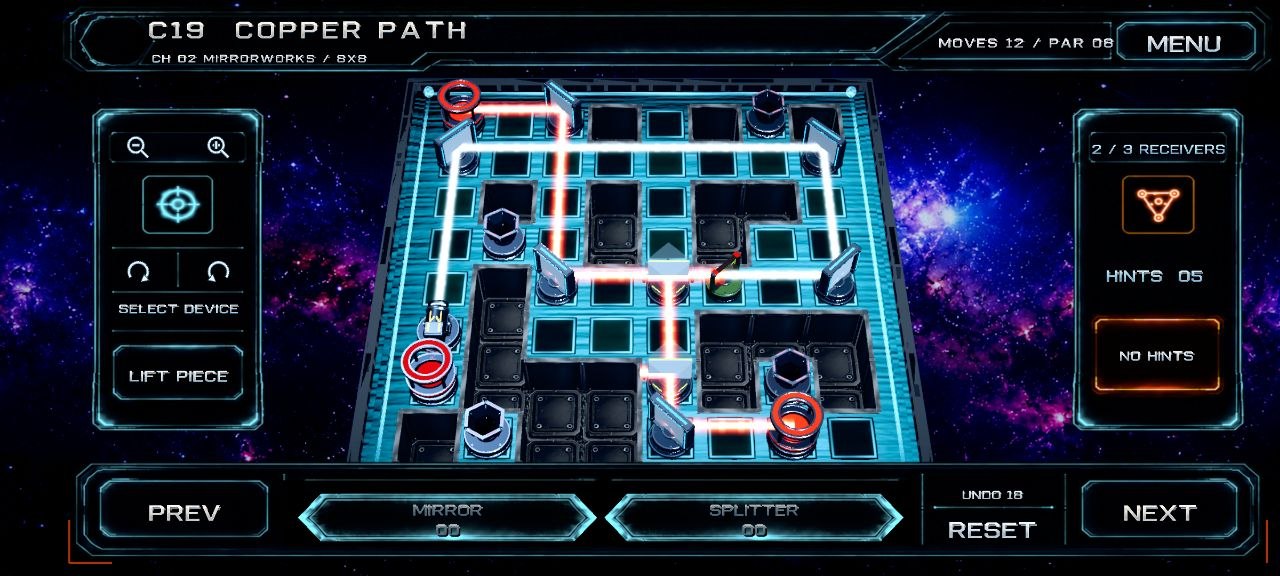
I reached level 19 and got stuck. Is it just me, or should the laser go over the pit here? How do I get a hint?
In the daily task, the size of the board scared me a little. But it’s nice to know that the difficulty is increasing. By the way, I didn’t manage it. Unfortunately, I don’t have time to figure it out right now.
Thank you for reaching C19 and sharing the screenshot and detailed notes. I’ve recorded the rotation direction, receiver-state colours, repeated Lift Piece taps and the daily board feeling intimidating. I’m glad the space theme and customization appealed to you.
Those recessed gap cells stop beams, but a beam can pass through components such as the emitter. On C19, you can route the beam around the gap and back through the emitter. Your screenshot makes the visual confusion clear. It also shows HINTS 05 but NO HINTS: campaign hints are disabled when Expert Campaign is enabled. If that setting is on, you can turn it off in Settings to use the hint button. If it is already off, please let me know so I can keep that as a separate issue.
If you happen to know your phone model and game version, those would help me attach the observations to the right build. No need to replay or spend more time on it. Thanks again!
Thanks for confirming your MOTO G32 and version 0.4.5. I’ve recorded your suggestion to explain beam pass-through at the emitter in the guide, plus your report that turning Expert Campaign off enabled hints and changed C19 to an easier layout. Thanks for clarifying those details.